

Dear Planning Planet Members,
Welcome to the newsletter; did you know that this newsletter goes to the largest community of project controllers on planet Earth? As many of you know we’ve transitioned to a new, faster, and more modern web portal that’s already benefiting our users. We appreciate your ongoing feedback in identifying the bugs or issues we need to fix.
Written something on project controls—an article, a thought piece, or even a rough idea? Get in touch and we’ll include it in future posts. It’s free, and we love collaborating with our community.
Out-of-Sequence Activities in Primavera P6
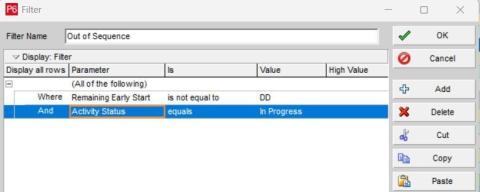
Out-of-sequence activities occur when actual progress violates the planned logic relationships, resulting in execution that does not follow the original network sequence.
They can be identified in Primavera P6 by filtering:
Activities with Status = In Progress
Early Start not equal to Data Date
These deviations are typically driven by factors such as resource shortages, incomplete predecessors, late approvals, subcontractor delays, or concurrent work without proper coordination. From a project controls perspective, out-of-sequence progress can distort the critical path, impact float calculations, and reduce the reliability of forecasts.
Proper handling requires reviewing logic integrity, validating actual progress, and selecting the appropriate scheduling option to ensure the schedule reflects real site conditions.
Source: Adham Mohammed
What do I think the real reason why CPM and PERT still exists?
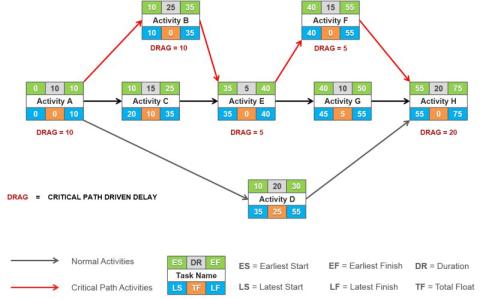
They are around not because MS Projects and P6 are so prevalent.
I believe that they exist as a means to:
- Cover up incompetence in construction management
- Provide a means to ask for excusable delays and to justify change orders
- Give the contractor and owner a way to fight each other for money post project
No where in the reasons above says anything about running the project, improving the project, or delivering to customer value.
CPM and PERT exists because there are enough people that make money off of the waste in the design and construction industry. They are the project controls people and the lawyers.
The only way to truly improve the industry is to focus on what works and what truly creates value.
Many things look like they create value but when you dive deeper they do not. All of the mathematical sophistication and complexity of CPM and PERT are there to hide the truth.
So if you want to improve the industry, you should focus on:
- Collaboration and collaborative contracts
- Production, work packages, and labor productivity
- Built in quality
- Better preconstruction
- Off-site construction and prefab
- Integrating technology and contech
- BIM and VDC
These are the things that will improve the safety, quality, and outcomes of your projects. The CPM and PERT schedule is a work of fiction that "hides" what is really happening. They allow the incompetent people not to be accountable for what is happening. And the give them a tool to fight each other post projects for mistakes that were made.
Some strong opinions above! Do you agree with this assessment? The author expects a lot of hate from this post but states it is a conversation that we should have as an industry.
Source: Doanh Do
Advanced Risk Modelling in @Risk: Behaviour-Driven Patterns for QCRA
Most QCRA models are built correctly, but many still miss how risks actually behave.
In real projects, risks are rarely simple or static. Some are conditional. Some only matter once a threshold is crossed. Some interact with each other, change form, or stop being relevant as the project evolves. Those behaviours are often present in workshops and discussions, but they are not always carried through into the QCRA model.
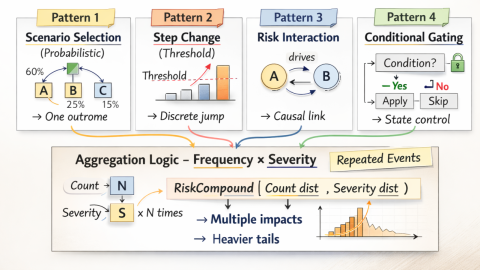
This article is about modelling behaviour, not just picking distributions. It sets out four practical modelling patterns that can be implemented directly in Excel and @Risk to reflect how risks really behave in QCRA models, including probabilistic scenario selection, step-change impacts, interaction between risks, and conditional gating.
These patterns are not always required. They are most useful when behaviour is clearly conditional, discrete, or state-dependent. For straightforward risks, simpler representations are often sufficient.
Pattern 1 - Probabilistic Scenario Selection
(mutually exclusive outcomes with uncertainty inside each outcome)
Pattern 2- Probabilistic Triggers and Step-Change Impacts
(uncertain triggers with deterministic or block-based consequences)
Pattern 3 - Risk Dependency and Interaction Logic
(how risks influence each other)
- Pattern 3A – Enabling dependency - (Risk A makes Risk B possible)
- Pattern 3B – Suppressing dependency - (Risk A reduces Risk B)
- Pattern 3C – Escalating dependency - (Risk A worsens Risk B)
- Pattern 3D – Conditional reshaping - (Risk A changes how Risk B must be modelled)
Pattern 4 - Conditional Logic and Risk Gating
(controlling when risks are allowed to apply)
How the patterns work together
- Pattern 1 selects which outcome occurs.
- Pattern 2 models threshold-driven step changes.
- Pattern 3 models interaction between risks.
- Pattern 4 controls when any of the above are allowed to apply.
The key is not complexity, but transparency. Read more...
Source: Amin Jalili
SHARE PROJECT XER / MPP NO INSTALLATION, LOGIN, OR REGISTRATION – JUST A SIMPLE LINK
XER Reader
Share your project schedules in XER and MPP format. No installation, no login, no email registration – just a simple link.
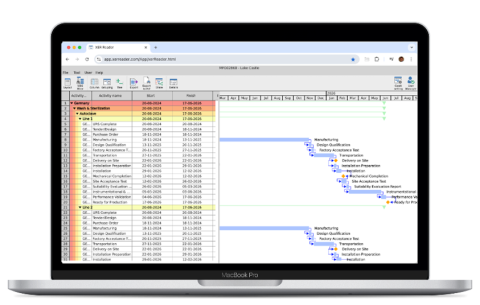
You have updated your schedule. Moved the data date and applied actuals. Adjusted milestones and progress on activities. You have calculated baseline variances and earned value values. You have gone and done all this work. All that effort. Why not share it.
- Share with the project team
- Share with steering group
- Share with suppliers
- Share with sponsor
- Share with partners
- Share with clients
- Share with owner
Try now and get 50% off using PlanningPlanet discount code PP50
Take a look...
A failure of P6 or just a gap in the execution system?
We spend months building a 10,000-activity P6 baseline.
It gets approved. We print it out.
But on its own, it cannot manage the daily chaos of a construction site.
P6 calculates what should happen. Site teams have to manage what can happen.
If a concrete truck gets a flat tire, a 10,000-activity schedule doesn't tell a crew of 15 guys what to do next.
That is not a failure of P6. It is just a gap in the execution system.
We fill that gap with the Last Planner System.
CPM holds the macro strategy. LPS manages the micro execution. They don't compete. They support each other.
Here is what happens when you connect the master schedule directly to the dirt.
- "CPM doesn’t fail on site, people fail. If the team are engaged, the planner is good, and there are honest updates then CPM works just fine!"
- "To be useful on site project management software must create project model that considers all existing constraints including resource availability, space, supplies, finances, etc. Critical Path Method ignores most of them and that is why CPM schedules are usually used for setting contract dates but not for managing resources and project delivery. Use right tools, create good model and crews on site will happily use it for construction management. And remember that those who will actually do the work must participate in model and schedule development and acceptance. Project planner is a moderator in this process."
- "It is not CPM that fails! It is misuse of the methodology. 10,000 activities is not the best way to build a schedule or the use of P6 or any other CPM tool. You should use Rolling Wave technique and proper WBS structure."
Source: Nithish Bharath
PROCESSES NO 7 – TIME / CALENDARS / DATES & TIMES
Fed up with adverts from software companies and consultancies that are going to change the world of Planning and solve all your project problems? This series of occasional articles promises nothing but thought provoking questions on how well we understand the basics of our profession from the perspective of a retired planner with 50 years’ experience in the industry whose worked in a variety of UK EPC roles for Clients and Contractors with no axe to grind.
We are going to look at PEOPLE, PROCESSES, and PROCEDURES (the old 3P’s – not 4P’s, 5P’s, 6P’s or 7 P’s) that we all have been educated and trained to use in our everyday work (5W’s + 1H) and POKE THEM IN THE EYE / LOOK UNDER THE STONE (the Inverse Universe) and get into trouble with the planning profession because for loads of reasons were not doing so well. If you want to contribute to this soul searching drop me a line with either POSITIVE or NEGATIVE comments (yes, we are PLANNERS that can hold both views at the same time!)
PROCESSES No 7 – Time / Calendars / Dates & Times
Moving on from PEOPLE we can start to look at PROCESSES. Underpinning all our scheduling work is the attempt to show and control time. Again, we are attempting to talk about things which are rarely spoken of in planning discussions.
The Strap Lines
- We can always get more money but not time.
- Time is money.
- Wasted time cannot be recovered.
Project loses time one day at a time.
It has taken a few thousand years (and several international conferences) for the simple definition of time to be accepted. We have 2 time periods which govern life – the day and year. We like to have the sun overhead at noon which dictates time zones / International Date Line (IDL – where the longitude 180 west becomes 180 east), and the year is linked to the seasons / religious festivals which we like to remain fixed. With the prime meridian (0 degrees longitude – actually the IERS Reference Meridian) fixed at Greenwich, London (because it had a good observatory) the IDL was fixed at 180 degrees of longitude ( which so happened to run down the Pacific Ocean and was thought to upset nobody). However, this boundary between today and tomorrow continually changes as countries opt one way or another. And just to be an absolute geek the prime meridian moves with plate tectonics.
TIME
Time – Small
The smallest discrete unit of time (in Quantum Mechanics) is called the Planck Time, 5.39 x 10 -44 seconds, which is the time taken for light to travel one Planck length and is too small to measure. Scientists have measured down to 247 Zeptoseconds (10 -21). The one second is defined in terms of the Caesium – 133 atom radiation transition energy levels.
Time - Useful
The earth’s movement around the Sun dictates that the
- Sideral Year – 365 days 6hrs 9min 10 sec,
- Tropical Year – 365 days 5 hrs 48 min 45 secs
These 21 mins difference (which for all intent and purposes is constant) lead us to all sorts of problems when we start to put together calendars. They dictate the rules for a leap year, a leap day and eventually a leap second (when it is agreed) to keep us in sync.
Originally, time consistency was needed for Tide Tables and navigation for maritime nations. Local time alignment only became necessary with the expansion of the rail networks in the 19th century, and increasingly international trade and travel dictated the fixing of calendars and dates.
Time – Big
The current age of the universe is about 13.8 billion years. So, nothing can be older than that (give or take the odd theory). However, the life span of the stable elementary particle – the electron – is currently measured at 66,000 yottayears (6.6 x 1028) or 5 quintillion times the current age of the universe (just thought I’d throw that one in for light relief)
Time - Computer
Time can be a strange thing (even ignoring Einstein) especially when applied to software operating systems. Windows, iOS, Unix, 8-bit, 16-bit, 32-bit, 64-bits are all different. All rely on underlying binary systems, a series of 0 and 1. So in a 32 bit system, if you have a string of 32, 1’s, counting time the largest number you can record is 4,294,967,295 in base 10 which takes us to 19th January 2038. So, in 2038 “old 32 bit systems” will revert to 1 January 1900 (the Y2K38 bug). Most computer systems will have migrated to 64 bit systems by then!
Primavera, as an example, counts time from 1 Jan 1900 in intervals of one minute which is its’ smallest unit (or not?) – see Ron Winter’s seminal paper on Inner workings of P6.
CALENDARS
Most of the world now uses the Gregorian Calendar (BC/AD changed to BCE/CE) but you should check that this is specified in the contract documents. This took over from the Julian calendar in 1582 as it was becoming increasingly unaligned with the Catholic Church festivals because of the difference in the earth’s sideral and tropical time rotations (21 mins) about the sun – see above. Other Calendars may be specified in certain countries. So, 2022 Gregorian is- Assyrian 6771, Hebrew 5782, Chinese 4720, Julian 2775, Buddhist 2563, Hindu 1943, Sikh 554, Islamic 1443, Iranian 1400, Holocene 12022 etc. (Wikipedia lists 90 different calendars + Variants). Multi faith yearly calendars give National Holidays, Holy Days etc but should be stated in the contract. Some projects / companies will have local non-working day arrangements as well. Where governments award additional national holidays (Yippee) an EoT is applicable. Numerous project type activity work have legal exclusion windows which can apply to any project. environmental windows, tidal times, operational constraints, monarchs’ birthdays, rugby matches, horse racing meetings etc. Again, they should be listed in the contract.
These working restrictions are all recorded as non-working time in specific named calendars and applied to each work activity and resources. So, it can get quite tricky if you have an activity calendar and two resource calendars applied to the same activity to try to work out what’s happening. Default is usually an 8/5/52, 10/6/52 or 24/7/52 calendar (hours per day/days per week/weeks per year). Other reduced productivity windows might also be stated in the contract – weather, festivals, Client Interfaces etc. but local knowledge, especially at site, is often needed. These all need recording as part of the calendar definition.
Working Shift Patterns are dictated by local customs or company / national union agreements. They usually consist of start / end times with major breaks in the working shift. So, 5 / 6 day shift, extended day shift, night shift, double-day shift, 9 day fortnight alternate trades shifts are typically set by union working rule agreements together with mealtimes and breaktimes. Unlike mealtimes, breaktimes are ignored in calendars and shift patterns but taken into account in chosen productivity rates which use a 50 minute hour rule. So, on productivity rates for example, a standard day of 8.5 hour day (8.00 am – 12.30 am, 1.00pm to 4.30 pm) has a 0.5 hr mealtime and 8 hrs working time split 6.67 hrs working productively and 1.33 hrs non-productive (or downtime allowances – a subject that needs a whole blog to itself). Other shift patterns are factored from this base for productivity and cost.
ISO 8601 (is the standard for worldwide exchange of date and time related data) has a lot of useful information on different calendar applications. British Standard week numbers seem to have fallen out of fashion. Some industries work on a 13 x 4 accounting week periods with 52 & 53 week years and issue their own calendars. Other have quarterly periods made up of 4 – 5 -4 or 4 -4 – 5 week periods. Some reporting will be done from the contract let date or significant milestone like pouring of first nuclear concrete or STO start date. It should all be in the contract data or agreed at the kick-off meeting.
DATES & TIMES
Dates
If we take Primavera P6 as the example of planning software in use, then it gets by with about 54 date fields which are either inputted, internally generated, or calculated! This poses problems in that it is sometimes difficult not only to find them but also decided which is being used in which calculation or report. Every baseline programme (P6 allows 3No active Baselines) also has these date fields. Dates can be displayed in numerous formats (see Ron Winter’s seminal paper on Understanding P6 Date Information). Again (for instance) dd – mm – yyyy or mm – dd – yyyy for dates and dd or dd.0 or dd.00 for durations should be stated in the contract.
So, in total we have - Project & WBS Date Fields – 11, Activity Date Fields – 25, Resource Date Fields – 10, Relationship Date Fields – 4, Audit Date Fields – 4. I’m sure different versions of P6 (and other scheduling software) will have variations but you get the picture.
Times
During the day times are expressed as hh.mm starting at 00.00 going through to 23.59.
If you put a F – S logic link between 2 activities, they cannot logically finish and start on the same day/time (without a lag) so P6 for instance would move a finish milestone onto the next minute, which might be the next day depending on its assigned calendar.
Conclusion
To complicate matters when analysing CPN’s (in say) P6, settings have a major effect on calculated dates (duration type, admin preferences, calendars, shift patterns and scheduling options are the major one). If you really want to try to understand how P6 works you must read Ron Winter’s seminal papers on The Inner Workings of P6 and Much Ado about dates – Understanding P6 Date Information, rather than the P6 User Manual.
Question to you all:
- Have you used any other calendar than the standard Gregorian one?
- Have you set your date input format but chosen not to show times? Try adding time to your dates display. Did you get some strange numbers? Try finding out where they came from. Try the same with duration settings to 1 decimal place.
For my next blog (No 8) in PROCESSES I am looking at underlying problems with one of our basic tools that we all must use – the Critical Path Network.
Source: Peter Holroyd
OPTIMIZING PLANNING FOR ONE OF BRAZIL’S LARGEST MINING PROJECTS WITH ALICE
Even the best project plans can break down when real-world constraints take hold. That was the challenge Reta Engenharia (Now part of Afry) faced during the planning of a mining project, where limited resource capacity and strict timelines made optimization difficult.
With no efficient way to compare different execution strategies, the team needed to understand how to reduce idle time, balance resources, and still meet critical milestones.
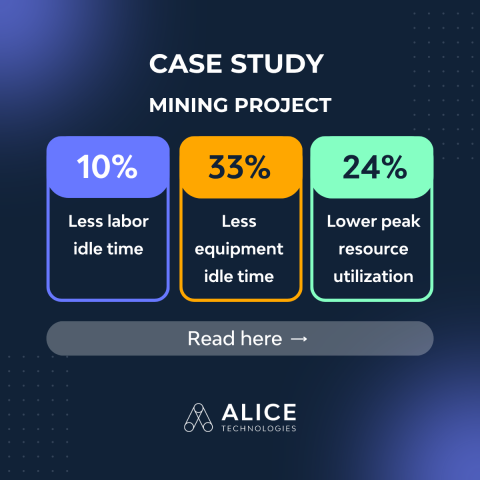
By using ALICE’s optimization capabilities, the Reta Engenharia team evaluated multiple ways to build the project, identified the most efficient approach and achieved 33% less equipment idle time, 24% lower peak resource use, and significantly faster planning.
Read the full case study here...
VALUE-ADD and FREE WEBINARS

April 1 - OPC-Integrator
OPC-Integrator is a tool to easily and quickly load data back and forth between Oracle Primavera Cloud (OPC) and Microsoft Excel. Flexible and secure, OPC-Integrator will save you and your team valuable time and energy when dealing with OPC data extraction, loading, updating and integrating. The OPC-Integrator gives both project users and administrators the ability to import and export many of the key data elements available in Oracle Primavera Cloud, allowing for the movement of data back and forth between Oracle Primavera Cloud and Microsoft Excel in a controlled manner. Significantly accelerate OPC implementations, project development via integration with other tools, and monthly statusing of projects - all with the OPC-Integrator.
April 14 - CAPPS - Easy Primavera P6 Updating
Capital Project Progressing System (CAPPS) allows for your team to update their Oracle Primavera P6 schedules with ease, cutting down on time spent with 75% faster status updates. You can get feedback on drawings and quality steps, as well as on hours worked, right from your engineering leads and specialty vendors. Additionally, you can update Primavera online from wherever you are using a computer, tablet, or phone. No prior knowledge of Primavera software is required, so you don't have to be an expert in order to do your updates.
April 16 - Primavera Unifier - Project Controls
When managing a project there are a multitude of different moving parts to keep track of. Managing Contracts, Costs, Design Documents, Site Documents, Quality Control Documents and Asset Management usually requires numerous, disparate software tools for each department or team. With Oracle Primavera Unifier, you can manage the fill scope of a project from inception to closeout and even through to facility and asset management. Having all these modules, business processes, and workflows in one centralized, secure and highly configurable tool stops costly and disruptive problems from taking root and saving your organization time, money, and frustration. With everything handled in one place, and relevant documentation linked to each other, project management suddenly becomes a lot faster, and easier, for the whole team.
April 21 - Primavera Unifier - Facility Management
Oracle Primavera Unifier now includes Facilities and Asset management (FAM). The asset management toolkit allows you to stay on top of your preventative maintenance requirement with ease. The space, facilities, and materials management allows you to easily record lease information. With the amount of new modules and functions, it can be overwhelming to figure out everything that you can do with this powerful technology, and that’s what we’re here for! In this webinar, we will be discussing and demonstrating a few of the main modules that have been added, specifically relating to Asset Management and Space Management.
April 30 - Primavera P6 EPPM Overview
Primavera P6 Web is the web-based, enterprise project portfolio management (EPPM) solution offered by Oracle. Unlike the traditional, installed P6 Professional client, the web version allows global teams to access, plan, manage, and update projects from any location using an internet browser. Primavera P6 Web is the industry-leading tool for planning, scheduling, and managing complex programs and portfolios. It provides a centralized, multi-user environment designed for enterprise collaboration. P6 Web allows teams to build and manage multi-project CPM schedules with advanced resource, cost, and performance management — all from a browser-based platform. Topics covered include: Dates, Resources, Costs and More!
BLOG: WHY HISTORICAL TURNAROUND DATA IS UNDERUSED IN COST ESTIMATING AND HOW TO LEVERAGE THEM ?
Struggling to turn turnaround data into reliable estimates?
STOs generate massive amounts of data, but without structure and context, it remains underused. By linking elements like BoE, closeout reports, productivity, and scope, organizations can transform raw data into actionable insights improving accuracy, reducing guesswork, and enabling smarter, data-driven decisions for future turnarounds.
HEARD OF P6 LOADER?

In Primavera P6, an Activity Code can be promoted (for instance from a Project Level Code to a Global Level Code), but it does not allow you to demote these codes. Among the multiple utilities that P6-Loader offers is the Activity Roll Down, which allows you to demote an Activity Code to a lower level, while reassigning the values to that lower level code without the manual assignment typically required when creating a new Activity Code at a lower level. This same utility enables you to combine two codes - dictionaries and all - and reassign the values to your activities. These two tasks can be done all on the same P6-Loader sheet. This utility allows you to clean up and work with your data in Primavera P6.
The P6-Loader is a custom Primavera P6 add-on tool that was developed by our team of Primavera software specialists here at Emerald Associates in order to simplify the process of loading, extracting, and updating Primavera P6 data, ensuring the process is smoother, easier, and much faster. The user-friendly nature of the P6-Loader solution means that it can be used by any user without requiring database administrator knowledge or security privileges. Cloud-enabled and Oracle Cloud marketplace approved, P6-Loader can make your job a whole lot easier!
Take a look...
ASTA Tip #141 Alternate shading in the table
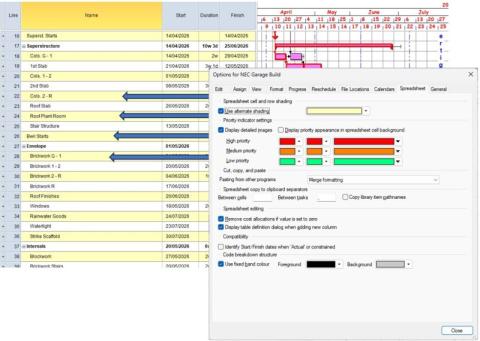
This week’s tip is another visual aid that some people like and some people don’t. A couple of people have recently asked me about the yellow alternate banding that appears in the table, on some templates this has been turned off and you may be looking to turn it back on again, or you may have a template with it showing and want to turn it off, so…..
Tip #141 Alternate shading in the table
Go to File, Options, Spreadsheet tab and at the top of the dialogue tick or untick ‘Use alternate shading’
Source: Anthony Ward
LET'S OPEN UP OPPORTUNITIES TOGETHER

To support every practitioner, employer, consultant, and recruiter in our network, we’re now opening up free job postings for everyone. Whether you’re:
- An employer with a vacancy
- A regular practitioner looking to strengthen your team
- A consultant searching for standout talent
- A recruiter with a role to fill
…you’re invited to share your opportunities with the entire Planning Planet community. No charge. Simply contact [email protected] and we’ll help you get your role in front of thousands of committed project controls professionals.
Let’s make this a space where opportunities flow freely, careers grow, and our community continues to lift one another. View Jobs... Post Jobs...
Project Planner - London
Permanent Employment London (EU.UK.LON) £60,000 + car allowance + full benefits.
Senior Planner – London (Construction / Build)
Permanent Employment London (EU.UK.LON) £95,000 + car allowance and package
Senior Planner – Power & Energy (Southwest Dublin, Ireland)
- Permanent Employment Ireland (EU.IE) €85,000–€90,000 + €7,000 car allowance + benefits
Cumbria – Contract Site Planner (Civils, Freelance)
- Contract Employment Cumbria (EU.UK.CMA) £500/day + accommodation
Planners (Nuclear & Power)
- Permanent Employment United Kingdom (EU.UK) £75,000 – £90,000 + car or allowance (circa £6,500) + staff benefits
Amsterdam – Lead Planner (Data Centres)
- Contract or Permanent Netherlands (EU.NL) €100,000 + car/allowance (circa €7,500) or competitive freelance rate
Dublin – Lead & Senior Planners (Hospitals / Civils)
- Contract or Permanent Ireland (EU.IE) €70,000 – €95,000 + car or allowance (circa €7,500) + staff benefits
London – Lead Planner (Main Contractor, Permanent)
- Permanent Employment London (EU.UK.LON) £85,000 + car or allowance (circa £6,500) + excellent staff benefits
Senior Claims Expert
- Permanent Employment UK-North West (Region) Negotiable, Heathcare
Senior Planner
- Contract Employment Warwickshire (EU.UK.WAR) £690 per day
Planning Claims Analyst
- Permanent Employment Surrey (EU.UK.SRY) Initial salary £65,000 to £76,000
A schedule no one can read is not a control tool.
It is decoration.
Too many project schedules look impressive on screen and become useless the moment you ask a simple question:
“What should I understand from this in 30 seconds?”
That is the real test.
A readable schedule is not the one with the most detail.
It is the one people can actually use.
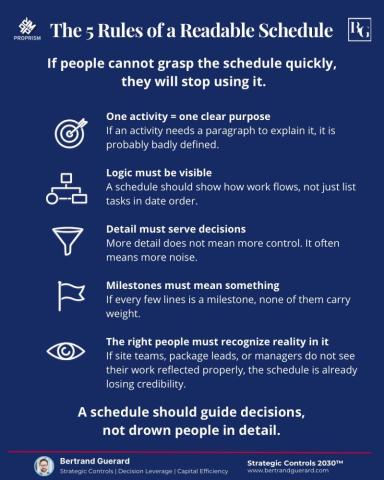
The 5 rules of a readable schedule:
- One activity = one clear purpose
- Logic must be visible
- Detail must serve decisions
- Milestones must mean something
- The right people must recognize reality in it
This is not just a planning preference either. PMI’s 2024 Maximizing Project Success report lists effective project schedule/roadmap management among the factors associated with project success.
- A readable schedule creates alignment.
- An unreadable one creates reporting theater.
- And once the schedule becomes theater, control starts disappearing quietly.
What is the biggest thing that makes a schedule unreadable in your projects?
Source: Bertrand GUERARD
64% Planned. 43% Actual. Something’s off ??
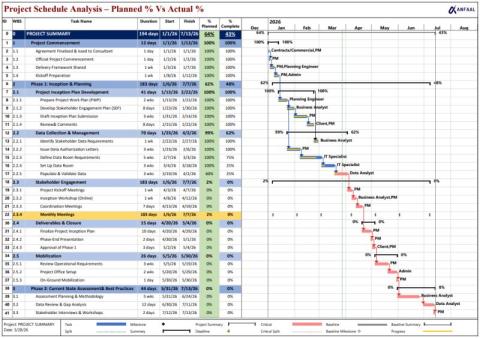
One thing we’ve noticed while working with MS Project is that it doesn’t show Planned % Complete by default. To make this work, we set it up using multiple custom Number and Text fields and aligned it with the schedule logic.
For this schedule, we calculated Planned % alongside Actual progress. At a glance, things don’t look too off, but when you compare Planned 64% vs Actual 43%, there’s a noticeable gap.
Looking a bit deeper, most of the lag is coming from the Data Collection & Management phase, and it’s now starting to affect what comes next. Nothing critical yet, but this is usually where projects begin to drift if not picked up early.
You’ll also notice recurring meetings highlighted in yellow, just to keep them visible without mixing them into actual work progress.
For us, tracking Planned % with Actual % has been quite useful. It’s a small setup effort, but it gives a clearer picture of where things are heading.
Do you track Planned vs Actual in your schedules, or rely only on Actual progress?
Source: Mubasher Rehman
OFF-SHORE CLIENT CASE STUDY

IAMTech Offshore Client iPlan4.0 Case Study: Built on nearly 30 years of turnaround delivery experience, iPlan4.0 embeds proven shutdown and turnaround best-practice methodology directly into the application — guiding teams to plan the right work, to the right standard, at the right time. The result is a step-change in planning data quality, driving safer, more predictable execution and dramatically increasing the likelihood of plants returning to service on — or ahead of — schedule, protecting production revenue and corporate reputation.
Discover what this meant for one of our offshore clients: View Case Study
SUPERIOR ALTERNATIVE TO THE "MOST POPULAR" SOFTWARE FOR US AS PLANNERS?

A superior alternative to the "most popular" software for us as planners?
Spider Project Team is a group of project management consulting and training companies. With headquarters in Moscow, Russia, we have branches, partners and representatives in other Russian cities, Australia, Brazil, Colombia, Kazakhstan, Romania, USA. We develop professional PM software Spider Project that is the most powerful and functional tool for project, program, and portfolio management.

We develop advanced approaches and methods of project management that are widely used by our customers in 37 countries. We provide training on project management and Spider Project software for our customers around the world.
We manage projects for our customers and implement corporate project management systems in companies of different industries. We believe that good project management can improve our world and are happy to provide the best services and tools to our customers.
We are proud of our achievements. The current version is used in 37 countries. Spider Project offers numerous unique functional features and is the only PM software that optimizes resource, cost, and material constrained schedules and budgets for projects and portfolios.
Spider Project offers numerous unique functional features and is the only PM software that optimizes resource, cost, and material constrained schedules and budgets for projects and portfolios.
Check it out here... Ask questions here...
GAINS IN RELIABILITY = MAJOR GAINS IN MARGIN

For a global operator, inefficiencies in shutdowns, turnarounds, and outage performance can have a significant impact on cost and production.
iPlanSTO customers benefit from:
- Fewer execution surprises
- Shorter outage durations
- More predictable production returns
- Less rework and fewer late-stage defects
- Lower reliance on heroic intervention
- Preventing single-unit incidents from cascading into site-wide shutdowns
Reducing unplanned downtime, preventing incidents, and improving turnaround execution doesn’t just improve reliability — it protects margins.
First look at iPlanSTO AI-Enhanced Planning: WATCH VIDEO or VIEW BROCHURE. How would this transform planning in your world?
To arrange your demonstration, contact [email protected].
WHY STO PLANNING IS STILL FAILING INDUSTRY

IAMTech Knowledge: Why STO Planning is Still Failing Industry — and What We Did About It - Shutdowns still overrun. Estimates still vary wildly. Critical path schedules still don’t reflect reality. We’ve seen it repeatedly across 25+ years working with major operators. In this piece, we break down why — and what actually fixes it. Read full article...
THE BEST CONTROLS CONFERENCE TIL EVA 34

Happy British Summer Time
A first glimpse at the complete lineup for EVA33.
There will be no stronger lineup and no better price than at the Armourers this year.
I hope you can make it and get other people along too to share the enriching experience.
Above all you will hear the most compelling case for use of the new BSI Project Controls Specification Standard. The need for this was requested at a Conversation Club. It has been delivered and tested. It works! Paving the way for further transformative improvement and change wherever the word Organisation is used and collaboration is embraced. We must become ever more connected and ever less parochial.
REMEMBER: If 2 days is not easy because of travel then just come to one. They are both have a strong programme. Go for day 2 if you are really interested in Estimating.
Also for grads and apprentices i will do 100 per head per day and 100 for dinner. That is all below cost but must done that with me direct. See if you can put a group together.
The focus is on Controls and Skills behavioural ,technical ,psychological, and cultural that people need to make what they do happen with purpose.
The full programme is on Eventbrite now...
Source: Steve Wake
WOULD YOU LIKE TO ADVERTISE ON PLANNING PLANET?
We want to give more of our members the opportunity to advertise on our site. Click here to get started!
THANK YOU FOR READING OUR MESSAGES
If you’d like to lend a hand to the small but enthusiastic team behind this newsletter, feel free to reach out to us at [email protected]. We know there’s still a lot of work ahead to make this an informative and eagerly anticipated bi-weekly read, so get in touch and be part of the journey.
Regards...
The Planning Planet Team