How to Use Traffic Light to Show Microsoft Project Progress Status
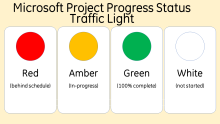
Sometimes in a Microsoft Project schedule, you might want a quick visual indicator of when a task is behind schedule or in progress and a good way to achieve this is through the use of a traffic light system.
 
This tutorial will show you how to configure your Microsoft Project schedule using a custom field with graphical indicator to highlight progress of tasks as at current or status date. 

Filed Under
Microsoft Project Baseline Percent (%) with Weighted Summary Roll-up

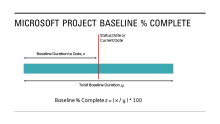
By default, Microsoft Project does not have a baseline percent (%) complete field or column like you would find in other scheduling software like Primavera P6.

This video outlines steps to follow if you want to display a baseline percent (%) complete column in a Microsoft Project schedule. It also shows how to roll-up percent (%) complete to summary tasks based on weighted percent (%) complete of the subtasks.

Show Calendar Days instead of Dates in MS Project Schedule columns

Sometimes during tender or bid submission for a project, the client might not provide a Project start date and bidders would be required to show ordinal dates in the Gantt chart timeline and calendar days in the start and finish dates columns, so that, for each activity, the schedule will show start and finish days, e.g. for a 10-day activity, the schedule will show day 1 in the start column and day 10 in the finish column.

Filed Under

2 Ways to Show Ordinal Dates instead of Calendar Dates in Primavera P6 Schedule

In this tutorial, I will show you 2 methods of displaying ordinal dates in a Primavera P6 schedule, the first method uses Microsoft Excel and the second uses Global Change facility in P6. Ordinal dates schedules are usually required when a project does not have a defined calendar start date.

“Keep in Touch”

I called an old colleague just to say “hello” and see how he was doing.  We have worked together at different companies over the past dozen years.  He is an inspirational finance executive and counted on me to implement his vision.