How to use Lumpsum cost in Primavera P6 to generate S-curves data

When it comes to generating Primavera P6 data for use in Excel to plot progress s-curves, the recommended practice is to use Resources as basis for progress measurement in P6, but there are times when it is not possible to use Resources either because of corporate policy, non-availability of resource loading or personal choice.
 
A common alternative method is to use lumpsum cost as weightings in P6.

How to show a column of week numbers in a Microsoft Project schedule

There are times when stakeholders use week numbers to discuss the dates in a project schedule and they would like to see columns of week numbers in the schedule. The tutorial outlines steps to follow in order to display week numbers such as "2021 Week 35" in a Microsoft Project schedule.

The tutorial uses 2 custom fields with formulas to show "Start Week No." and "Finish Week No." columns. The formulas for these 2 columns are:

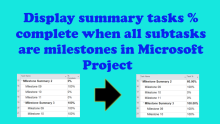
Show summary % complete in Microsoft Project when all subtasks are milestones and some of these milestones are completed

In Microsoft Project, when all subtasks are milestones, the summary percent complete is 0% even when some of the milestones are completed. The summary percent complete only changes to 100% when all the milestones are 100% complete.