Asta Powerproject

Description

Discussion on aspects of Asta Powerproject

Container
No

Forum Sponsor

Top Posters

Julian Pegg
1 posts
Peter Nagy
2 posts
Raymund de Laza
17 posts
Syed_Asad
0 posts
Tony Greyvenstein
0 posts
Ahmed Al-Jubouri
13 posts
Umar Alvi
3 posts
Sibusiso Mahlalela
0 posts
Michael Samanyayi
3 posts
Simon Gumede
0 posts

Forum Sponsor

Top Posters

Julian Pegg
1 posts
Peter Nagy
2 posts
Raymund de Laza
17 posts
Syed_Asad
0 posts
Tony Greyvenstein
0 posts
Ahmed Al-Jubouri
13 posts
Umar Alvi
3 posts
Sibusiso Mahlalela
0 posts
Michael Samanyayi
3 posts
Simon Gumede
0 posts

Early & Late "banana curve"

Hi - I'm looking to produce banana curves (early and late date envelope) as part of the project controls suite of metrics using Powerproject. I used to produce these in P6 using activity count resource in the Resource Assignment spreadsheet window and then exported to Excel for graphing.

I've assigned an activity count to the remaining activities in the programme as a consumable resource but then am drawing a blank when it comes to getting the AC spread for the planned early and late date (ideally in a tabular fashion).

Has any one any ideas/done something similar?

Forum Sponsor

Top Posters

Julian Pegg
1 posts
Peter Nagy
2 posts
Raymund de Laza
17 posts
Syed_Asad
0 posts
Tony Greyvenstein
0 posts
Ahmed Al-Jubouri
13 posts
Umar Alvi
3 posts
Sibusiso Mahlalela
0 posts
Michael Samanyayi
3 posts
Simon Gumede
0 posts

Collapse completed summary tasks only

D
Dariusz C 👤 Member for 7 years 5 months

Hi 


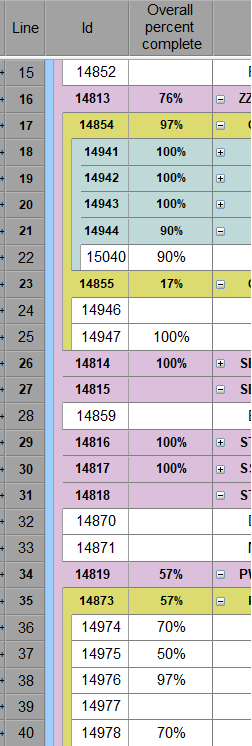
Is there any way to collapse summary tasks where OPC = 100% only?

My schedule contains a lot completed summary tasks so I don't want to show them in the view with entire content.

I can do this manually but looking for more convienient way.

Summary Tasks where OPC is under 100% should not be touched and be visible with all tasks underneath.

Something like below:

completedsummarytasks.png

Thanks in advance!

Forum Sponsor

Top Posters

Julian Pegg
1 posts
Peter Nagy
2 posts
Raymund de Laza
17 posts
Syed_Asad
0 posts
Tony Greyvenstein
0 posts
Ahmed Al-Jubouri
13 posts
Umar Alvi
3 posts
Sibusiso Mahlalela
0 posts
Michael Samanyayi
3 posts
Simon Gumede
0 posts

Slip disappears in new progress period

Hi all,

I have multiple progress periods, and for some reason, the slip values in the slip column disappear on all progress periods past the 5th one. For all progress periods 1-4, I have had no issues.

I am basing the slip on a baseline.

Nothing has changed except the value, and another reschdule, all of which are part of the processes I always follow.

Anybody have any ideas?

thanks 

Forum Sponsor

Top Posters

Julian Pegg
1 posts
Peter Nagy
2 posts
Raymund de Laza
17 posts
Syed_Asad
0 posts
Tony Greyvenstein
0 posts
Ahmed Al-Jubouri
13 posts
Umar Alvi
3 posts
Sibusiso Mahlalela
0 posts
Michael Samanyayi
3 posts
Simon Gumede
0 posts

Currency format

Hi Pplanners and PP users,

When I export a PP project as an XER file, the Currency thousand separator field remains empty; as a result, P6 does not want to import the project; I have to open the XER file in MS Excel, fill in the field and so on.

I have not found yet where to set up the thousand separator in Powerproject, it would help a lot.

By the way, many thanks to Malcolm Emmerson for his webinar earlier this week, very good!

Alexandre

Forum Sponsor

Top Posters

Julian Pegg
1 posts
Peter Nagy
2 posts
Raymund de Laza
17 posts
Syed_Asad
0 posts
Tony Greyvenstein
0 posts
Ahmed Al-Jubouri
13 posts
Umar Alvi
3 posts
Sibusiso Mahlalela
0 posts
Michael Samanyayi
3 posts
Simon Gumede
0 posts

Float and dates don't nake sense

 I have a schedule with a must finish by date of 6/24/21. The early finish for the project is 6/29/21, so about 5 days behind schedule. But it is showing -170 days of total float. I am not sure where this is computing from. The imposed finish is 6/24/2021 in properties. I have never had this happen before. Is there something I should at?

All my other projects are showing correct float. It is only this one.

Thanks

Forum Sponsor

Top Posters

Julian Pegg
1 posts
Peter Nagy
2 posts
Raymund de Laza
17 posts
Syed_Asad
0 posts
Tony Greyvenstein
0 posts
Ahmed Al-Jubouri
13 posts
Umar Alvi
3 posts
Sibusiso Mahlalela
0 posts
Michael Samanyayi
3 posts
Simon Gumede
0 posts

Forum Sponsor

Top Posters

Julian Pegg
1 posts
Peter Nagy
2 posts
Raymund de Laza
17 posts
Syed_Asad
0 posts
Tony Greyvenstein
0 posts
Ahmed Al-Jubouri
13 posts
Umar Alvi
3 posts
Sibusiso Mahlalela
0 posts
Michael Samanyayi
3 posts
Simon Gumede
0 posts

XML Export to MSP Problem

Hi,

Over the last 6 months, a schedule I have been receiving as an xml export from PowerProject has been importing into MSP incorrectly. By this, I mean a significant number of tasks are only showing as 0 days duration (and both start/finish dates also showing as the same date), and the remaining tasks are showing wildly varying differences to the pdf schedule that is provided at the same time.

Prior to July 2020), I had no issues at all with the xml file importing with all durations and dates matching the pdf schedule.

Forum Sponsor

Top Posters

Julian Pegg
1 posts
Peter Nagy
2 posts
Raymund de Laza
17 posts
Syed_Asad
0 posts
Tony Greyvenstein
0 posts
Ahmed Al-Jubouri
13 posts
Umar Alvi
3 posts
Sibusiso Mahlalela
0 posts
Michael Samanyayi
3 posts
Simon Gumede
0 posts

Reports on logic

C
C S 👤 Member for 11 years 3 months

New to powerproject, have mainly used MS Project previously and am not a very advanced user.

I have found myself in a position where I have four tender programmes submitted in powerproject that need a high level review done of their logic. For two of the programmes I was able to use one of the (I assume) proforma templates from the report drop down menu. Unfortunately the other two programmes don’t seem to have this functionality enabled. I have tried creating a new report using the wizard but can’t seem to replicate the info I require.

Forum Sponsor

Top Posters

Julian Pegg
1 posts
Peter Nagy
2 posts
Raymund de Laza
17 posts
Syed_Asad
0 posts
Tony Greyvenstein
0 posts
Ahmed Al-Jubouri
13 posts
Umar Alvi
3 posts
Sibusiso Mahlalela
0 posts
Michael Samanyayi
3 posts
Simon Gumede
0 posts