Hi
Is there any way to collapse summary tasks where OPC = 100% only?
My schedule contains a lot completed summary tasks so I don't want to show them in the view with entire content.
I can do this manually but looking for more convienient way.
Summary Tasks where OPC is under 100% should not be touched and be visible with all tasks underneath.
Something like below:
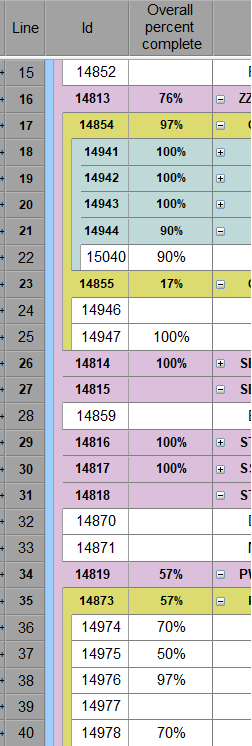
Thanks in advance!















Dariusz,
You can if you make a small compromise and that is not showing the completed tasks under an incomplete summary.
The filter would be
[[wysiwyg_imageupload:8036:]]
Criteria 1 - Summary Tasks with Task Progress Completed
Criteria 2 - Tasks or Milestones or Summary Tasks with Task Progress Specific Progress Amount Less Than 100%
Also, Objects must meet ANY criteria
Otherwise, I'm sure you could write an SQL statement but not sure I can help you with that.
Let me know if that works for you.
Kind regards,
Konstantinos
Sorry Dariusz
You have to do it manually.
One Click and save is all you need.
You don't have to show all your sub tasks.
You can have a sub summary labelledd 100% and move every complted task down into that showing only the work in prgress.
Best regards
Mike T.