Blogs

How to show a column of week numbers in a Microsoft Project schedule

There are times when stakeholders use week numbers to discuss the dates in a project schedule and they would like to see columns of week numbers in the schedule. The tutorial outlines steps to follow in order to display week numbers such as "2021 Week 35" in a Microsoft Project schedule.

The tutorial uses 2 custom fields with formulas to show "Start Week No." and "Finish Week No." columns. The formulas for these 2 columns are:

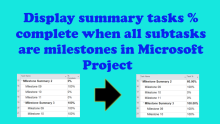
Show summary % complete in Microsoft Project when all subtasks are milestones and some of these milestones are completed

In Microsoft Project, when all subtasks are milestones, the summary percent complete is 0% even when some of the milestones are completed. The summary percent complete only changes to 100% when all the milestones are 100% complete.

How to show Baseline Execution Index (BEI) in Microsoft Project

The Defense Contract Management Agency (DCMA) 14-Point Assessment is a set of metrics used to evaluate the quality of a project schedule to ensure that the schedule is fit for purpose. And one of the 14 metrics is the Baseline Execution Index (BEI) which is an indication of how a schedule is performing against a set baseline and the video below explains how to set-up a Microsoft Project schedule to display BEI.

Better Zoom Meetings

In one of my training classes, there is an exercise to conduct a daily stand-up meeting.  The meeting should be no longer than 15-minutes and be well structured.  In class, we challenge the leader with common distracting and unproductive behaviors.  Watch the clip, the results are often hilarious.  

How to Use Traffic Light to Show Microsoft Project Progress Status

Sometimes in a Microsoft Project schedule, you might want a quick visual indicator of when a task is behind schedule or in progress and a good way to achieve this is through the use of a traffic light system.
 
This tutorial will show you how to configure your Microsoft Project schedule using a custom field with graphical indicator to highlight progress of tasks as at current or status date. 

Filed Under

Microsoft Project Baseline Percent (%) with Weighted Summary Roll-up

By default, Microsoft Project does not have a baseline percent (%) complete field or column like you would find in other scheduling software like Primavera P6.

This video outlines steps to follow if you want to display a baseline percent (%) complete column in a Microsoft Project schedule. It also shows how to roll-up percent (%) complete to summary tasks based on weighted percent (%) complete of the subtasks.

Show Calendar Days instead of Dates in MS Project Schedule columns

Sometimes during tender or bid submission for a project, the client might not provide a Project start date and bidders would be required to show ordinal dates in the Gantt chart timeline and calendar days in the start and finish dates columns, so that, for each activity, the schedule will show start and finish days, e.g. for a 10-day activity, the schedule will show day 1 in the start column and day 10 in the finish column.

Filed Under