

Dear Planning Planet Members,
Welcome to the newsletter; did you know that this newsletter goes to the largest community of project controllers on planet Earth? As many of you know we’ve transitioned to a new, faster, and more modern web portal that’s already benefiting our users. We appreciate your ongoing feedback in identifying the bugs or issues we need to fix.
Written something on project controls—an article, a thought piece, or even a rough idea? Get in touch and we’ll include it in future posts. It’s free, and we love collaborating with our community.
SHARE PROJECT XER / MPP NO INSTALLATION, LOGIN, OR REGISTRATION – JUST A SIMPLE LINK
XER Reader
Share your project schedules in XER and MPP format. No installation, no login, no email registration – just a simple link.
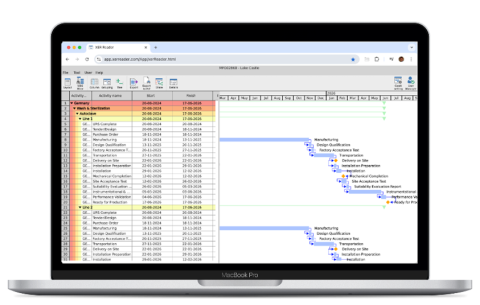
You have updated your schedule. Moved the data date and applied actuals. Adjusted milestones and progress on activities. You have calculated baseline variances and earned value values. You have gone and done all this work. All that effort. Why not share it.
- Share with the project team
- Share with steering group
- Share with suppliers
- Share with sponsor
- Share with partners
- Share with clients
- Share with owner
Try now and get 50% off using PlanningPlanet discount code PP50
Take a look...
PROJECT CONTROLS and PMO WORKING TOGETHER
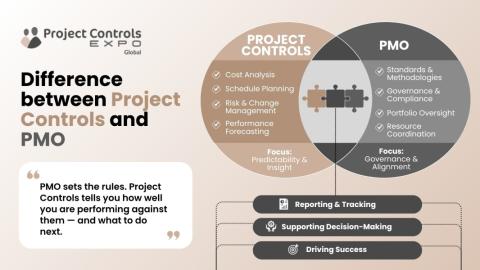
In recent conversations across the industry, I’ve noticed there is still no clear, shared understanding of the distinction between PMO and Project Controls — often leading to confusion in roles, expectations, and value.
As a simple way to frame it: PMO sets the rules, and Project Controls tells you how well you are performing against them — and what to do next. The PMO focuses on governance, standardisation, and alignment, while Project Controls provides the data-driven insight, forecasting, and decision support needed to deliver successfully.
I’m sharing my article as an attempt to bring more clarity to the discussion — and would be keen to hear your views. How do you see the relationship between PMO and Project Controls in your organisation?
Join the discussion, have your say...
Source: Anil Godhawale, IEng, CCP, PSP, CEO ProjCon Group
SUCCESS IS NOT BUILT ON POWER IT'S BUILD ON PRECISION

Success in business is not built on power it’s built on precision. - That’s exactly why many high-performing leaders are drawn to golf.
Recently, I started looking at golf not just as a sport, but as a mindset.
In golf, you don’t just hit the ball and hope for the best.
You study the distance, the wind, the terrain, and every possible obstacle. You define your target clearly, select the right tool, and execute with focus.
Sound familiar?
This is exactly how successful professionals operate in their careers and organizations.
They don’t chase random wins.
They define clear objectives, break them into phases, and deliver results with consistency. Just like placing a golf ball on target, they know how to deliver outcomes with precision not just effort.
What stands out the most is patience.
No one wins a full round with one perfect shot. It’s a sequence of calculated moves:
• Long shots that require vision
• Short shots that demand accuracy
• Recovery shots that test resilience
Business is no different.
In our day-to-day activities, we often rush toward outcomes, expecting immediate success. But real achievement comes from applying a “golf strategy”:
• Define your end goal clearly
• Break it into achievable phases
• Focus on precision over speed
• Adapt to challenges without losing direction
Because just like in golf, one bad move doesn’t define the result but how you adjust does.
The leaders who consistently succeed are not the ones who swing the hardest.
They are the ones who think ahead,
stay disciplined, and execute with clarity.
So maybe success is simpler than we think.
- Set your target.
- Plan your shots.
- Play the long game.
Source: Basel .K Nasab, Project Contract and Control
AI-ENHANCED PLANNING

IAMTech AI-Enhanced Planning - Exclusive Planning Planet Product Preview: AI-enhanced planning is no longer the future — it's the present. What used to take months or years can now be done in days or weeks!
Don't get left behind, click the link for a first look at iPlanAI - how would this transform planning in your world? WATCH YOUTUBE PREVIEW.
To arrange your demonstration, contact [email protected].

IAMTech Knowledge: Gulf Coast operators are front-loading maintenance. Most will leave value on the table. The region is entering one of its largest Q1 maintenance cycles in years. The operators who execute consistently will pull ahead. The ones who don’t will wonder why.
Read the full article by Ross Coulman, IAMTech Managing Director: Read full article.
WHEN THE DIRECTOR WANTS A CRITICAL PATH REPORT - SHOW ME THE PATH TO COMPLETION
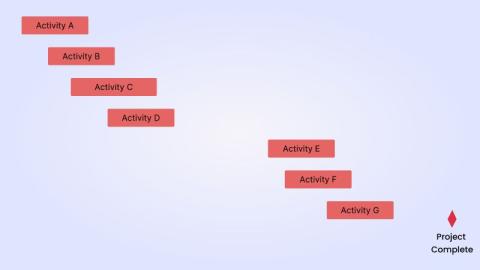
While leading a global project controls team, I received a call from a project director who had serious concerns about the reports being produced by one of our schedulers. He had specifically requested a critical path report, expecting to see a continuous, unbroken sequence of activities connecting the current status of the project all the way through to the final completion milestone.
What he received instead was a single-page Gantt chart showing a cluster of red bars at the beginning, followed by a 9-week gap, then another set of red activities, then a 12-week gap, and finally the end-of-project milestone sitting in isolation at the far right. There was no logical flow, no narrative that easily interpreted from the chart.
Needless to say, the project director was furious. He hadn't asked for a collection of red bars. He had asked for a ""path"". The output demonstrated a fundamental misunderstanding of what a critical path is and what it's meant to communicate to project leadership.
At the end of the conversation, the project director made a remark that has stayed with me ever since: "We need planners not tool operators."
Source: Mohamed El-Mehalawi, Professor, Nile University
PROCESSES NO 8 – CRITICAL PATH NETWORK, 70 YEARS OLD, ANYTHING NEW?
Fed up with adverts from software companies and consultancies that are going to change the world of Planning and solve all your project problems? This series of occasional articles promises nothing but thought provoking questions on how well we understand the basics of our profession from the perspective of a retired planner with 50 years’ experience in the industry whose worked in a variety of UK EPC roles for Clients and Contractors with no axe to grind.
We are going to look at PEOPLE, PROCESSES, and PROCEDURES (the old 3P’s – not 4P’s, 5P’s, 6P’s or 7 P’s) that we all have been educated and trained to use in our everyday work (5W’s + 1H) and POKE THEM IN THE EYE / LOOK UNDER THE STONE (the Inverse Universe) and get into trouble with the planning profession because for loads of reasons were not doing so well. If you want to contribute to this soul searching drop me a line with either POSITIVE or NEGATIVE comments (yes, we are PLANNERS that can hold both views at the same time!)
No 8 - Processes - Critical Path Network - 70 years old this year- Is there anything new to be said?
Moving on from PEOPLE we can start to look at PROCESSES. Underpinning all our scheduling work is the attempt to show and control time. Again, we are attempting to talk about things which are rarely spoken of in planning discussions.
Having looked at the fundamentals of time, calendar, and dates/times in blog 7, we are now starting to look at our PROCESSES. Underpinning all our scheduling work is the use of critical path network methodology. Rather than repeat numerous articles on the subject lets just look at the fundamentals that build a CPN and point out a few problem areas.
So, you are the planner on a new project. Ask the basic question. Is CPN right for this project? If it is very short term, STO work, inventory planning, R&D, repeated testing, resource skill dependent, equipment dependent etc then probably not. Various other techniques ADM, GERT, VERT, CCPM, SDPM, RCPM, KFFM, CEM etc can be used but we like what we know.
So, having chosen CPN on for your project let us set off with my first strap line. - THE SCHEDULE IS OWNED BY THE TEAM AND THEY ARE RESPONSIBLE FOR DRIVING IT. THE PLANNER IS THERE TO LAYDOWN THE BASELINE PLAN IN LINE WITH THE APPROVED MANAGEMENT PLANS, FOLLOW THE CONTRACT, COORDINATE THE INTERFACES, IDENTIFY CRITICAL ITEMS, SET THE MILESTONES, MONITOR AND REPORT PERFORMANCE, CHALLENGE ACCEPTED METHODOLOGIES WHERE APPROPRIATE AND STEER THE PROJECT BY ALWAYS LOOKING FORWARD.
Let us get into the basics of forming a CPN Schedule
PROJECT METHODOLOGY
The schedule should reflect and support the many project methodologies and written plans that are produced by the team to demonstrate how the overall project is going to be delivered. It does not exist in isolation and within a company will have to interface with many coded Project Breakdown Systems (WBS, CBS/CAM, Account Codes, Asset codes, SAP codes, BIM codes, Risk, Estimate etc). On any project it will have to follow the specific contract requirements and any project control procedures. Each schedule is produced for a specific purpose (tender, contract, update, delay, recovery, acceleration, as-bult, what-if etc) and will reflect the schedule level and schedule class for its intended purpose. The schedule is only applicable for a set of project assumptions and for that moment in time. Harder to spot are the biases and optimism that the team share in the input data. Don’t forget to record all these. Quite a big ask before you even start!
Second strap line - PLAN THE WORK, WORK THE PLAN. CONSTANTLY
LOGIC RELATIONSHIPS
Historically (1950’s) we started with 3 systems CPM, PERT, PDM and shiny new computers looking for useful things to do. By the 1990’s the software houses had reduced this to PDM but called it CPM (Mosaic have a great paper – A Brief History of Scheduling - if you are interested). We generally apply the logic relationship of an information, physical or resource process. Future activities have defined starts from the start or finish of previous work which is needed as input to the future activity. Originally this involved 1 logic relationship link, but this has increased to 4 to cover all possible cases. A bit more logic relationship sophistication has been added with Lags and Leads allowed between activities.
Note that: in reality your project will have several types of logic relationships already built into the delivery process. However some activities will move forward on assumptions that will have to be revisited (fuzzy, circular etc). Once you are progressing the project different logic pathways will be chosen to respond to current issues (probability, conditional etc). Work will have to be repeated (ghost / occasional / on – off testing etc). Changes may require a restart to some work. Changed assumptions will require rework.
DURATIONS
For deterministic schedules calculating activity durations is fraught with difficulties (P6 for instance has 4 duration types). Traditionally, generalised productivity rates have been applied to take off / BoQ derived rates and quantities and resource numbers for engineering and construction work. Procurement durations tend to be supply chain driven. Together with lead-in and lead-out work this can derive a fixed duration value. For more uncertain work elements traditionally the PERT formula (pessimistic + 4 x mean + optimistic)/6 has been used. Benchmarking, where available is also a good reference guide. Ideally once started an activity should be progressed uninterrupted to a finish. Stopping and starting work does no one any favours. Remember these are working days we are calculating. Overall duration will depend on applicable calendars. Optimism, biases and assumptions are your greatest enemy!
Note that: in reality your project durations will be rarely correct. Assumptions on general overall productivity rates and applied resources will be wrong and quantities will change. Procurement times will vary with the market conditions at PO placement. Increasingly schedules undergo a QSRA (Quantitative Schedule Risk Assessment) which allows a probabilistic spread of activity durations (using for example Monte Carlo Simulation – MCS) to be applied but experience has shown this technique underestimates risk, and the underlying network model can be found wanting.
ACTIVITY DESCRIPTION
It is important to understand from the activity description what is the content of any activity. It should be unique (by node ID’s – never reuse) and have defined start and end points. It should end in a defined deliverable which is passed on to the next activity. Ideally a formal record should be available to verify this passing (documentation system), and it should be the subject of a quality check. Pressure is usually applied to start work as soon as the deliverable is received but unless you have all the other information to complete the work or this is critical then this should be avoided. Further paperwork may be required on the deliverable after the activity is completed but this is rarely shown (MoM issued, ITP sign off approval, 28 day concrete test results etc).
Note that: in reality your activity descriptions will be interpreted flexibly. Work will start without complete information and handed on incomplete to show progress. There will be gaps in the workflow and revisits to so called complete tasks and actual dates.
HARD AND SOFT CONSTRAINTS
All schedules will have constraints imposed by the contract. Start and end dates are the most obvious but sectional handover dates, client interface dates, utility dates, 3rd party access dates etc are also common.
Note that: in reality your project will also have all sorts of assumptions and constraints imposed from the project management plans (P6 for instance has 8 types that effect network analysis integrity) and the way the team intend to deliver the project. Typically, in EPC projects you may have JV work split agreements, detailed engineering work done in different locations, design safety and review obligation with the client team, procurement done under framework agreements rather than traditional PO’s, construction done on sites with other live production facilities, joint commissioning teams etc. Your project team may want to prioritise some work by starting early or delay some non-critical work. That assumptions list is becoming longer - BUT CONGRATULATIONS YOU NOW HAVE THE INFORMATION TO FORM ‘A’ BASIC NETWORK OF ACTIVITIES FOR ANALYSIS OF YOUR PROJECT.
YOU DIDN’T START FROM A BLANK PAGE, DID YOU? THE COMPANY HAS LOADS OF STANDARD SCHEDULES (FRAGNETS) COVERING MOST INDUSTRIAL SECTORS ALL SET UP TO SAVE YOU TIME! COPY THE LAST PROJECT TYPE SCHEDULE TO GET A HEAD START.
Did the logic work? Do you get a critical path? Does the overall time span look reasonable (benchmark)? How does the float look? Is it ready for peer review sign off ? ......so many questions.
Let’s send it out to the project team to get their feedback. After all you want them to own it. You can now add in all those coding structures. You can filter and align with budget cost accounts, estimate sheets, cost load the schedule and do all those quality checks (tick boxes). You can set it up for earned value analysis. You can develop the higher level roll ups. …….so much you can do!
If the schedule is still looking good let’s refine it and create ‘the’ schedule.
Third strap line - PLAN THE FLIGHT, FLY THE PLAN. ENDLESSLY
So, let’s develop this further as we have come so far.
RESOURCES - It’s fine developing the schedule but it’s people (and P&E sometimes) that will deliver it so we need to do a resource assessment of the critical skills and numbers that we need so we can use them most productively. This involves critically reviewing how many we can expect to have available and for what period and then optimising them – resource smoothing and levelling. The project team will tell you which are the critical resource as they will be on the risk register. So, the critical resources needed are obtained from the budget cost plan / BoQ and estimate sheets labour value and using the company resource codes (HR input) put onto the schedule activities. You can then adjust the logic and free float available in the schedule to limit the number of expected critical resources used and to smooth them for their duration. This can be done for say the top 3 critical resources, but it can get messy (change on change) after that. Occasionally P&E can be a driver (cranage, muck shifting etc).
Note that: in reality your project will need to develop a resource management plan that manages both the onboarding of additional resources and options for obtaining their services. Specialist skills work can be subcontracted, agency staff hired or in a large company, work put out to other work centres. Whilst an initial resource assessment shows your planning intent, as the project progresses the details and timing will change so it’s high up on the risk register to manage by the team. Actual productivity and resource availability achieved can seriously affect your planned future durations which should be looked at at each update,
PHYSICAL / LOCATION / ACCESS / LEVEL / INFORMATION - The logic relationships you use in developing the schedule will be continually refined as near term activity plans are expanded (rolling wave). This daily / weekly / monthly / 3 monthly planning cycle will be done by different team members (in different systems), but the planner has to keep an overview to ensure that critical activities are prioritised and volumes of work scheduled / done are in keeping with overall progress requirements.
Note that: in reality the lower level (4 and 5) schedules will start to identify the minute detail that is required for work to be progressed. This countdown or pre-start process should start long before any work is scheduled to start and any potential delays prioritised and cleared. Each discipline manager (E,P,C) should run its own forecast needs list and major potential blockers should be highlighted to senior management long before they become critical.
PROGRESS MEASUREMENT SYSTEM – RULES OF CREDIT - As the project progresses you will want to measure progress of the work. This can be done by having established an agreed Rules of Credit progress measurement system where each deliverables stage is awarded a percentage of the work content involved. These percentages will be different for each stage of the project (FEL - Pre-FEED, FEED, Basic, EPC or RIBA satges). Usually the budget value is chosen (EVM alignment) as the function but work, manhours, quantities, quality etc can be used.
Note that: in reality it is important to apply common RoC across a company. Together with the company time and financial reporting systems this allows you an assessment of productivity which will dictate your future resources. You will have different RoC for different project types and functions.
COST LOADING - It’s important that the accepted schedule ( now morphing into the Performance Measurement Baseline Schedule (PMBS) or just baseline) is cost loaded with the budget lines that form the PMB - Performance Measurement Budget (see next blog on EVM). The aligned WBS coding of the schedule with the budget cost plan / BoQ / estimate allows this. To show the full PMB (tender or contract sum) extra activities covering OH&P, fees, escalation, contingency, MR, risk etc will need to be added (or not). It’s important to follow the contract for including or excluding Provisional, Direct and Indirect PC sums, intended PO novations’ etc. Place holder activities can be used instead.
Note that: in reality your schedule will be cost loaded at a WBS group activity level rather than a cost allocated to every activity (you can but it is an immense amount of work for little gain, bear in mind you will have to collect and verify costs at activity level as well). You will have to spread the budget along these cost lines in way that mimics the cost function profile you expect. Now cost function could be commitment, budget item spends as per schedule, monthly application, accrual costs, invoice payment. Each has its own advantages and disadvantages; we will explore this in our next blog on EVM.
ORGANISING AND FILTERING - Scheduling software is great at allowing you to organise and filter your data through numerous lenses. This is where the software comes into its own. Whilst WBS is the key project common organising element (and EPS at a higher portfolio level), schedule activity ID’s, resource and activity codes offer unlimited choices to target schedule data information at specific groups. This also includes Client SAP and asset codes, physical area works, linear projects time chainage codes, process system codes, and floor levels for high rise buildings.
Note that: in reality your project schedule will be sliced and diced in numerous ways. This is essential for the targeting of information so as to engage specific groups in the project team. Agreeing what information, you send them and in what format allows for better engagement. DO NOT SEND THE WHOLE SCHEDULE TO EVERYONE AND EXPECT AN INTELLIGENT RESPONSE!
RISKS - Every project carries risk. Some projects have a list of accepted risks which are priced and scheduled into the scope. These should be highlighted on the schedule and in your assumptions.
Note that: in reality your project will have numerous risks (most highlighted in the risk register). There are numerous ways you can allow for this in the schedule (which mirror the cost estimate build up allowances) e.g. Individual durations can be increased, productivity reduced, non-working days can be added to the calendar, a terminal contractor’s buffer contingency can be added. This can be done by following a QSRA assessment. Just be clear which risk is included, and which is excluded. Don’t forget HSEQ, technical and performance risks besides cost and schedule.
Fourth strap line - PLAN THE WORK, WORK THE PLAN. RELENTLESSLY
SCHEDULE USES - You can use the schedule created for various purposes – tender, contract, progress, updates, recovery / acceleration / crash, as-built record, delay analysis (EoT). Schedule data from it will be used as input to all the other project reporting systems. Lots of reports can be run from it (30, 60 , 90 days look ahead, critical path, float trends, milestone movement, what-ifs etc). These reports will be covered in later blogs.
Note that: in reality your schedule will always be a compromise of detail and information. What suits one usage will not suit another. What’s perfect one day will be rubbish the next. As a scheduler you just have to suck it up!
STANDARDS - There no such thing as a perfect schedule. Only one that fulfils its purpose at the time it was created. Various quality standards have been proposed (GASP, UFGS, AMP, PMI, CIOB, AACE, GAO, DCMA etc) but they are very much a niche product. All the common contract bodies (FIDIC, NEC, JCT, RIBA, ICE etc) have their own take on schedules and your projects contract should be followed precisely. Each company will also draw up its own scheduling procedures to ensure minimum commercial compliance.
Note that: in reality so long as your schedule meets the contract specification, gains acceptance by the Client, is owned and used by the project team and follows the company procedures then scoring marks on any tick box standard is way down the list.
BASIS OF SCHEDULE - What ever schedule you produce you must write a Basis of Schedule document that explains how it was derived. Contents are pretty self-explanatory, but you must also include items on schedule assurance (who produced it, who approved it, system used to develop it, skills and experience of future users etc) and resilience (how do you deal with changes, wrong assumptions, potential future options etc).
Note that: in reality your approved Basis of Schedule document will be your key defence document throughout the project that contains all the fundamental scheduling information, that explains how the schedule was derived, progressed, updated, changed, used, and finally recorded the as-built information.
SOFTWARE - Whatever schedule you produce you will have to use the software specified in the contract which hopefully is supported by your company and has a user base that you can lean on if needed. Increasingly company information systems are integrated along specific software usage lines so anything other (than say P6) will cause major problems for interoperability.
Note that: in reality, from a user perspective, not all software is equal. Whilst every scheduler will have some version of Primavera on their CV, some will have MSP and Elecosoft (Asta), a few might have SAP, MRP, Deltek, Maximo etc but finding skills in anything else is problematic.
Fifth strap line - PLAN THE WORK, WORK THE PLAN. WITHOUT FEAR OR FAVOUR
Reference here response file - Peter Holroyd - LinkedIn
Question to you all – Do you use any other scheduling technique than CPN? Does the software still surprise you? How engaged is the project team with the schedule?
What is your Mantra? Do you follow the 10 Planning Fundamentals, the 25 Golden Principles, your company planning procedures or something else? Let us know in your responses.
For my next blog (No 9) in PROCESSES I am again looking at underlying problems with our basic tools and techniques – Earned Value Management
Source: Peter Holroyd, Planning Manager
ENGINEERED CONTROL ACROSS THE STO LIFECYCLE

iPlanSTO - Shutdown, Turnaround, and Outage (STO) Performance Software.
ENGINEERED CONTROL ACROSS THE STO LIFECYCLE:
- Executive-level, real-time visibility into STO progress, risk, and readiness—across sites and regions
- A single, trusted execution model that connects scope, schedule, readiness, execution, and completions
- AI-enabled decision making helps identify, plan, and execute the work that truly matters
- Enterprise-ready integration that complements existing ERP, EAM, and scheduling systems
- Repeatable STO playbooks that reduce variability and dependency on individual site teams
- Controls that prevent “close-out drift” — verification steps, handover evidence, and completion quality embedded into the workflow
First look at iPlanSTO AI-Enhanced Planning: WATCH VIDEO— or VIEW BROCHURE. How would this transform planning in your world?
To arrange your demonstration, contact [email protected].
ONE STOP SHOP FOR P6 COLLABORATION
CAPPS is a one-stop solution for P6 project team collaboration and updating, ideal for turnarounds, outages, and shutdown collaboration. Join our free webinar (below) to see how it all works! In the meantime, here is a clip from a past webinar showing our new crosstab grids.
Take a look at the video and see for yourself...
VALUE-ADD and FREE WEBINARS

April 16 - Primavera Unifier - Project Controls
When managing a project there are a multitude of different moving parts to keep track of. Managing Contracts, Costs, Design Documents, Site Documents, Quality Control Documents and Asset Management usually requires numerous, disparate software tools for each department or team. With Oracle Primavera Unifier, you can manage the fill scope of a project from inception to closeout and even through to facility and asset management. Having all these modules, business processes, and workflows in one centralized, secure and highly configurable tool stops costly and disruptive problems from taking root and saving your organization time, money, and frustration. With everything handled in one place, and relevant documentation linked to each other, project management suddenly becomes a lot faster, and easier, for the whole team.
April 21 - Primavera Unifier - Facility Management
Oracle Primavera Unifier now includes Facilities and Asset management (FAM). The asset management toolkit allows you to stay on top of your preventative maintenance requirement with ease. The space, facilities, and materials management allows you to easily record lease information. With the amount of new modules and functions, it can be overwhelming to figure out everything that you can do with this powerful technology, and that’s what we’re here for! In this webinar, we will be discussing and demonstrating a few of the main modules that have been added, specifically relating to Asset Management and Space Management.
April 23 - CAPPS v14 - Turnarounds, Outages, Shutdowns
Not all of your project team members are P6 EPPM experts, nor should they have to be! With Emerald’s CAPPS (Capital Projects Progressing System), a secure Primavera P6 add-on, your team has a simpler, more cost-effective way to provide P6 schedule and resource planning, timely schedule updates, and can view Gantt charts and key dashboards - all in one digital, mobile-enabled tool. In this latest version, the software has grown from updating only to team collaboration, and really is not just for Capital Programs anymore. As we embed our TAPS (Turnaround Progressing System) technology into CAPPS, we have a one-stop solution for P6 project team collaboration and updating. We have also added new crosstab grids, allowing your team to make lightning fast updates. If that isn’t enough, we have also added brand new Gantt charts, heatmaps and dashboards for easy visualization of your tasks, priorities, due dates, and bottlenecks.
April 30 - Primavera P6 EPPM Overview
Primavera P6 Web is the web-based, enterprise project portfolio management (EPPM) solution offered by Oracle. Unlike the traditional, installed P6 Professional client, the web version allows global teams to access, plan, manage, and update projects from any location using an internet browser. Primavera P6 Web is the industry-leading tool for planning, scheduling, and managing complex programs and portfolios. It provides a centralized, multi-user environment designed for enterprise collaboration. P6 Web allows teams to build and manage multi-project CPM schedules with advanced resource, cost, and performance management — all from a browser-based platform. Topics covered include: Dates, Resources, Costs and More!
AI in CONSTRUCTION MANAGEMENT

With supply chain disruptions, labor shortages, and tightly connected programs, even small changes can throw entire projects off track. Adjusting plans manually takes time, often days or weeks and by then projects have already lost time and margin.
Advanced technologies can significantly improve processes and this is where generative scheduling technology can be applied to help construction teams assess millions of schedule scenarios in minutes, and find faster, better alternatives to completion.
Check out the ebook to learn why traditional planning techniques fall short and how AI-powered planning is changing the game.
PROJET ONLINE REPLACEMENT
Have you ever been in a situation where a software vendor promises during the sales phase that their product will solve all your problems, but once you get to implementation, or even testing, you discover that the most critical functions are not supported at all? At that point, you are left with two options: look for another product or accept a degradation of your processes. Neither is an enviable choice. This is exactly the situation some companies will soon face as they begin transitioning from Project Online to alternative systems.
Some of Project Online capabilities are relatively easy to replace. In fact, replacements may even significantly improve existing functionality, allowing organisations to benefit from moving to more modern systems. This is especially true for project portfolio data management – registers and reporting.
However, there is a second, more specialised layer – functions directly related to project schedule management, collaboration, access control, quality assurance, integration of subprojects, resources, costs, risks, and ultimately, schedule calculations.
LET THE SCHEDULE CONTROL THE PROCESS
How can a good schedule help a project to run smoothly? Schedule development is one side of the coin, and schedule maintenance is the other side.
Scheduling is far more than defining dates on a timeline. It is the process of translating the project plan into a structured execution model and continuously aligning it with progress, risk exposure, and operational realities.
In this article, we explore how schedule development, validation, and maintenance work together to keep complex construction projects on track, ensuring alignment between scope, resources, and project objectives.
Whether you're a developer planning long-term infrastructure investments, a contractor coordinating construction activities, or a project controls specialist responsible for performance monitoring, these scheduling phases play a critical role in project success.
Source: Kareem Khattab, Planning Manager
STRUCTURING THE ROADMAP FOR DELAY ANALYSIS IN PROJECTS
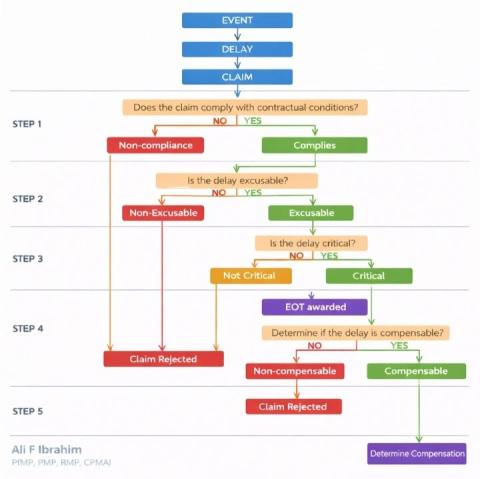
Structuring the Roadmap for Delay Analysis in Projects
A structured approach to delay analysis ensures clarity, fairness, and better decision-making. The roadmap below simplifies how delay claims should be assessed:
- Step 1: Contractual Compliance
Is the claim aligned with contract requirements? - Step 2: Excusablity
Was the delay beyond the contractor’s control? - Step 3: Criticality
Did the delay impact the project’s critical path? - Step 4: Entitlement (EOT)
Is the contractor entitled to an Extension of Time? - Step 5: Compensation
Should the delay result in financial compensation?
This structured methodology helps:
- Reduce disputes
- Improve transparency
- Support fair entitlement decisions.
- Strengthen project governance.
In today’s fast-paced project environments, having a clear delay assessment framework is not optional ,it’s essential...
Have your say, read what people have proposed as improvements...
Source: Ali Fakhir Ibrahim, PfMP®, PMP®, RMP®, CPMAI™ , Project Manager - Controls
ASTA Tip #143 AREA SELECT TOOL
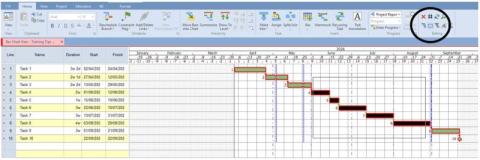
There’s a feature in Asta Powerproject which helps when you are selecting multiple tasks in the bar chart to make changes to them all. There are a few ways to multi select tasks within Asta Powerproject however this selection tool is a nice additional feature you may not have known about! So this week’s tip is……..
Tip #143 Area Select Tool
On the ‘Home’ tab at the top of the screen look to the far right of the ribbon and you will see a button which looks like a dotted square. Hover over this button and you will see it says ‘Area Select’. Click this button once, now move your cursor into the bar chart, click, drag and let go over a number of tasks and they will select, now you can now make your change to affect them. To turn this feature off, again click once on the ‘area select’ button or press the ‘ESC’ button on the keyboard.
Source: Anthony Ward, Asta Powerproject Training / Trainer / Consultant
WHAT IS PPM SOFTWARE AND WHY TEAMS RELY ON IT TO MANAGE GROWING PORTFOLIOS? | BLOG
Managing multiple projects at once quickly becomes complex.
PPM software gives organizations a clear portfolio-level view of projects, resources, budgets, and priorities all in one place. Instead of tracking initiatives in isolation, teams can balance workloads, improve decision-making, and ensure resources are focused on the projects that drive real business value.
LET'S OPEN UP OPPORTUNITIES TOGETHER

To support every practitioner, employer, consultant, and recruiter in our network, we’re opening up free job postings for everyone. Whether you’re:
- An employer with a vacancy
- A regular practitioner looking to strengthen your team
- A consultant searching for standout talent
- A recruiter with a role to fill
…you’re invited to share your opportunities with the entire Planning Planet community.
No charge. Simply contact [email protected] and we’ll help you get your role in front of thousands of committed project controls professionals.
Let’s make this a space where opportunities flow freely, careers grow, and our community continues to lift one another. View Jobs... Post Jobs...
Permanent Employment London (EU.UK.LON) £60,000 + car allowance + full benefits.
Senior Planner – London (Construction / Build)
Permanent Employment London (EU.UK.LON) £95,000 + car allowance and package
Permanent Employment United Kingdom (EU.UK) £75,000 – £90,000 + car or allowance (circa £6,500) + staff benefits
Permanent Employment UK-North West (Region) Negotiable, Heathcare
Contract Employment Warwickshire (EU.UK.WAR) £690 per day
SUPERIOR ALTERNATIVE TO THE "MOST POPULAR" SOFTWARE FOR US AS PLANNERS?

A superior alternative to the "most popular" software for us as planners?
Spider Project Team is a group of project management consulting and training companies. With headquarters in Moscow, Russia, we have branches, partners and representatives in other Russian cities, Australia, Brazil, Colombia, Kazakhstan, Romania, USA. We develop professional PM software Spider Project that is the most powerful and functional tool for project, program, and portfolio management.

We develop advanced approaches and methods of project management that are widely used by our customers in 37 countries. We provide training on project management and Spider Project software for our customers around the world.
We manage projects for our customers and implement corporate project management systems in companies of different industries. We believe that good project management can improve our world and are happy to provide the best services and tools to our customers.
We are proud of our achievements. The current version is used in 37 countries. Spider Project offers numerous unique functional features and is the only PM software that optimizes resource, cost, and material constrained schedules and budgets for projects and portfolios.
Spider Project offers numerous unique functional features and is the only PM software that optimizes resource, cost, and material constrained schedules and budgets for projects and portfolios.
Check it out here... Ask questions here...
THE BEST CONTROLS CONFERENCE TIL EVA 34
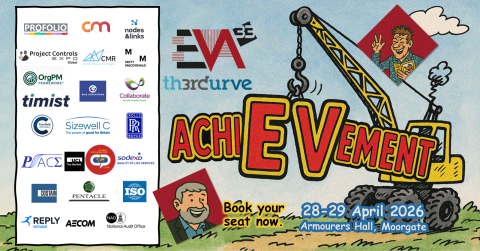
A first glimpse at the complete lineup for EVA33.
There will be no stronger lineup and no better price than at the Armourers this year. I hope you can make it and get other people along too to share the enriching experience. Above all you will hear the most compelling case for use of the new BSI Project Controls Specification Standard. The need for this was requested at a Conversation Club. It has been delivered and tested. It works! Paving the way for further transformative improvement and change wherever the word Organisation is used and collaboration is embraced. We must become ever more connected and ever less parochial.
REMEMBER: If 2 days is not easy because of travel then just come to one. They are both have a strong programme. Go for day 2 if you are really interested in Estimating.
The focus is on Controls and Skills behavioural, technical, psychological, and cultural that people need to make what they do happen with purpose.
20% discount til end April 27
Use FINALSCORE
The full programme is on Eventbrite now...
Source: Steve Wake, Thought Leader and Organiser
WOULD YOU LIKE TO ADVERTISE ON PLANNING PLANET?
We want to give more of our members the opportunity to advertise on our site. Click here to get started!
THANK YOU FOR READING OUR MESSAGES
If you’d like to lend a hand to the small but enthusiastic team behind this newsletter, feel free to reach out to us at [email protected]. We know there’s still a lot of work ahead to make this an informative and eagerly anticipated bi-weekly read, so get in touch and be part of the journey.
Regards...
The Planning Planet Team