After an attempt to import XER to Primavera, the system crashed and doesn’t work even after the computer restarted. Is it Release 22.12 problem (I have this version installed) or a common P6 issue? Is it the only option to fix it via reinstallation or there is a work around?
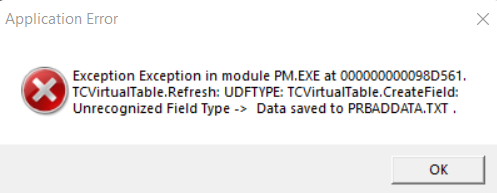



Alex,
You shouldn't have to try that first. Are other XER's importing ok?? then the problem is not with P6.
Santos,
Thanks for the advise. I will investigate what was wrong with the XER but .. to check if the issue was fixed I need working Primavara :) And the only option is uninstall Primavera and Installed it again.
Santos,
Thanks for the advise. I will investigate what was wrong with the XER but .. to check if the issue was fixed I need working Primavara :) And the only option is uninstall Primavera and Installed it again.
Alex, It seems that your database has been corrupted or had invalid entry on the database table UDFTYPE and table UDFVALUE. If you have access to P6 database using the SQL Server Management Studio or any other SQL database browser (if the database is SQL) or Oracle Database Browser (If database is P6 Oracle), you can delete all entries with created date when you import the XER for both tables. Once deleted those entries, you should be able to run the P6 again.
Alex, looks like a problem with one of the UDF fields in the XER file being imported. You can try opening the XER file in a text editor and just deleting out the entire UDF table/section of the XER file. Your core scheduling data won't be affected, but you'll just not import any of the UDF related data.