MULTIPLE CALENDARS AND ACTIVITY DURATION - THE DEVIL IS IN THE DETAILS
- To keep it simple I will use a single team per activity and activity count will be kept at 2.
- Teams do not have special calendars. Team calendar is calculated as an overlap of activity calendar and team resources calendars. The mismatch increases activity successive time.
- Successive time tells you the undivided time span from start to finish of activity
- Available time by calendars exclude no work time.
- Successive time and available time by calendar matters. Unfortunately neither is a value you can get out of the box, a user defined fields and formula calculation is needed.
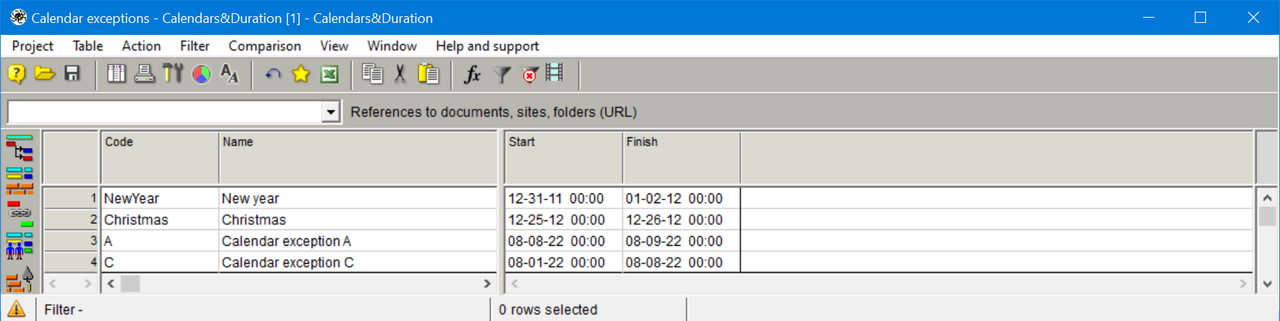
- In order to manage calendar exceptions you need to show all calendar exceptions in a concise manner. Using graphical methods to see and manage calendar exceptions can be daunting and error prone; it is not an acceptable approach.
- The use of multiple calendars can be a bit complicated and perhaps not well understood.




Sometimes you want to reduce/optimize the activity mismatch (and succesive hours) within available float.
Better if done by the computer without imposing infamous date constraints.
With a few simple formulas the mismatch can be quantified. Formula execution is set to execute automatically in Activity Gantt after scheduling.
In addition to activity mismatch I also want to calculate the resource mismatch; it is not necessarily the same for all resources within same activity team.
Rafael,
one easy way is to change all activity DPH type to Duration (for example using formula), set Start NET equal to Start (formula), delete all resources, calculate project schedule and compare two schedules.
This way you will get the mismatch for all activities.
To create the schedule based on resource calendars only change activity calendars to 24/7 without exceptions.
The same can be done with resources instead of deleting them. This can also be done applying formula.
Another option - not applying Start NET. Then the schedule will ignore resource constraints and calendars. Comparing with this schedule can be also useful.
This exersize will take several minutes.
Mainly I am looking on how to figure out when and by how much the mismatch of resource and activity calendars delays the execution(finish) of an activity because you have to wait until all team resources are available at the same time.
The mismatch does not increase activity duration but delays the activity execution(finish). The delay becomes 0 when there is no mismatch, when the calendars are all the same, like in Activity 2. I believe the ratio of Duration/(Available Time by calendar) can be useful to quantify the mismatch. I wonder how others track and quantify this mismatch.
Remedial action might be to assign other resources, something Spider Project automatic skills replacement can do, other remedial action can be to delay exceptions such as a trip or vacations when there are no other resources sharing the same skill, and so on. I wonder how others take action to reduce the mismatch.
The mismatch is the devil within resource calendars!
Rafael,
please elaborate on your notion of "manage" calendars. What are you looking for?
Best regards,
Bogdan
CALENDARS TABLE
EXCEPTIONS TABLE
Your comments and suggestions on how to manage the calendars will be welcomed.