Formula editor shows error with correct formula Greetings. I am writing for the following reason, my copy of MS Project fails when trying to add a formula in a numeric custom field specifically the "Number 2". I tried several times without achieving anything, even modifying the original formula. These are the formulas IIf ([Job] <> 0 | Format ([Actual Job] / [Job] | "0.00%") | "0.00%")IIf ([Work]> 0 | ([Actual Work] / [Work]) * 100 | 0) These are the names of the fields in Spanish, what they do is calculate the executed work with decimals, since project only shows integers. The error MS Project indicates is always in the first PIPE from left to right. I opened a previous file that had one of these formulas included and it works, but when opening the formula and clicking OK, the same error appears ... although the formula works in the file until the editor is opened. Captures of the error are attached ... I appreciate someone tell me that it may be happening, or if it is an additional configuration of the S.O. 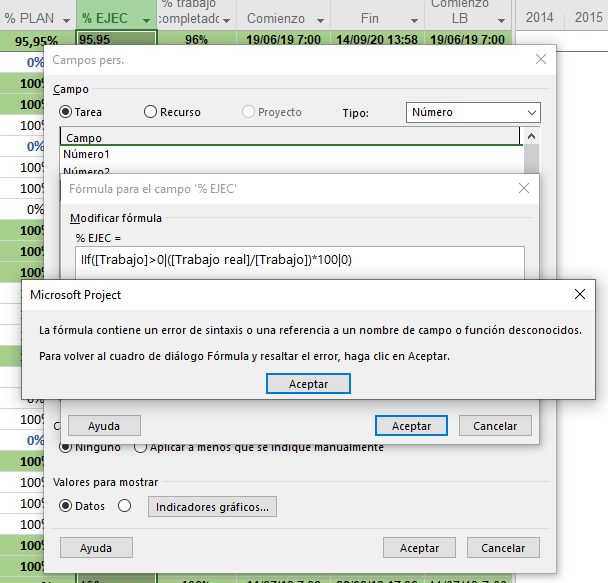
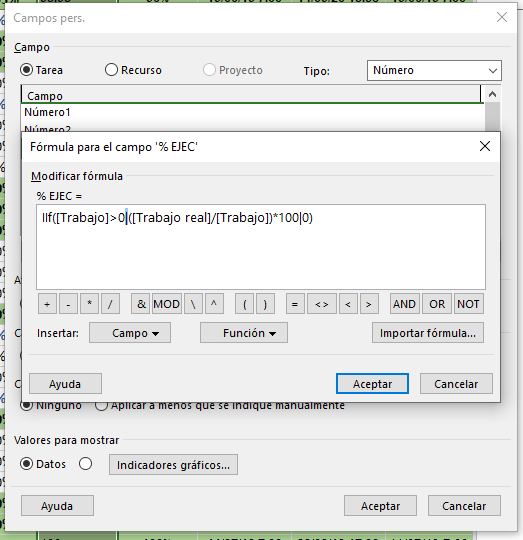 Thank you
Formula editor shows error with correct formula
Featured Partner



Top Posters
Zine Eddine
2 posts
Alex Lyaschenko
27 posts
mxsiegel
0 posts
Mattvtek
0 posts
Gareth Evans
3 posts
PP Admin
3, 129 posts
Rajkamal Tangirala
5 posts
Rahul Kumar
1 posts
blake333_
0 posts
Jeamiell Ostrovsky
2 posts
Our Partners












https://elringdepm.wordpress.com/formulas/
I see Spanish field names and comma separator, maybe this is the Key.
Sorry din't work
Thank you for your answer, I will read it and try ... then I will comment on the results
I do no longer use MS Project but in order to avoid software issues with language I always use English settings. I always use US English keyboard for similar reason. Maybe your regional settings are the source of these issues.
MSP: Install and Configure the Microsoft Project Interface
Configure Windows Regional Settings
In some cases, if you save a project with non-matching OS and application language settings, data loss can occur.
Try substituting “|” with a comma “,”.