Hello every body
I faced a problem that when i put a checkmark on the "Start" option the activity goes back to the start of the project and cannot be moved back again to its place
Please need your help
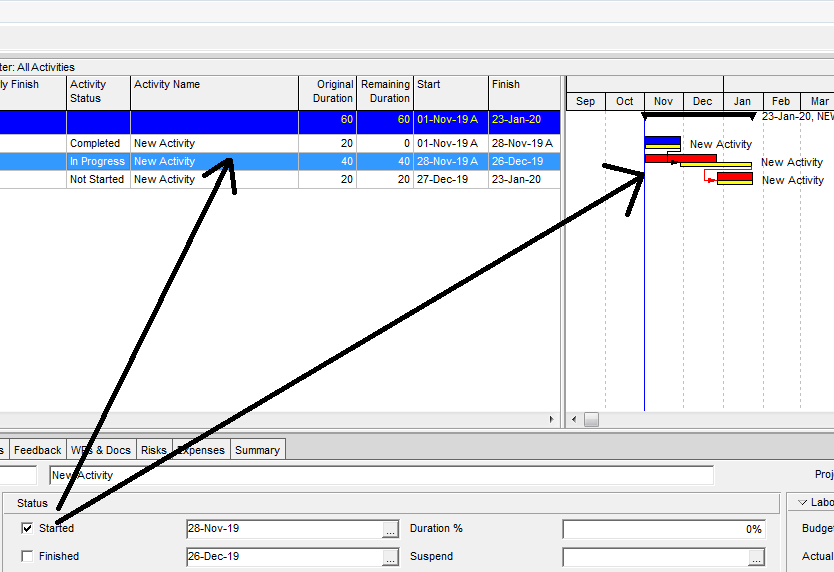
Images attached
Hello every body
I faced a problem that when i put a checkmark on the "Start" option the activity goes back to the start of the project and cannot be moved back again to its place
Please need your help
Images attached



to mark an activity started check the starte dbox then select the drop dpnw and select the ACTUAL date that this actviity started
when done statusing the schedule actual start and finish dates change the data date and run the schedule calculations again.
Thank you very much
Anas,
(You have changed your problem statement since the original post. This addresses your most recent comment.)
Any actual dates after the data date are wrong. To fix, re-schedule with the Data Date advanced to just after the AS of your second task. This is normally done as part of a disciplined progress update process, after all actual dates and remaining durations are entered.
Alternately, you could keep the existing Data Date (with completed work in the future), then re-schedule using the "Actual Dates" option instead of "Retained Logic." This option is wrong on many levels, but it will give you the dates you want in your example.
Good luck, tom
When you tick the box "Started"" this is indicating that the activity in question has commenced, and is therefore in progress - as shown in the activity status column. However, you also need to provide the Actual Start date if it is differnent to the value shown.
Are you displaying Early Start dates on the bar? once you tick the box you should display Actual Start date, or alteverively the field simply called "start" as this displays the correct date based on the activity status.