Hi Guys,
A good day to everyone and it been i while i have visit the site. God Bless.
I would just like to know how can we correct the time in an actual schedule? the error in time kinda give our project schedule a negative float value, and i have tried to correct it, but it just revert back to the wrong time after schedulling, is there a way to correct this? (the project should be starting at 8:00AM and should be ending at 5:00PM and we have found out the issue late). I have seen one online from eastwood harris but it only shows how t identify the error and no solution was given. Hoping one of you guys could shed light on the issue cited above. Please see attached
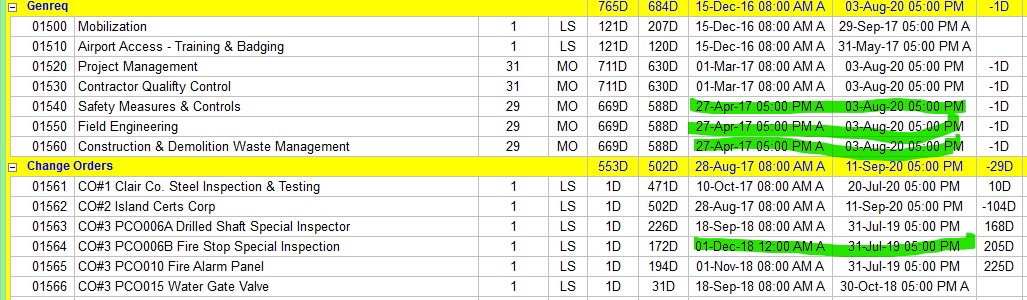
capture of the project.
With warm regards,
Ruel



You are right Zoltan.
To fix the future dates he make sure to set the Data date time either 8:00am for the not started project or 5:00pm for the updated ongoing project.
Raymond that only fixes actual dates with acutal times. This does not address the forcasted dates and times.
Thank you Raymond and Zoltan,
Both METHOD provided works fine, i just made 2 copies of the said project and tried each method on each one...
Ruel
To correct all actual start time, show actual start column with time then select all activities and make sure the cursor at the bottom pointed under actual start column.
Ctrl+r, then replace all time with 8:00.
1. turn on your times under edit users preference dates then select 12 hour
2 go to the projects directory make sure your project is highlighted an open select the dates tab make sure that the TIME on the start date is 8:00 am
3. on the project must fininh by date make sure the TIME is 5:00 pm
4. on the data date make sure that the TIME is 8:00 AM
5. any activities that have an actual start date make sure that the time is 8:00 AM
6. any activites that have an actual finish date make sure that the TIME is 5:00 PM
7. any start milestones make sure that on the constraint date that the TIME is 8:00 AM
8. any finish milestones make sure that on the constraint date that the TIME is 5:00 PM
once you correct all of this
VERY IMPORTANT MAKE SURE THAT ALL OF THE REMAINING DURATIONS ARE IN WHOLE DAYS.
edit users preference TIME UNITS tab under the Durations Format make sure that decimal places is set to 2.