Hi All, any clue as to how to get the Resource label to display as per the attached pic? On the Resource Profile section of the chart it should say "nn Men Required, where "nn" is the number in the left border. I am using P6 17.2 server and Standalone Lite versions but am unable to make this work in either version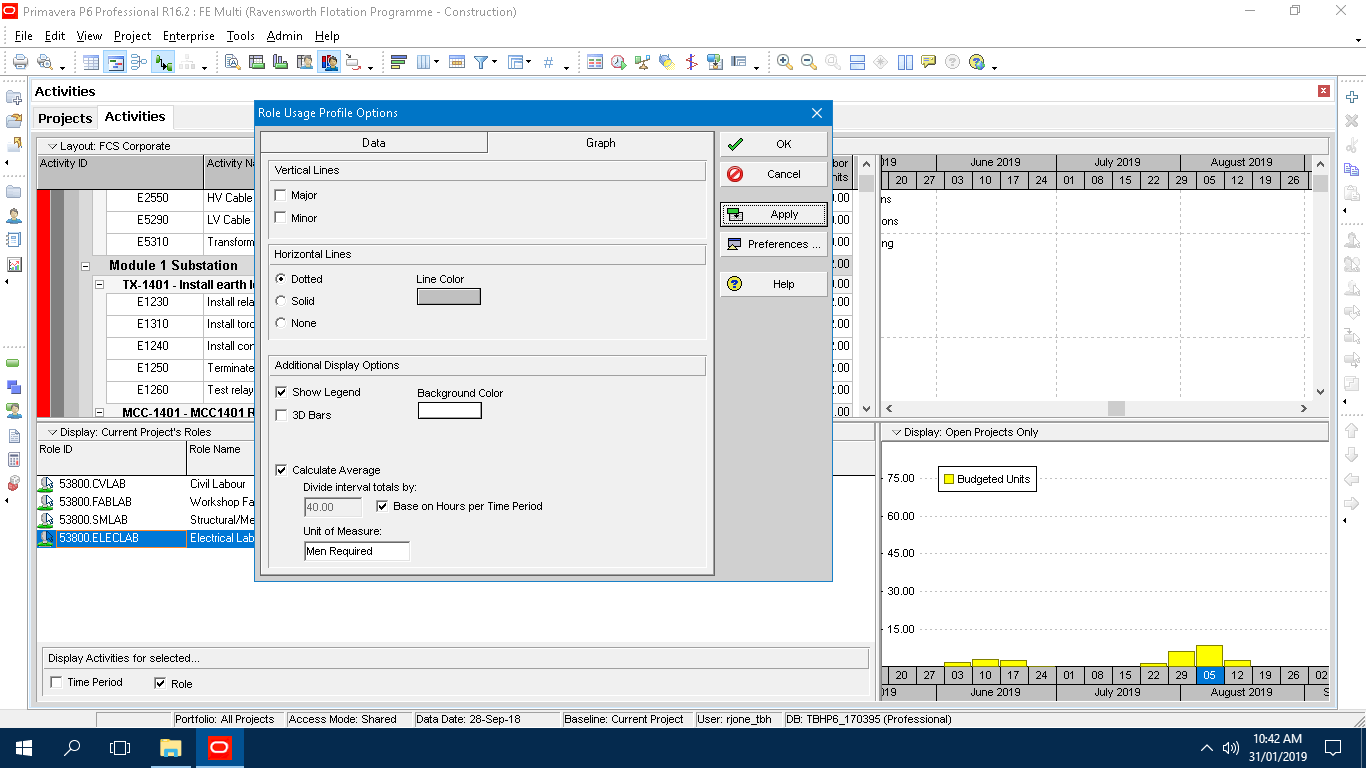
Resource Profile Unit of Measure labelling
Forum Sponsor



Top Posters
Julian Pegg
1 posts
Peter Nagy
2 posts
Raymund de Laza
17 posts
Syed_Asad
0 posts
Tony Greyvenstein
0 posts
Ahmed Al-Jubouri
13 posts
Umar Alvi
3 posts
Sibusiso Mahlalela
0 posts
Michael Samanyayi
3 posts
Simon Gumede
0 posts
Thjanks Rafael, it was the Show Unit Label toggle. Much appreciated for the link.
The following link might help.
https://doduykhuong.com/2017/07/31/why-is-unit-of-measure-not-showing-in-resource-usage-profile-in-primavera-p6/
The following simple scenario combines different calendars and partial workloads you can try yourself.