Unable to Filter; Received Error Message: AVAA0-1669-0

As I've been implementing all the helpful advice members have been providing, I suddenly received an error message when attempting to filter:
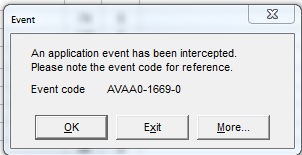
 

capture.png


And it's not just this schedule; filtering no longer works in any of my schedules.  In fact, the filter button has even been removed from the menu bar.

I had this happen once before, and the only solution I had was to redirect to a previously saved database (I am using a SQLlite database).  Fortunately I recently saved my entire database, and I export the XER schedule often.  (Although, I should be doing an XML export)

So I'm not devestated, just set back an hour or so.

Has this happened to anyone else?

S
Santosh Bhat 👤 Member for 21 years 1 month

There is an article on Oracle's Support that might cover this issue. Doc Id. 2145705.1

G
Greg Paulson 👤 Member for 7 years 11 months

Thanks for the suggestions.  They didn't solve the issue, so I redirected to my previously saved database.  I'm going to make a practice of copying / archiving it each night just in case this ever happens again.

G
Greg Paulson 👤 Member for 7 years 11 months

Thanks for the suggestions.  They didn't solve the issue, so I redirected to my previously saved database.  I'm going to make a practice of copying / archiving it each night just in case this ever happens again.

Z
Zoltan Palffy 👤 Member for 16 years 10 months

its definetly a layout issue 

Bar-necking can cause this in a layout. 

Solution: Disable bar-necking in the Activity View.  

  • Select View, Bar

For each bar that has "Display" selected go to the "Bar Settings" tab.

  • De-select both "Calendar nonwork time" and "Activity nonwork intervals" under the Bar Necking Settings Option

Click "OK"


If AVAA0 error still happend then delete the layout 

  • Printing options are also part of the layout and may be a source of the problem.  

Printing issues can be caused by not having the printer's driver installed on the PC.  

  • First make sure that there is a printer driver installed.

Second verify that a default printer is set

  • Third try to print to a PDF printer 

If the error occurs in Page Setup the scaling options may need to be changed.  Use the "Fit to" scaling option instead of the "Fit timescale to" option. The "Fit to" option should have values, not zeros for the pages wide and tall settings.

Forum Sponsor

Top Posters

Julian Pegg
1 posts
Peter Nagy
2 posts
Raymund de Laza
17 posts
Syed_Asad
0 posts
Tony Greyvenstein
0 posts
Ahmed Al-Jubouri
13 posts
Umar Alvi
3 posts
Sibusiso Mahlalela
0 posts
Michael Samanyayi
3 posts
Simon Gumede
0 posts

