All,
Is there a way of showing the WBS level in any view? Even a formulae in global change to show the WBS level that the activity is in would help.
Thanks
Pranab
All,
Is there a way of showing the WBS level in any view? Even a formulae in global change to show the WBS level that the activity is in would help.
Thanks
Pranab



Prenab,
I don't know of any in0built field in P6 that tells you that any particular activity is "level4" or "level7" of the WBS hierarchy.
If I was tasked with presenting this, I would generate an activity Number UDF field, an use Excel to generate a value that would be imported back into the schedule to present. But you need to do this each time new activities were generated or if the WBS structure was changed.
While other software can display WBS level as an activity field it looks like P6 cannot.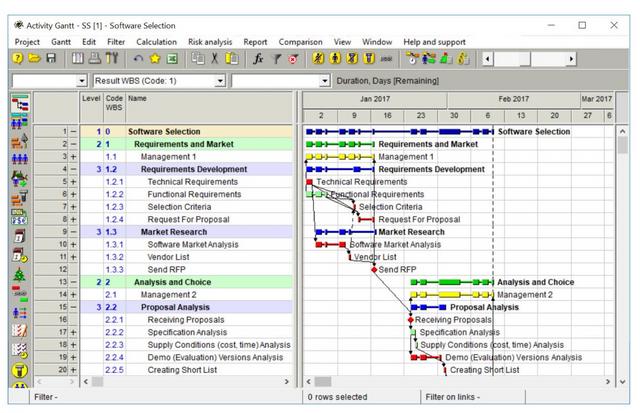
Of course P6 know the level and indent activity names accordingly, therefore if using Excel this can be calculated.
https://doduykhuong.com/2018/04/01/primavera-p6-export-to-excel-how-to-identify-wbs-level-for-activity/
do you mean in the gantt area where the bars are ?
if so in the gannt area rigth click bars
look for current bar labels and highlight it
then click on the bars label tab
on the bottom click Add
then select the position that you want it on the bar
under label select wbs path
or go to current bar
click on bar labels
then click on the bars label tab
on the bottom click Add
then select the position that you want it on the bar
under label select wbs path
if you are putting it under the bar make sure that the row hight is large enough to see it
if you are looking to band the wbs in the gantt area that is not possible
Hi Santosh,
I meant as a number, in the activities view have against each activity a number showing what WBS level the activity is in.
thanks
Pranab
Try these:
1) Iin Group and Sort Options - for the WBS grouping you are using, tick the box to "Show ID/Code"
2) In Columns, show the "WBS Path" column