Restore Database

Dears,

I have a problem with my p6 stand alone version, I had took abackup file before chaning my windows and when i set up p6 again i tried tor restore my databse but it failed and i got the attached message.

Please advise because i lost  a three years work.

Thanks,
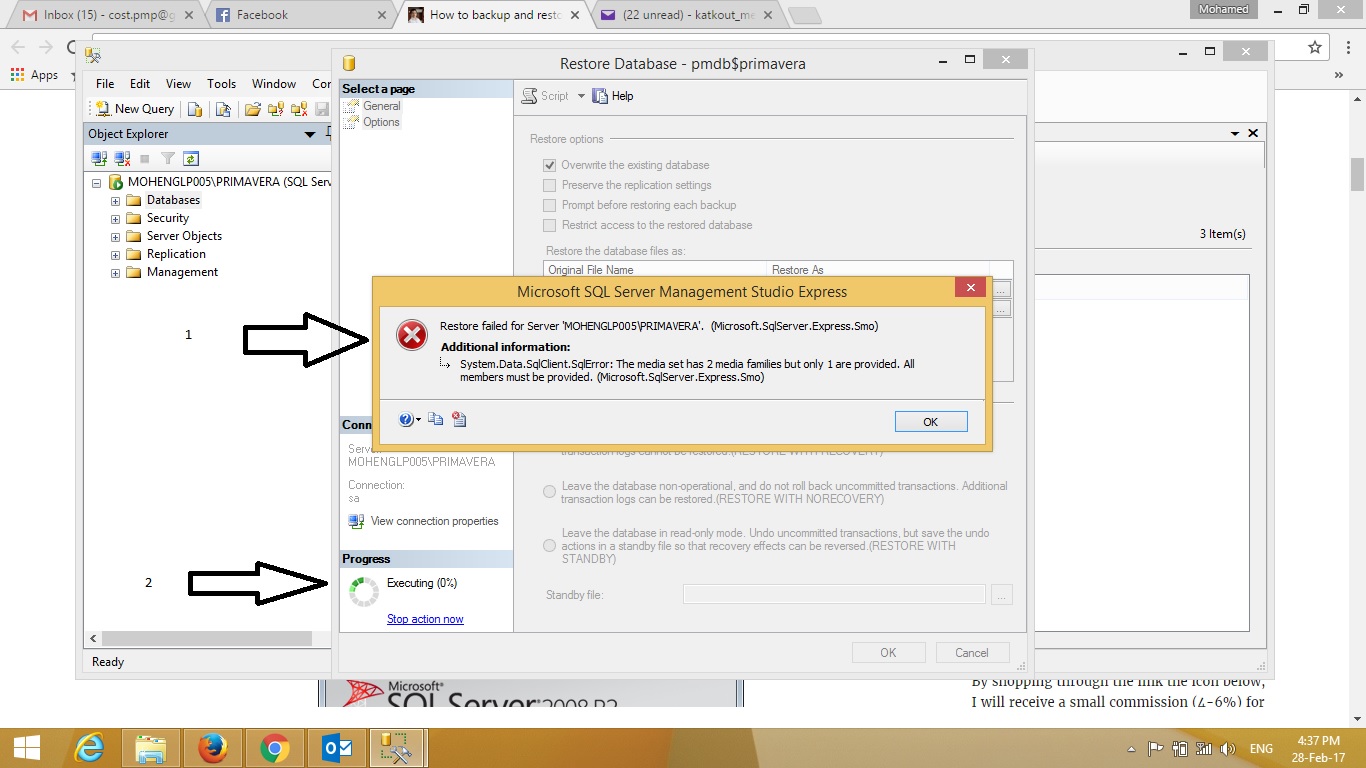
untitledx.jpg

Z
Zoltan Palffy 👤 Member for 16 years 10 months
If using P6 Standalone with a SQL Express Database:
• The default Server Name is <machine name>\primavera.
• The default login (using SQL Authentication) is:
 Username: SA
 Password: Prima123Vera
• The default destination folder for the backup file is C:\Program Files\MSSQL\Primavera\MSSQL.1\MSSQL\Backup
Right click on "Databases" and choose "Restore Database".
Specify the new database name in the "To database" box. Select "From device" and browse tothe location of the .BAK (backup) file. Check the "Restore" box to select the backup set to be restored.
 
If moving the database to a different computer verify the path to the data file is correct.
Click on the Options Page and verify the Restore path matches the path to the current data files folder.
 
VERY IMPORTANT
After restoring a Primavera database you must resync the following database schema users: privuser and pubuser. The Resynch command resyncronizes the database with the login ID's privuser and pubuser on the server.
To resynch the privuser and pubuser, run this query against the newly restored database:
 
EXEC sp_change_users_login 'Update_One', 'pubuser', 'pubuser'
EXEC sp_change_users_login 'Update_One', 'privuser', 'privuser'
 
HOW TO RESYNC the DATABASE
1. Launch SQL Server Management Studio from Start/Programs/Microsoft SQL Server 2005/SQL Server Management Studio (Express)
2. Connect with Windows or SQL Authentication.
3. Expand the "Databases" folder on the left and highlight the database name.
4. Click the "New Query" button at the top left.
5. Paste the resync script in the blank window on the right-hand side.
6. Be sure that the correct database name is shown in the drop-down box to the left of the execute button.
7. Richt Click Execute.


M
Mohamed Galal 👤 Member for 14 years 8 months

I were working in windows 7 and i changed it to windows 8.1, so i setup primavera 6 and when i tried to restore the backup file it failed.

can you explain how to restore database on microsoft SQL 2005.

Regards,

Z
Zoltan Palffy 👤 Member for 16 years 10 months

what do you mean you changed your windows you udated the version of windows ?

also can you type the error message the screen shot is too small to read

thanks

Forum Sponsor

Top Posters

Julian Pegg
1 posts
Peter Nagy
2 posts
Raymund de Laza
17 posts
Syed_Asad
0 posts
Tony Greyvenstein
0 posts
Ahmed Al-Jubouri
13 posts
Umar Alvi
3 posts
Sibusiso Mahlalela
0 posts
Michael Samanyayi
3 posts
Simon Gumede
0 posts

