When Trying to login to P6 R8.2, Professional Client (Desktop), we are facing this problem.
Does anyone have a solution for this, please help.
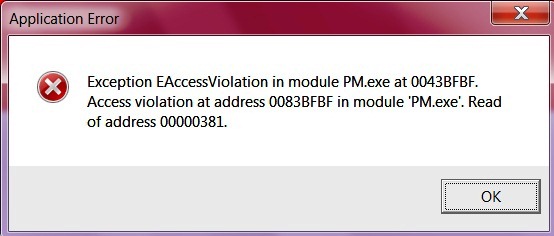
Thanks in Advance.
When Trying to login to P6 R8.2, Professional Client (Desktop), we are facing this problem.
Does anyone have a solution for this, please help.
Thanks in Advance.



I am having the same issue.. any help is much appreciated.
Hello,
Primavera P6 Professional R8.2 has stopped working. A problem caused the program to stop working correctly. Windows will close the program and notify you if a solution is available.
Exception EAccessViolation in module PM.exe at 0043BFBF. Access violation at address 0083BFBF in module ‘PM.exe’. Read of address 00000381.
Does anyone have a solution for this, please help.
Hello,
Primavera P6 Professional R8.2 has stopped working. A problem caused the program to stop working correctly. Windows will close the program and notify you if a solution is available.
Exception EAccessViolation in module PM.exe at 0043BFBF. Access violation at address 0083BFBF in module ‘PM.exe’. Read of address 00000381.
Does anyone have a solution for this, please help.
Hello,
Primavera P6 Professional R8.2 has stopped working. A problem caused the program to stop working correctly. Windows will close the program and notify you if a solution is available.
Exception EAccessViolation in module PM.exe at 0043BFBF. Access violation at address 0083BFBF in module ‘PM.exe’. Read of address 00000381.
Does anyone have a solution for this, please help.
Hello,
Primavera P6 Professional R8.2 has stopped working.
A problem caused the program to stop working correctly. Windows will close the program and notify you if a solution is available.
Exception EAccessViolation in module PM.exe at 0043BFBF. Access violation at address 0083BFBF in module ‘PM.exe’. Read of address 00000381.
Does anyone have a solution for this, please help.
Is this problem resolved? I know I had similar issues and Oracle released a patch that worked pretty well for us resolving this.
Please let me know, as I have the patch for R8.2 on this still and I can upload it for you.
Hello,
This worked for me.
Open up SQL server management studio,
Run a query,
Paste this:
declare @ret int, @msg varchar(1000)
exec obsproj_full_rebuild @ret OUTPUT, @msg OUTPUT
Execute.
Source: http://theprimaverablog.com/2012/04/primavera-p6v8-2-error-exception-ea…
Thanks!
please read below...
You need Administration access from IT Group...
https://forums.oracle.com/forums/thread.jspa?messageID=10203708
Hello,
Have you installed your Database on laptop? Have you configured your database?
Hi Guys,
Does anybody have a solution for the above mentioned problem as yet? I'm stuck in the same boat with my weekly reports being due today.
Kind Regards,