Hi guys
Is anybody can guide me, my project start date & finish date is matching but the duration is not calculating properly , for eg. start date : 20-dec'16, finish date - 19-apr'18 , Duration should come - 474 days, BUT IT IS SHOWING ONLY 453 DAYS.
When i check by changing the date format to hours format in Start date , it is showing different timings. But when i set initially the calendar i make standard time & working hours. If each activity hours is different then i need to change in each activity , like 20-dec'16 8:00 AM , finish date 19-Apr'18 17:00 PM.
Can anyone guide me ???? Urgent
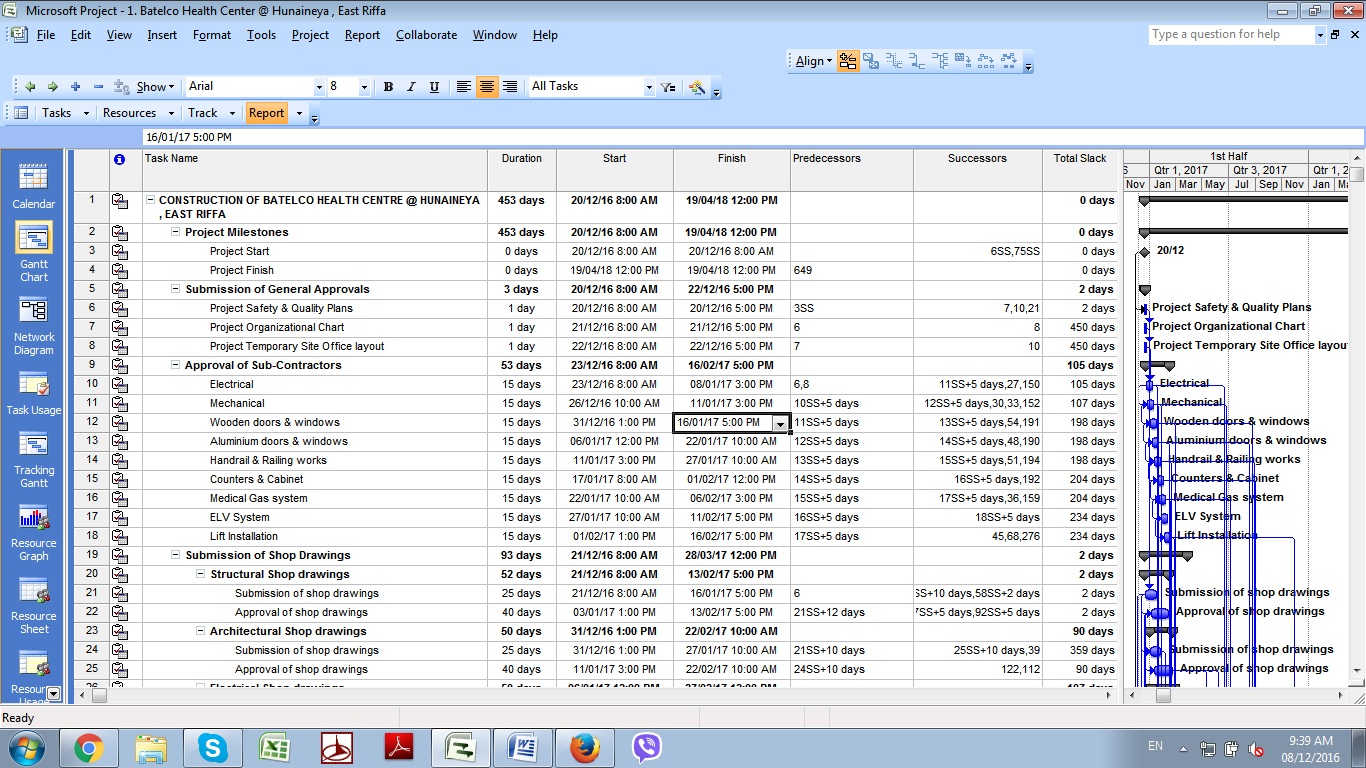















As in all CPM tools, Duration in MSP is in Working Time, not solar time. In my opinion your focus should be on understanding and explaining the basis for the 32.5 non-working days in your schedule.
Follow Alexandre's advice and remove all the task calendars. Assign a Project Calendar that properly reflects the working time you expect.
If your "manager" fails to understand this and continues to insist on the durations in solar time, you may try to satisfy him by applying a solar-time task calendar (i.e. 7dx8h with no exceptions, with "hours per day" set to 8) to the summary task ID 1 only. That's a step down a slippery slope, though.
Hi tom,
Thanks for your reply.
Ya i agree , i have assigned some holidays for this specific project. If i make the " Task calendar " - select as None , Will i get the exact duration.
When i calculate manually , i agree that i am gettting 486 days of the above project - Starts - 20-dec-16 to 19-apr-18.
So what best i can do to change this overall duration as 486 days, bcos my manager is asking why the overall duration is less.
Hi tom,
Thanks for your reply.
Ya i agree , i have assigned some holidays for this specific project. If i make the " Task calendar " - select as None , Will i get the exact duration.
When i calculate manually , i agree that i am gettting 486 days of the above project - Starts - 20-dec-16 to 19-apr-18.
So what best i can do to change this overall duration as 486 days, bcos my manager is asking why the overall duration is less.
Hello,
I suspect that assigning a specific calendar to every task has also some consequences on MS Project calculating the project duration.
When the Task Informations, Advanced, Calendar is displaying "None", that means that the task is being scheduled as per the project calendar; therefore, it is unnecessary to assign the "Standard" calendar to the task.
Alexandre
Sabaapathy,
MSP is calculating the duration of the summary task exactly as the interval between its start and finish:
There are 485 solar days (+4 hours) between your start and finish milestones, and your expection of a 474-day project duration implies that you have accounted for 11.5 days of non-work exceptions, e.g. holidays (starting from a 7dx8h base calendar). The 453-day computed duration implies that the actual assigned calendar for this summary task has an additional 21 days of non-working time over the 69-week duration of the project. You need to find these in your calendar specifications. For example, if standard work weeks include only 6 working hours on Saturdays, that could add an additional 17.25 days of non-working time.
These issues are essentially the same for P6.