I'm using P6 version 6.2.1 and I'm encountering something I've never seen before. The print, print preview, and page setup functions are all grayed out. I suspect this is a user rights issue, though I've looked and can't see anything obvious. I don't have admin rights to modify it, or to experiment. A search of the forum, and of google, came up dry. Anyone ever run into this before? Aside from user rights, my only other thought is a program error, but as I said I've never seen this before.
Thoughts? Thanks in advance.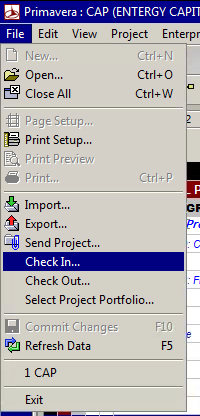



There are printers installed, but I think it might be the citrix issue. However, the same problem existed when I was using it locally. I'll take a look at the other suggestions. Thanks for geting back to me!
1. is a printer installed ? or the layout has Activity Usage Spreadsheet showing on top.
a. Choose Start, Settings, Printers.
b. Right-click on any available printer and select 'Set as Default printer'.
c. Log back into Project Manager and the print options will be available.
2. Is this on Citrix server ? if so then tt could be a corrupt Citrix user's profile.
a. Each Citrix client's configuration has local Printers enabled and connected at Logon (for ICA clients).
b. Any Citrix Printer Policy that is enabled on the Citrix server does not have Auto-Creation turned off:
3. Microsoft stores the default Printer for a user in the HKCU key which is in the registery specifically:
HKEY_CURRENT_USER\Software\Microsoft\Windows NT\CurrentVersion\Windows
Under the WINDOWS key, there is a string value called 'Device' which stores the default printer for the user.o
If this WINDOWS key is missing, or the string value is missing, it will not set a default on the server for the user, and will not allow the print options in PM for the user.
In the event that this key is missing, perform the following:
a. Log onto the Citrix server as any other user.
b. Export the HKEY_CURRENT_USER\Software\Microsoft\Windows NT\CurrentVersion\Windows key.
c. Log in as the affected user and import this key into the registry.