Hi All,
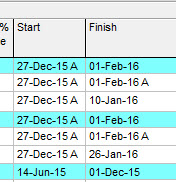
Could anyone help me. I'm new guy in primavera P6. Please I just want to know why there is letter "A" in the start and finish dates in my activity table but other don't have. its means there is an error that something i made? and i can't removed.
Thanks in advance for your help.
Regards,
Marco
[[wysiwyg_imageupload::]][[wysiwyg_imageupload::]]



if you want to remove the actuals go to the status tab first uncheck the check box next to the finish date then uncheck the box next to the start date. Thne make sure that the remaining duration equals the originla duration. Press F9
Hi Selva,
You won't get an "A" in the actual dates columns because they only populate when activities are actualised anyway. You'll see the "A" in the "Start" and "Finish" columns which combine actuals with forecast but Actual date columns are only filled in as the work is progressed and so does not need this indicator to make it clear that the date is an actual.
Hope this helps
Rob
[[wysiwyg_imageupload:4512:]]
Dear All,
Please help me, how to get the A symbol suffix in actual updations?
Thanks
Selva
yes it means that this activity has actually started on that particular date and or has finished on that particular date. This is how progress is recorded on activities. if you add a column for actual start and or actual finish you will see that the date is the same.
However in your screen shot it appears that either progress has not been recorded correctly or that the data date has not been adjusted.
For example your third activity show a finish date of 10-Jan-16 this is impossible the same is true for the 7th activity where the start date is 14-Jun-15. If the actuals are correct that means that the data date is 02-Feb-16 therefore all activities should either have actuals prior to 02-Feb-16 or the start dates and or finish dates should be AFTER 01-FEB-16.
It appears that the data date has not been changed press F9 and change the date to 02-Feb-16
Marco,
A stands for Actual, it means you've entered an Actual Date compared to a Planned Date.
=jerome
http://plannerstips.blogspot.co.uk/