When Trying to login to P6 R8.4, Professional Client (Desktop), we are facing this problem.
Does anyone have a solution for this, please help.
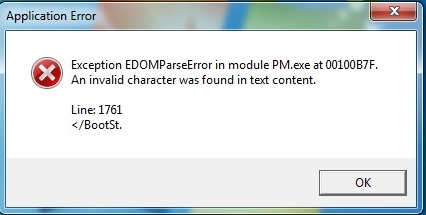
When Trying to login to P6 R8.4, Professional Client (Desktop), we are facing this problem.
Does anyone have a solution for this, please help.



i couldn't login and this message appears
[[wysiwyg_imageupload:2423:]]
please help ???
now i receive this
[[wysiwyg_imageupload:2421:]]
Please any one could help ?????
i couldn't login
i couldn't login
here is your solution
1. Login to P6 with an admin/superuser account.
2. Select Administer / User Access
3. Within the User Access applet, select the users link.
4. Click the Add button to add a new user.
5. Enter search criteria that does not contain unsupported characters (For Example: English)
6. Click Search
7. Close the dialogue box
8. Logout of P6