Hello Everybody,
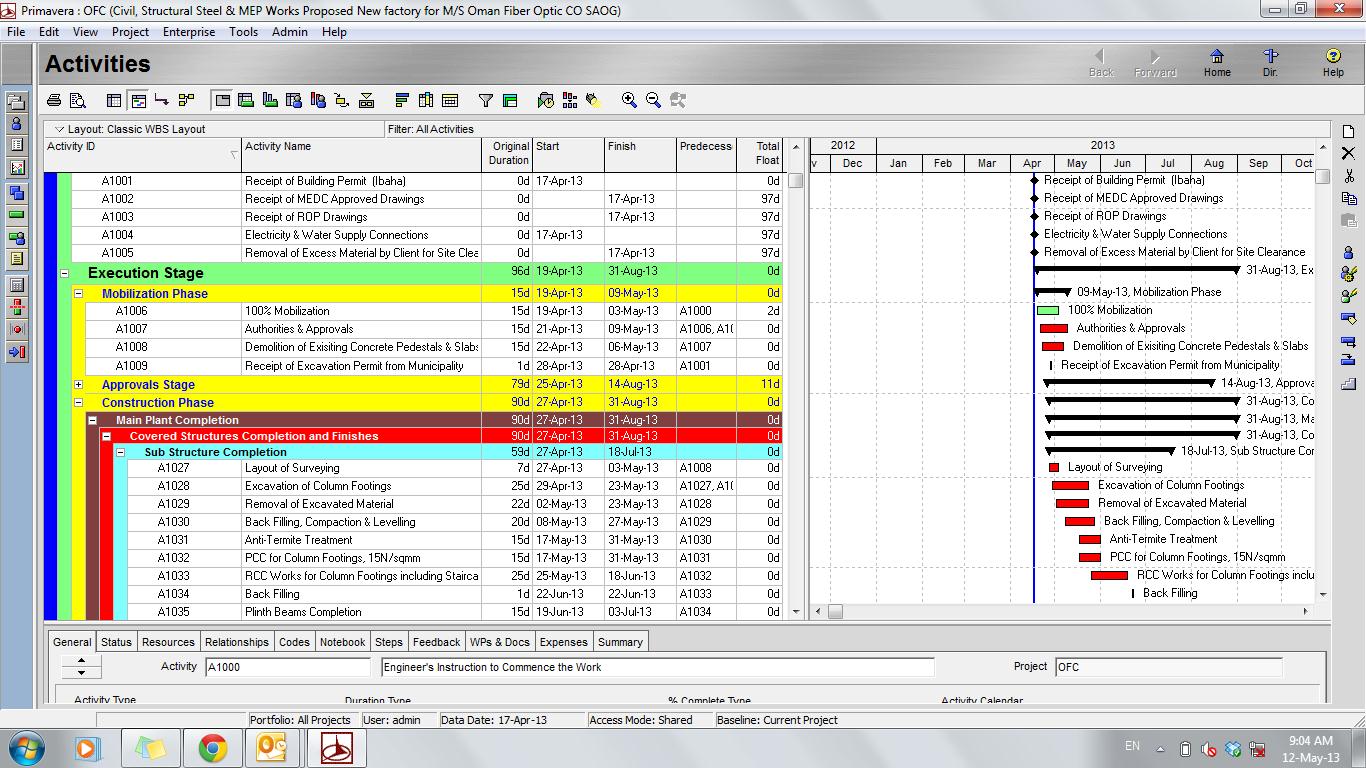
I am facing the problem in my Schedule as the WBS duration is not matching with the dates. Duration is showing less than the original duration.
I have already checked my Calenders and there is no problem in that.
The issue is, the activities under WBS Main Plant, Covered Structure & Finishes and Sub Structure Completion is showing correct dates and duration as well. But the WBS duration is showing wrong whereas the dates are corrrect.
So. Kindly help in this regard how to make it rectify.
Regards,
Ashik



just by changing the project to a deflaut calendar this only applies when adding NEW activities. For all of the existing activities they are still on the original calendar assigned to them. You have to ASSIGN the existing activities to the default calendar. Add a column for calendar, filter for ALL, in the calendar column for the first activity at the top select the default claendar and then do a fill down, now re-schedule your project.
It is ALWAYS a 2 step process adding a calendar does NOTHING until you ASSIGN the activities to that calendar and recalculate the schedule.
just by changing the project to a deflaut calendar this only applies when adding NEW activities. For all of the existing activities they are still on the original calendar assigned to them. You have to ASSIGN the existing activities to the default calendar. Add a column for calendar, filter for ALL, in the calendar column for the first activity at the top select the default claendar and then do a fill down, now re-schedule your project.
It is ALWAYS a 2 step process adding a calendar does NOTHING until you ASSIGN the activities to that calendar and recalculate the schedule.
Hi everybody ,
I am a new user of Primavera.
I am facing an issue regarding total duration of a project which is showing two different duration in two systems. I have imported this project to the second system from the first One where it was created.
I have changed defaulf calender and made it same for both the projects .Still it didnt make any difference.
Later i made unit of time in User Preference as same for the both the projects .
It would be very helpful if somebody can help me to solve this issue..
Vipin
Ashik,
1)
Go to Enterprise menu > calendars
Scroll down until you find the calendar which has a tick in the "default" column
Is this the same calendar used on ALL activities within the Main Plant, Covered Structure & Finishes and Sub Structure Completion WBS?
2)
Got to Edit menu > User preferences
Set the unit of time for durations to "hour"
Is the duration of your WBS still incorrect?
The following link might help. For users of P6 I would recommend always look for knowledge at Ron Winter and Eastwood Harris websites.
http://eastwoodharris.com/DL/TP/100602_P6V_%20Bars_Tricks_and_Traps.pdf
Mr.Gary,
Thanks for your reply.
If you see in my above posted schedule, the dates are showing same as the sub activities but the duration is not correct.
I have checked the calenders also, even it shows 7 days/week as working days.
Your posted presentation is very useful but i didnt get solution for this question.
I have seen the WBS used by in Calenders also, It shows properly.
Kindly revert back to me
Ashik
Ashik,
It is not intuitive how P6 calculates durations of summary bars.
The following link will take you to a presentation by Paul Harris which explains how this works very well. This should answer your query.
http://eastwoodharris.com/DL/TP/100602_P6V_%20Bars_Tricks_and_Traps.pdf