 Hello all,
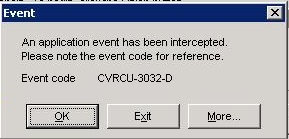
I am currently having some issues with importing projects into Primavera, I recently started work with a company who have asked me to try and resolve this issue.
They tell me that this error has starting happening since the migration of the database to a new server, the test database they have set up also which has been migrataed to the new server exports with no issues.
Any advice would be apprieciated, thanks in advance.
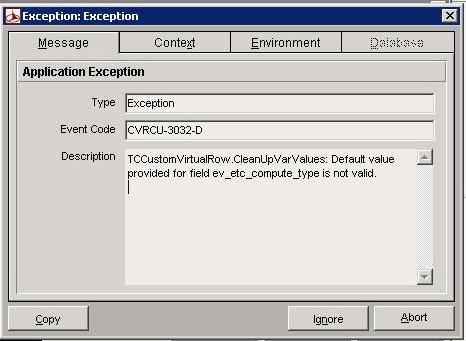
These is the screen shots I am getting: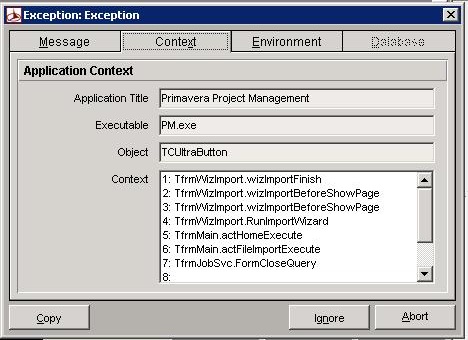



Phansuek
John Simms has provided specific detail on how to fix this error
Phansuek
John Simms has provided specific detail on how to fix this error
Dear Larry Cortez
Could you explain for more detail for fixing. I'm also getting this problem. Please, help.
my e-mail is [email protected]
Big Thanks
It seems that Larry knows his stuff, well done!
This is the info back from Oracle:
Note: These steps should be run by your Database Administrator.
1) IMPORTANT! Make a full backup of your database
2) For SQL Server:
Log into Management Studio (Express) as either 'sa' or 'privuser' and execute the following query against the PMDB database in question:
Update prefer set ev_etc_compute_type = 'EE_Rem_hr';
For Oracle:
Log into SQL*Plus as either 'admuser' or 'privuser' and execute the following query against the PMDB database in question:
Update prefer set ev_etc_compute_type = 'EE_Rem_hr';
The solution for this issue is confirmed in knowledgebase doc id: 908716.1 (Event Code: CVRCU-3032-D when importing a XER file)
To solve this error you will need to run a query to update the 'Technique for calculating Estimate to Complete' default in your database
The error is caused by a invalid default value for the 'Technique for calculating Estimate to Complete' in your database
Name
--------
=== ODM Data Collection ===
sample project
Exaple XER file
FileName
----------------
test.xer (3.24 KB) (04-Jan-2013 11:52:15 AM)
FileComment
----------------------
Hi John
It seems that Larry is right.
Regards
Dieter
John,
This issue is sometimes encountered when you migrate or upgrade a database. There is likely an invalid value in the PREFER.ev_etc_compute_type column. Log in to the database as sa or privuser and run the following transaction. It should fix the issue:
Update prefer set ev_etc_compute_type = 'EE_Rem_hr';
John,
This issue is sometimes encountered when you migrate or upgrade a database. There is likely an invalid value in the PREFER.ev_etc_compute_type column. Log in to the database as sa or privuser and run the following transaction. It should fix the issue:
Update prefer set ev_etc_compute_type = 'EE_Rem_hr';
just to add that this happens on all projects I try to import, even exported project from the same database.
Sequel Server database.
Hi Dieter,
Thanks for your reply.
I tried by your comments but no luck, the EV settings wont allow me to select an option in the ETC section, see image.
I also check the Admin Preferences>Data Limits and the EPS/WBS tree levels are set at the highest (50)
Any Ideas on what to do next?? Thanks John
[[wysiwyg_imageupload:1472:]]
Hi John
This entry is the parameter how to calculate the Estimate To Complete for a WBS.
You wrote this happens after the database was transferred.
- MS-SQL-Server or Oracle
- All projects to import or a specific one?
- Can you open other projects?
- Create a test project, then modify the Earned Value parameters.
- Export this project
- Import with "create new project"
- Run "Check Project Integrity"
- Check under Admin Preferences, Data Limits: Level of EPS/WBS levels, set higher value
Now Ok?
If not, compare those two XER files.
If still not ok, sent complete error message
Good luck!
Dieter