hi to all experts, here i am searching the way to edit some containts which is under "Activity Usage Profile Options". example Exist text : Baseline : Budgeted : Actual : Remaining Early : Remaining Late here can i change these text to my desired text i.e. inspite of Baseline i want Civil ? Because this examples i saw in my friend's laptop he is using the same version of Primavera P6 v.7. Can anyone solve my problem pls.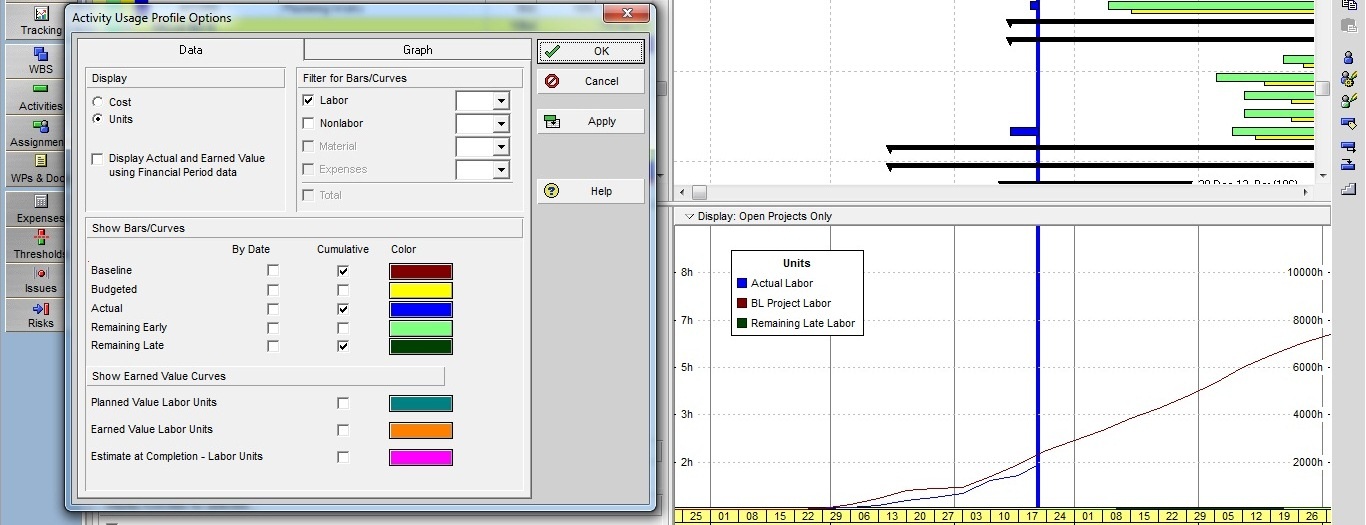



thanx Mr. Raymund de Laza
for to clear my all doubts....:)
Irfan,
That is a stack histogram.... that's so simple to do....
here is the image....
would rather send through your email....[[wysiwyg_imageupload:1409:height=241,width=562]]
dear friends, please find attached an example which is showing the modification of legends in Activity Usage Profile Options.
Would anyone share with me that how to edit legend in Activity Usage Profile Options ?
[[wysiwyg_imageupload:1407:]]
dear friends, please find attached an example which is showing the modification of legends in Activity Usage Profile Options.
Would anyone share with me that how to edit legend in Activity Usage Profile Options ?
[[wysiwyg_imageupload:1407:]]
Irfan,
Why was your friend does'nt like to share with you what he have? Is he/she a friend Indeed?
You have a friend that can solve the problem, why are you asking others to solve your problem....
@ Raymund de Laza but wht....?
Yes you can, that's possible .... but......??? :>
thanx Daniel Limson,
m agree with u, but 1 of my friend i dont know how he edited that text field.
i surprised to saw that & that's why m searching the ways to edit that text.
thanks................
Irfan,
I am afraid this is not eiditble and this not the place to do it, if you want Civil Works Labour Profile, you need to filter all civil works, you need to assign activity codes for civil works or you can filter civil works under a unque WBS code.
Best regards,
Daniel