Study the following activity table and Gant chart, all the necessary information should be there. The calendar for activity A has continuous working days. The calendar for activities B and C is for a 10 days on 4 days off roster.

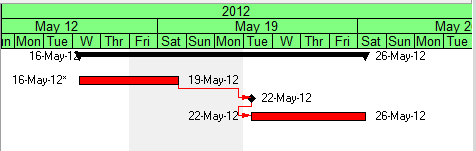
Note that the end date will not be pushed out unless over 2 days duration is added to activity A. This means that activity A should have 2 days float.
Why then does activity A have a float of negative 2 days?
(hopefully the picture isn't too small)



It might be an issue with the lag calendars, unfortunately P6 is limited to some global control of lag calendars instead of an independent calendar. Sometimes you need it to be equal to successor, sometimes you need it to be equal to predecessor and sometimes different to successor or predecessor but not a 24/7 calendar.
Suggest you try changing the options and see if the computed values of float varies.
Also try changing the milestone type from finish to start milestone.
It seems to be calculating the late finish of Activity A using Activity B's calendar, for some reason.
Can you try a couple of things for me?
(1) Please confirm relationship from A to B is FS with zero lag
(2) Please confirm what settings you have in schedule options for "Compute Total FLoat As" and "Calendar for scheduling relationship lag"
(3) What happens to total float if you change the settings in (2)?
(4) What happense to total float if you make activity B a start milestone?
(5) What happens if you make it a task?
(6) What happens if you dissolve activity B?
(7) What happens if you give Activity B (as a finish milestone) the continuous calendar?
Rob,
In P6, the default number of hours per day is 8 hours = 1 day, the moment you change the working hours then the calculations will change.
Regards,
Daniel
That is correct, if I had the same calendar for all my activities, the total float of each of my critical path activities would be zero. I think this may be a bug.
There are no constraints on any of the activities except for the first one (A) which has a "Start on or After" primary constraint.
Check if there are no Finish No Later han constrints.
I can only guess that it's because of the difference in calendars;
and the links as FS for all;
if you got the same calendar for all,
then your total float will be zero