I am having a problem with my schedule in calculate multiple float paths
The contractors schedule submitted to me has over 6000 activities this is my first month on this project and I am not very familiar with this schedule. For some reason whenever I try to run the schedule it gets stuck at 95% and then my computer crashes. I think the reason for this is use of multiple calendars and a lot of unnecessary relationships. The schedule in not very good it has random critical paths and the critical path is 80% different from the longest path.
To get back to my problem, when I asked the contractors scheduler about the problem I have he said to uncheck the option of calculate the multiple float values and run the project I am not sure if it is good idea can anyone explain to me the impacts of this.
Just one think you might need to be careful about using multiple float path;
When you have different calendars assigned to activities accross the project and , possibly you might also have different calendars assigned to activities in the same float path. In this case, if you choose a specific activity that your path to end on and to calculate by Total Float then you might end up with a float path that does not even include your selected activity. The reason for this is, to put simply, that for total float calculation the schedule only chooses the highest critical activities and if you selected activity has a predecessor(s) that have less float of your selected activity, it does not select it.
In summary, to my experience it is always safer and better to use calculate by Free Float when having multiple float path.
Spider Project is most functional and powerful professional project management software.
The first SP version was launched in 1993 and since then it has been constantly improved. Today is used in 34 countries though most Spider Project customers are in Russia. Spider Project offers numerous unique functional features and is the only PM software that optimizes resource, cost, and material constrained schedules and budgets for projects and portfolios.
The unique features of Spider Project include Quantity Based Scheduling, Conditional Scheduling, Skill Scheduling, Optimal Resource, Cost and Material Leveling, Resource Critical Path Calculation, Cash and Material Flows Calculation and Management, Trend Analysis, Advanced Risk Simulation and Analysis, Calculation of Success Probability Trends, Calculation and Management of required Project Time and Cost Buffers, Application of Corporate Norms, Management of many Parallel Budgets, Multiple WBS and many others.
Spider Project was and is used for management of many large scale programs in Russia, including $51bln construction program for 2014 Winter Olympic Games preparation.
The application areas where Spider Project is successfully used include Aerospace, Banking, Construction, Defense, Energy, Engineering, Infrastructure, Manufacturing, Metallurgy, Mining, Oil & Gas, Railways, Retail, Shipbuilding, Software Development, Telecommunications, Utilities, etc.
P6-Auditor - Display information from Primavera P6 audit tables in a user-friendly format
Unifier-Archiver - Extract and archive important documents and attachments from Primavera Unifier
Unifier-Loader - Load data into and out of Unifier via Excel
PCM-Loader - Import data into Primavera Contract Management with flexible and secure, template-driven Excel spreadsheets
PCM-Archiver - Extract and archive important documents and attachments from Primavera Contract Management
PCM-Unifier Migrator - Automatically transfer live and historical data from Primavera Contract Management to Primavera Unifier with ease
Create Radically Better Construction Schedules with ALICE Technologies
Use the power of AI to create construction schedules that reduce risk while cutting costs and build time. With ALICE, develop the ideal schedule during preconstruction -- or recover projects that are off schedule and over budget.
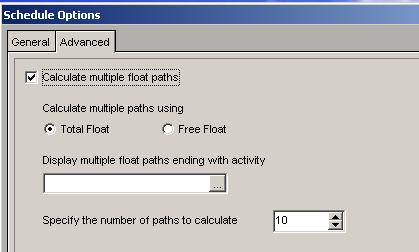



I am having a problem with my schedule in calculate multiple float paths
The contractors schedule submitted to me has over 6000 activities this is my first month on this project and I am not very familiar with this schedule. For some reason whenever I try to run the schedule it gets stuck at 95% and then my computer crashes. I think the reason for this is use of multiple calendars and a lot of unnecessary relationships. The schedule in not very good it has random critical paths and the critical path is 80% different from the longest path.
To get back to my problem, when I asked the contractors scheduler about the problem I have he said to uncheck the option of calculate the multiple float values and run the project I am not sure if it is good idea can anyone explain to me the impacts of this.
Thanks again
Regards
Some
Just one think you might need to be careful about using multiple float path;
When you have different calendars assigned to activities accross the project and , possibly you might also have different calendars assigned to activities in the same float path. In this case, if you choose a specific activity that your path to end on and to calculate by Total Float then you might end up with a float path that does not even include your selected activity. The reason for this is, to put simply, that for total float calculation the schedule only chooses the highest critical activities and if you selected activity has a predecessor(s) that have less float of your selected activity, it does not select it.
In summary, to my experience it is always safer and better to use calculate by Free Float when having multiple float path.
Thanks for your reply Jain,
If I understand well, by activating this option, P6 will calculate a certain numbers of CP.
Can you confirm that final result will appear in columns "Float path" & "Float path order" ? Or somewhere else ?
Is there any standard layout you used to show them ?
Regards
Frederic,
This option allows you to plot multiple float paths for a schedule activity. You can then rank on basis of degree of criticality.
IMO, You should construct MCP manually and then use this feature to examine overall program criticality from a broader perspective
Cheers,
bump