How to format the critical bar? For example, like bellow, the size of the critical bar is thinner than the early bar. 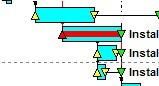
Format of the critical bar
Forum Sponsor



Top Posters
Julian Pegg
1 posts
Peter Nagy
2 posts
Raymund de Laza
17 posts
Syed_Asad
0 posts
Tony Greyvenstein
0 posts
Ahmed Al-Jubouri
13 posts
Umar Alvi
3 posts
Sibusiso Mahlalela
0 posts
Michael Samanyayi
3 posts
Simon Gumede
0 posts
I have changed the original example of P3, the "subtotal" is thinner, the early bar is thicker. I have do the same by creating a new file, it seems like the "subtotal", although it will follow the early bar.[[wysiwyg_imageupload:608:]]
[[wysiwyg_imageupload:607:]]
it will follow early bar as far as i know
Dear Ferdinand U.
It works. Thank you very much!
But it seems that the critical bar size is related with the early bar size. They will increase or decrease at the same time. Is it correct? Can the critical bar be changed individually?
How to change the original size of the critical bar?
increase the size of your early bar to match the screenshots you showed
critical activities will be original size
How to change the position of the critical bar? I can only change the position of the bar like early bar, late bar, float bar and resource early bar.
I am using "Format ---------Bars----pattern" to assign the pattern to one code value, but all the critical bar turned the color from red to the original color, what's the matter? And the size of critical activities didn't changed.
use pattern bars CODING
critical activities will be thin red
Hi Mekanajo Nejo
Check by lowering the position of critical bar