Hai
In Project Detail option i Set Default Calender - >7 Days Work Week
& Enterprise Calender -> 7 Days Work Week
But Still The Summary Bar is Taking Activity Calender(Standard 6 Days Work Week)
In Calender Option-> Used By Also it is Not Showing Project Name
Is there Any Setting I need to Change in Project Detail
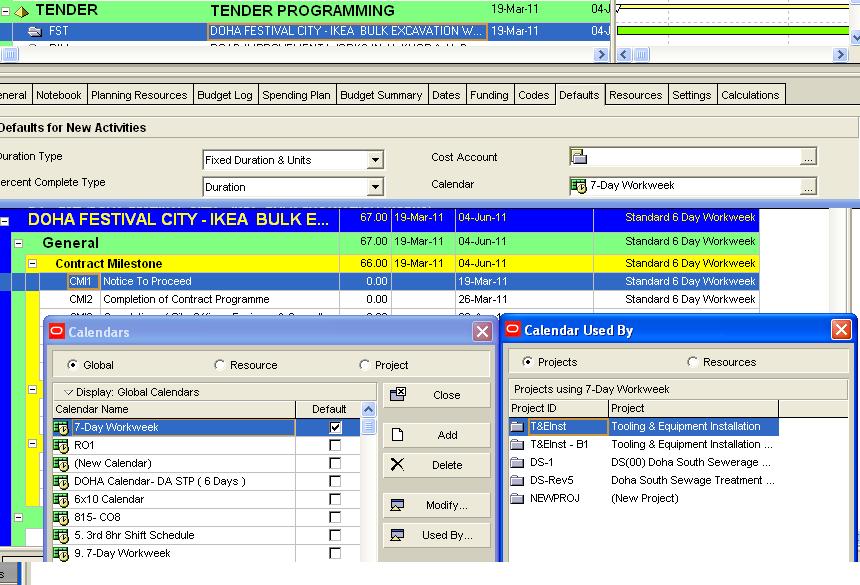
Regards
Mani



Sir
Thanks for your Valuable Reply
I got it
Regards
Mani
Calendars for Calculating WBS and Other Summary Durations
In Primavera Version 6.2 and ealier the summary duratios were calculated on the Global Default calendar.
In Version 7 the summary durations, including the project duration in the Projects Window are calculated in a similar way as SureTrak:
· When all the activities in a band share the same calendar then the summary duration is calculated on the calendar of the activities in the band and
· When they are different the summary duration is calculated on the Project Default calendar.
The picture below has the Project Default calendar set as the 8hr/d & 5d/w and the picture shows that when the calendars are different then the Project Default calendar is used to calculate the summary duration for WBS Nodes, Projects etc:
Paul E Harris
Eastwood Harris Pty Ltd, Melbourne, Australia
Planning and Scheduling Training Manual & Book Publishers, Consulting and Training
www.eh.com.au
www.eastwoodharris.com
www.primavera.com.au- a Primavera scheduling software resources site
Dear Mani,
may be due to user preferances time period data,your WBS Summary bar is showing incorrectly.
the WBS Summary also takes this in to consideration while calculating the duration.
so along with the default project and enterprise calendar the user period duaration must also be matching.
like if you want to have 6 day per week calendar in the wbs summary bar then follow the steps
go to edit --user prefernaces---time units ,
if you are working 8 hrs per day then
Hours/day-----8hrs
hours/week--8*6=48hrs
hours/month--48*25=200hrs
hours/year -- 2400hrs
Hai Moin
Thanks for the Reply
My Problem is Not Activity Calender
My Problem is with WBS Summary Bar Calender
Because P6 will Calculate Original Duration of WBS Summary Bar Based on Project Default Calender
My Project Default Calender & Enterprise Calender is 7 Days Work week
So My WBS Level 1 Orginal Duration Should be 78 Days (19- March to 04-June) But its Showing 67 Days based on (6 day Work week Calender)
Can u say me How can i Show Orginal Duration as 78 Days
I am using P6.7 Oracle Database
Regards
Mani
Hi Mr.Mani,
as per my understanding i thik you have already assigned 6 days calender to activity and then you have change the default calender to 7 days work week, thats why it is still showing 6 days work week calender.
If this is the condition you can opy for global change or you can just select 6 days calender for one activity and the fill down to rest.
regards
moin