Primavera 6.7 Challenge Rgd I’nal Resoure pay-rate laws
Forum Sponsor



Top Posters
Nick Johnson-Pond
3 posts
sairedz25
0 posts
Ahmed Awad
2 posts
Syed Shoeb
0 posts
Vimukthi
0 posts
bal aji
2 posts
Lee Mallek
23 posts
Viet Tran
9 posts
Ola Gbotoso
0 posts
Jaturapit Multongka
1 posts
Vladimir,
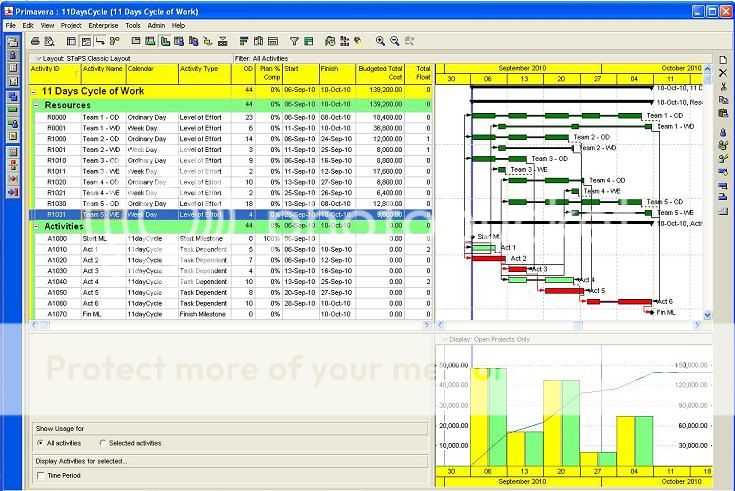
The schedule is already done and submitted then come back from client due to additional requirement which is pay rates issues so I change the resource loading and use the model I mention. Meaning the activities timeline is already known.
I agree with Rafael that Pay Rates should not be included in the schedule and let the timesheets and accounting system do the work but for some instance the client requires the cash flow and effect of the pay rates.
If the schedule is from the scratch and just developing then I model it differently using LOE for resources as per example below.
Each of the resources was duplicate say R1 for Ordinary and R2 for Weekend then assigned to LOE having duration type of Fixed Unit/ Time. Using this setting Primavera automatically adjusts hour/unit and multiple by rate assigned when they schedule.
Ex:
R1 have task calendar assign Ordinary day Monday to Friday (with 11 day cycle exemption) – single rate
R2 have task calendar assign Week day Sat – Sun (with 11 day cycle exemption) - double rate
In Primavera, Calendar can inherit holiday and non working day to Global calendar (i.e. 11 day cycle)
Activities are defines as Task dependent and using 11 day cycle calendar.
In regards to your query and example machine (R1) = 24hrs and have only one resource (R2) 8hrs. I don’t understand why you need 24hrs cycle to 8hrs operations? I said it out of topic because pay rates is the issues here.
Best Regards,
Rodel
Maybe you can make overtime(s) definitions to happen on their own calendar(s) and the activities on their own separate calendar, in this way you can model overtime to happen always on weekends.
To me modeling of overtime to happen always on week-ends is the most easiest, the following are kind of harder to model.
A-On regular week, after five consecutive hours, lunch time is triple pay, after 8 hours, it is 2.0X. Regular week starts on Wednesday first shift.
B-On week-end, after 8 hours per shift (modeling of shifts is a critical issue) following is double while regular is 1.5X, lunch is 3.0X and after 8 hours it is 2.0X.
... too much granularity? To me it is, we simplify our models as long as it has no effect on the schedule. For example some components of a crew work at noon, while the others take a rest, this happens during concrete pours, we schedule regular hours for the hole crew and use average rates that include some allowance for work at noon (lunch time). Schedules are not meant to substitute accounting software, setting one to deppend on the other is a double edge knife, keep "scheduling timesheets" at the portolet, regular Job Costing timesheets should be enough.
Best Regards,
Rafael
P.S. At PA week-ends are for Dorney and Hershey Park, week-end pay shall be at minimum triple.
If you work in shifts then each resource has own calendar and machines work with all of them.
If you use resources with different work time machines shall work with all of them.
Assigning resources R1 and R2 with different calendars you shall know before the scheduling what time they will work on activity. Is it always known without scheduling?
It belongs to the topic and you did not answer my questions or I did not understand your answer.
Best Regards,
Vladimir
Hi Vladimir,
We done this before using different calendar per resource but instead of time this model use days.
In regards to machine allocation, why you need to assigned 24 cycle to 8hrs operating time? (I think it also out of this topic)
Best Regards,
Rodel
And how did you level your resources?
And one more question. Lets suppose that you have some machine R1 with 24 hours work day and an operator R2 with 8 hours work day. Does it mean that when this operator rests the machine works itself?
I had been on a similar problem before and the solution the suits is using resource dependent activity. Using this type of activities resource calendar is used instead of activity calendar. Two resources will be assigned with different calendars and pay rates.
Ex:
R1 - calendar Mon - Thu - single rate
R2 - calendar Fri - Sun - double rate.
When the activity is progress and only R1 will fall on Mon - Thu and R2 will fall on Fri - Sun.
I handled it successfully without any problem.
Hope this help.
This is not easy....
Although Primaveras timesheet system allows an overtime rate, it is hours above 40, not all hours at the weekend.
The only solution I can think of is to disable "calculate costs from units" so that when you import the timesheet systems hours, you can separately load the costs which will have to be calculated outside Primavera.