Activity on Arrow and Non-Continuous PDM are wrong.
Forum Sponsor



Top Posters
James Williams
74 posts
Johannes Vandenberg
14 posts
Soheil Barekat
4 posts
Peter Holroyd
51 posts
Neil Atkinson
5 posts
Trian Asmoro
1 posts
Erkan Polater
9 posts
Luis Jr Ngade
6 posts
Ben Welsher
1 posts
Rohan Dashputre
0 posts
Rodel,
I can send you funny example of MSP levelling if you are interested and will send me your E-mail.
Usually PM packages use some default levelling algorithm and may suggest to select other priority fields like P6, Open Plan, Spider (in Standard option) do.
You discovered that P6 default levelling priority is Activity ID, in P3 it was Late Start, Total Float.
MS project describes one algorithm in its Help but uses another. Both are too primitive and produce poor schedules.
Best Regards,
Vladimir
Hi Vladimir,

Look what I found in MSP. It use the longer duration of parallel activity as leveling priority. (see below) Very interesting.
Best Regards,
Rodel
Vladimir,
Thanks, I just assumed and I not saying it am correct. I’m just wondering what would be the basis of sequence or leveling priority of any Planning application when leveling.
Best Regards,
Rodel
Rodel,
activity ID does not play any role in Spider levelling.
We recommend our users to make their activity IDs meaning what is activity type, where it is, who is performing, etc - not numeric but text based. There is no such thing as proper order of activity IDs.
It would be strange if changing activity code will change the schedule. For manual prioritization we use Priority field.
So P6 default activity levelling priority is Activity ID. Thank you for the information. I did not know this.
Best Regards,
Vladimir
Hi Vladimir,

Correct me please if I’m wrong. I found on our exercise schedule that activity id was not in properly order. “Market Analysis” has an activity id of 1010 while the “Technical Requirements” 1020. When I change the “Technical Requirements” activity id to 1010, “Market Analysis” to 1020 and change the Activity leveling priority as 3-Normal for all task and level again it has the same result as the post # 164 by Rafael. I assumed that the default leveling priority for P6 is activity id where most of the application may be doing the same. My understanding on computer is garbage in garbage out. Meaning it will not necessary decide on their own without any basis. I’m just wondering what will be the basis of leveling priority for Spider Project when running an optimal result, would it be same. (see below)
Best Regards,
Rodel
Yes, you are right, but these priorities still produce poor schedules. Even for the project that we scheduled none of them produce good result. But for my surprise if to run levelling several times using the same priority the schedule will change each time and even become optimal (for this particular example). But unstable schedule create different problems.
This approach - selecting the priority among activity fields we call Standard. But in Spider Project you can also select Optimization and may be sure that the schedule is close to optimum.
And manual levelling is exhausting exersize in any case - even when the schedule is properly created. And I dont think that this is the way to find the best solution in the large schedules.
Best Regards,
Vladimir
Hi Vladimir,
I agree that deciding which activities will have a better priority on activities running parallel will be a tedious task if a planner not doesn’t know which one is which and the logic is not properly applied on the schedule but those options that we did are just an example to match the example presented. A planner can use other leveling priorities like Activity ID, Total Float, Free float, Durations, Early Start and etc... that will help the planner to have a good result. I believed that option is created for a better purpose and not just a display.
Best Regards,
Rodel
Rafael,
I think that the ways of using Spider is proper to discuss in Spider Project forum.
We recommend to apply Spider risk management - this is the best way to manage projects.
Vladimir
Rodel,
construction projects consist of thousands activities and use at least several dozens resources.
Your decision on activity priorities will change the schedule, next decision will change the schedule, etc. Can you imagine the number of choices? But the problem is much more complicated - these decisions are made one after another, but matters their combination. It is impossible to try them all.
Just imagine that I will send you the schedule consisting of 6000 activities and approximately 70 assigned resources and suggest to find the best schedule. What time do you expect to spend searching for this solution? And I am not sure that the result of your efforts will be successful.
Best Regards,
Vladimir
Vladimir,
As you know a few months ago we switched to Spider Project and believe me it has not been like a daily change of underwear, or twice when an accident. We still got some way to go until we feel fully comfortable on our use of Spider Project. Therefore I would like you to comment on our approach to keep some control of the leveling.
We do our basic resource leveling using “standard” algorithm or “advanced” and in this way we can keep prioritization. If the schedule revision does not yet extend project duration we choose either one. At time we combine the scheduling algorithms with ”soft logic” we toggle on and off either at the links table (the eawsy way) or by using formulas and even by using Reference Books functionality where we can manipulate table values. If still the job is predicted to be late after the exercise then we choose “optimum”. Unfortunately once in need to exclusively use “optimum” is because it is so behind we end up using the option until the end of the job. This happens in about 25% of our jobs, even when frequently is because of correction to the drawings by others we never get back full EOT.
Best regards,
Rafael
Vladimir,
Correct me if Im wrong. A planner is applying manual priority to those activities that running parallel and decides which one have a better priority if leveling the resource. I don’t think too many parallel activities that have same resource at the same time if the schedules are using a proper logic.
Best Regards,
Rodel
Rodel,
applying manual priorities is the same as levelling projects manually. If the the number of activities is small it is possible, for large projects you will not know what priorities to change.
I dont think that such what if estimates are practical in the real schedules.
Best Regards,
Vladimir
Vladimir and Rodel,
We previously tested a sample job in which the scheduler using other software figured it out by whatever methodology a priority set that would yield similar results but the trick of running several runs in sequence is new to me.
I still wonder if in complex jobs, with thousands of activities and many trades working on the job it is practical or even possible to manually prioritize among thousands of activities and get optimal and second if the trick of running in sequence the resource leveling routine will work and in how many runs.
P6 might work for those who are comfortable with playing with prioritization and running multiple resource leveling runs, for us it is not a practical solution. It is quite a burden on us when we are forced to use software as bad as P6, software we do not know.
We were SureTrak users before switching to Spider Project and we were forced several times to use MS Project and P3, about P6 not yet and sure it will happen. At one job we were quoting, different web based software was required, it was not P6 web. This one we perceived it as breaking into our privacy as all we do was to be stored at their website servers even if not formally released, we were not even in possession of the files and if a claim in court was to be raised we had no guarantee the files were not manipulated by the agency.
Best regards,
Rafael
Hi Vladimir,
That’s what I did. I schedule the project first and change the leveling priority as shown on the figure that I posted (see 1st column). I change task "Technical Requirements" as 1-Top and the rest are 3-normal then level again. I also change back the leveling priority to 3-Normal for all and I goes back to the original result that I posted for comparison (Post #160 & #158)
Best Regards,
Rodel
Hi Rafael,
when we first launched Lite version of Spider Project we decided that our users will require only Optimization and Previous version support levelling algorithms and excluded Standard option.
But many people asked us to keep Standard option as well.
They created Standard schedules for their Clients but used optimization for themselves.
So we added Standard option to the Lite version.
By Standard we mean the approaches supported by other packages (P3, P6, Open Plan). The approach was explained by Rodel in his previous message - play with different criteria and select the best result. When resource competition is not high some standard levelling priority may give the solution that is optimal. Since standard scheduling is faster the planner may select to use this selected standard option.
Rodel opened my eyes that P6 uses something similar.
When you level your project first time you get some schedule that is far from optimal. But if you level again using the same levelling priority you may get better schedule, on the third run you may get even better (or worse) schedule. So wise planner will level the project many times and will select what schedule to submit to the customer and what to keep for himself. There is only one problem - with each run he will get different schedule, and after entering actual information he shall repeat the trick and still may get the schedules that are not similar to the initial. I am not sure that your Client and suppliers will be happy if the planned order of works will change frequently. And besides in large projects you will still be far from optimal decision.
When I discussed this example at IPMA congress in Paris in 1996 Open Plan representative proudly told me that they found the decision - if to run levelling twice in a row using Scheduled Float criterion they get the optimal solution for this example.
So the advise for P6 users - never run the levelling once using certain levelling criteria. If you have done it only once then after entering actuals you may get quite different schedule when you will plan next project period even if the same levelling priority is applyed.
And previous Rodel advise - discard default levelling options.
This discussion was very useful to me. I did not look at P6 levelling for a long time and did not test it thoroughly.
Best Regards,
Vladimir
Hi Rodel,
please inform us what levelling priority did you use.
And I suggest to repeat the levelling from the beginning - first schedule the project and then level. Are the results the same?
Best Regards,
Vladimir
Hi Rafael,
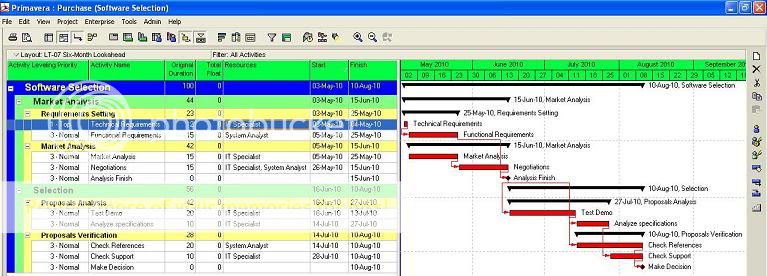
I think this is more on ability of the planner on how they can decide on what is the best for their project by doing different what if scenario.
As per your example I did the same in P6. I change the leveling priorities and it have the same output as per your example below.
Vladimir,

Is a difference of 3 weeks in 15 as per Spider Project resource leveling algorithm, is just a 20% overrun. Maybe contractors are granted for a 20% overrun before liquidated damages are applied. Perhaps the issue is in the inability of the scheduler to set up the hidden settings, perhaps is not in the software. We can make Spider as bad as P6 and use a substandard leveling algorithm, like the one we have for comparison purposes.
Why do you insist in calling the Substandard option as Standard? Call it by its meaning, Substandard.
Best Regards,
Rafael
Rafael,
you did not appreciate that P6 creates poor schedule that you can submit to the Client but shows you (secretly?) that the very first activity of this schedule has total float (look at the Rodel schedule). And if you will adjust the schedule manually (or using Spider Project) you will own this float and use the best schedule for yourself and P6 schedule for your Client.
Everything has its good sides.
Best Regards,
Vladimir
Vladimir,
Here we as a Contractor are frequently required to change software as if a change of underwear and we are supposed to know the hidden traps of the foreign to our company and imposed software, or even worst, outsource an integral part of our management by using an external scheduler. Even if we on the run can spot that P6 resource leveling depends on us to bypass default setting to my eyes is a design horror.
If the resource leveling routine cannot be set to extend project duration by not allowing over-allocation then it will prevent the contractor to show when an Owner caused delay is delaying the job because of resource availability as this will have the effect to allow for unlimited resources when the unavailable resources should extend project duration. When the delay is hidden by the schedule resource leveling it will create an illusion that everything is OK and this may create problems. It is self serving to the interest of the Owner at the expense of the Contractor.
This is another reason why I always have been critical about Primavera as I always perceived the company as biased in favor of the Owner, always at the expense of the Contractor.
Best regards,
Rafael
Hi Rodel,
thank you for the explanation, because Preserve schedule Early and Late dates is P6 default levelling option.
So floats depend on the levelling settings.
First activity float shows that the schedule is not optimal, very very nice.
Best Regards,
Vladimir
I agree Rafael, that is why Preserve schedule early and late date should not be used when levelling resources. It is used only for analysis and comparing the movement of dates after the levelling. If proper levelling is done, the correct float will be given.
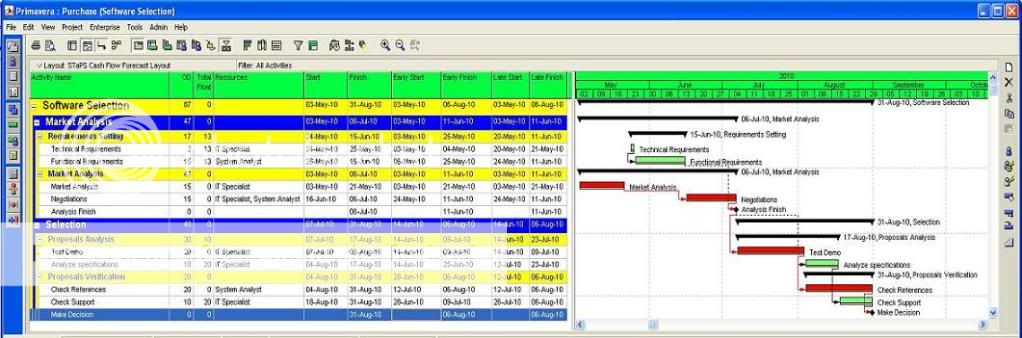
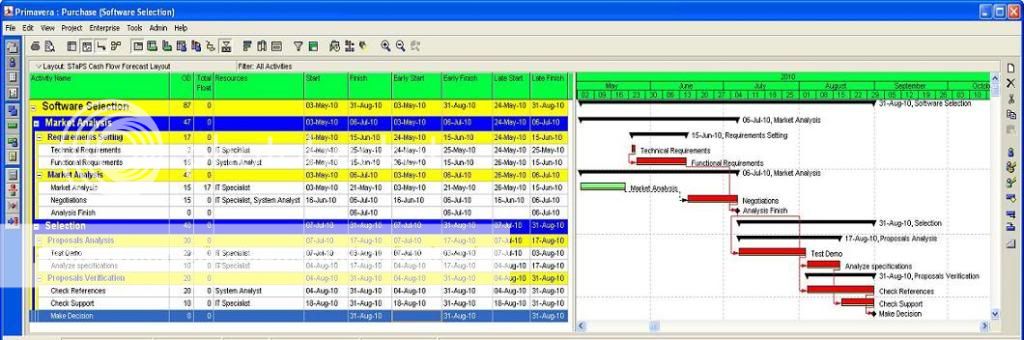
See belowcomparison:
Using Preserve schedule early and late date option:
Early and late date did not update and remain as original compare to start and finish date.
Proper levelling without using any option. Early and Late dates are updated as shown on Start & Finish dates.
Best Regards,
Rodel
Rodel,
I do not have P6 so the answer must come from Vladimir. But here we are required to schedule using early dates and get results for float showing early dates.
Total float is calculated by subtracting the early finish date from the late finish date (start dates can be used instead). We are required to display early schedule and the difference between early and late dates is how float is computed, not sure if what you are displaying with the second option is the difference between late dates prior and late dates after leveling which can be different.
Best regards,
Rafael
Hi Rafael,


Thanks for the xer and correct me if I’m wrong. I downloaded the files that you shared and do the exercise. I suspect that the screenshot that you posted is level the resource using “Preserved scheduled early and late dates” options that its why it not showing the correct float. It forced primavera to retain early date which is the basis of calculating float. As shown below.
Note: I change the resource name to match on the screen shot that you used.
Here is the explanation using that option:
If you mark the Preserve Scheduled Early and Late Dates checkbox, the project’s current early dates are retained before levelling. In addition, when you preserve these dates, the module only forward-levels the schedule, which means that the early dates of activities from the start to the finish of the project are scheduled.
To review the levelled early dates, I show the Start and Finish dates to compare Early Start and Early Finish date as shown on the figure above.
If you clear the Preserve Scheduled Early and Late Dates checkbox, the module also performs backward levelling. Backward levelling schedules activities to occur as late as possible without delaying the project finish. The module reverses the levelling process, beginning at the project’s late finish and working towards the beginning of the project. If insufficient resources are available to schedule an activity on its late dates, the activity is advanced to an earlier date. When the schedule is levelled forward and backward (by clearing the checkbox to preserve scheduled early and late dates), the project’s early and late start/finish dates are updated as shown below.
On this exercise P6 clearly show that resource levelling facility is correct.
Best Regards,
Rodel
Sorry,
You are the first who took notice which means nobody is checking on the files to verify on my claim. And I was hoping for someone in the US Federal Government, the US General Service Administration and a few others who specify CPM software were to check on these. I believe it would be a great shame to them if what they specify is proved to be so deficient. To me would be like take it as it is and pretend there is no error, in any case assume even if the specified scheduling tool is wrong the blame is on the Contractor.
Let me know if it matches as I do not have P6.
http://rapidshare.com/files/376343421/Purchase.xer
Best regards,
Rafael
Hi Rafael,
I believed you shared wrong xer. It was the first exercise and not the same as what you posted.
Thanks,
Rodel
Vladimir,

I just received your screen capture of a schedule you previously sent me in Spider Project format, and I believe it was part of the demo version or older Spider Version. I no longer have it nor do I have P6 so your help will be appreciated.
The float displayed by the last activity as you pointed out is quite weird.
UNBELIEVABLE
You can download the xer file from the following link:
http://rapidshare.com/files/375350976/Test.xer
Because I do not have P6 I would appreciate if anyone send me a print out of the calendars used in this job from –a year to +a year of the job duration to make sure there is no trick there.
ENJOY
Best regards,
Rafael
Vladimir,
Thank you a lot, also appreciate and now perfectly understand why float bars are not displayed, for me is not just that they are not 100% part of the solution set but that if assumed continuous can lead to serious disruption of the schedule, this is a fact all should understand, the Owner and the unwary Contractor. We all know that if a contractor by his own actions disrupts his schedule he cannot issue a claim and here is a possible trap for this to happen. Precisely this is the kind of debate I hope we will be talking with all when eventually most software get it right about resource float.
I would appreciate any help of yours with the sample jobs becuase you are way ahead of me with the understanding of this issue.
Best regards,
Rafael
Rafael,
finish float can differ from the start float if resources are assigned as independent teams (first shift and second shift as an example). The certain portion of an activity shall be done before other activity can start and lets suppose that this other activity is critical. So this preceding portion of an activity is critical too. But later portion may be delayed. If assignments are independent (first shift, second shift) then the last portion of an activity can be delayed.
This is discontinious model and rather artificial but may happen in PDM.
Best Regards,
Vladimir
Vladimir,
Can I say that Spider Project single value is correct for activity start or finish because it is based on a Continuous PDM Model, that Non-continuous PDM model could yield differnet values for start float and finish float if activity is non continuous at the moment of performing the computations?
By the way the following article can be of interest to those still using Activity on Arrow software.
http://research.economics.unsw.edu.au/ctseng/Float.pdf
- "In the context of activity-on-arrow (AOA) network representation, textbooks on project management, based on our survey, have for decades been using a popular formula to calculate free floats that may lead to erroneous results in the presence of dummy arcs."
Best regards,
Rafael
Hi Mimoune,
I think that this question is to me.
Spider Project calculates forward and backward resource constrained schedules and the float shows maximal delay of activity start (or finish) that does not delay project finish.
It does not mean that intermediate delays are acceptable.
Spider Project also calculates resource assignment floats and there are examples that activity is critical (its start cannot be delayed) but has finish float (the work is done by another shift).
You may notice that Spider Project shows early and late bars for activity dates and not the lines for activity floats.
Best Regards,
Vladimir
mimoune,
Because it is just 2 days float in this case yes. This sample job cannot illustrate my second statement that you cannot always place at will the activity somewhere in between the late bar and early bar without it becoming in conflict with availability of resources. There got to be available idle resources for your bar relocation(s).
I am working on a quantity take off for a bid but tomorrow will try to create a sample job to illustrate my second statement in a way you can manually move the bar in between early and late bar and resource availability is not there.
Best regards,
Rafael
Rafael thanks
please i need a simple answer
did the total float shown by spider project, respect those conditions ( resource max usage, and network logic)for all the duration of the said float.
Best regards
Mimoune
mimoune

This is supposed to mean that if activity is delayed to occur at late bar it will not be overloaded.
Note that there might be instances between early bar and late bar the activity cannot be rescheduled without overloading, this is a trap with resource constraining we must be aware.
Vladimir,
Plase correct me if I am wrong.
I know at times it is needed to model volume lag but I am keeping the issue out as not to camplicate modeling of lag any further.
Rodel,
Do you mean P6 lag cannot have its own calendar, that got to be either predecessor or successor calendar across the board. In occasions I have the need to model lag using a different calendar than predecessor or successor and in other occasions when successor and predecessor calendars are different my model requires for it in some instances to be successor and in other to be predecessor.
At times we use a calendar for lag different from successor and predecessor activities such as when specs require for you to wait a specific time duration for backfilling, less if concrete cores yield a certain strength, while at times the minimum stripping time is to prevent concrete creep so time can have precedence even when strength is achieved, we model lag using the appropriate calendar.
There are other occasions where this happens but the illustration is from a draft schedule of a job that is about to start.
Best regards,
Rafael
Seriously
please this is a very simple question for every body.
if a software after leveling ( respecting maximum availability of resources and network logic) say that an activity has for example 15 days of total float.
what does that suppose to mean !?
best regards
Rafael,
You can read PMRefMan if you need to understand your entire question as it will cover all the pages here in PP. Its self explanatory and I use default option when running resource leveling.
Ex: “Calendar for scheduling Relationship Lag ........................Predecessor Activity Calendar”
It is an option where most of Planning Software now is using to calculate relationship lag. The default on MS Project 98 to 2002 version, P3 and others planning software is Predecessor Activity Calendar. In P6 you can select as shown on my post link below.
.xer to .prx Post #6
Cannot leveled means not leveling that particuar activity (Forward, Backward) Please refer to the manual link below.
Primavera 6.1 Reference Manual
Best Regards,
Rodel
Rodel,
I cannot understand some of the settings as they are particular to P6, one that I do not understand is the setting for relationship lag calendar:
Calendar for scheduling Relationship Lag ........................Predecessor Activity Calendar
I must assume there is the option to define an individual calendar for every relationship. For example in some links the lag can be set by work days calendar while in other occasions it got to be modeled using calendar days even when successor and predecessor calendars are in work days. Take for example bonding agent and cement plaster, if during a week end the lag between the two shall be modeled as per a different calendar used by both activities. I thought this was available on P6.
Also cannot understand use Expected Finish date as in Primavera SureTrak Expected Finish Dates is not a constraint per se but a subroutine that re-compute remaining durations.
About Progress Override is a setting banned in our specs.
About Compute Total Float As Start Float, does it means you can redefine float and get different results? Total float cannot be both, there shall be a standard. I heard of other software that go as far as allowing you to add a third definition, the maximum of Start and Finish float, it can be anything you want it to be.
I cannot not see a warning telling that the displayed value of float for activity A1010 will delay the job completion or will result in an over-allocation.
I cannot understand “Activity that cannot be leveled A1010”.
Perhaps with this you will understand how unfair it is to force a Contractor to use scheduling software other than his own.
Best regards,
Rafael
R. Catalan,
Im cooled as the weather here in Melbourne is starting too breezed... and dont mean for any fight.
I respect Rafael’s opinion but we stand P6 is correct.
Rafael,
Below is the report as requested.
Scheduling/Leveling Report - 15-Apr-10 12:09 AM - PM.exe
========================================================
Default Project..................................................Test
Projects:
Test............................................................Test For Resource Leveling
Scheduling/Leveling Settings:
-----------------------------
General
-------
Scheduling ......................................................Yes
Leveling ........................................................Yes
Ignore relationships to and from other projects .................Yes
Make open-ended activities critical .............................No
Use Expected Finish Dates .......................................Yes
Schedule automatically when a change affects dates ..............No
Level resources during scheduling ...............................No
Recalculate assignment costs after scheduling ...................No
When scheduling progressed activities use .......................Progress Override
Calculate start-to-start lag from ...............................Actual Start
Define critical activities as Total Float less than or equal to .0
Compute Total Float As ..........................................Start Float
Calendar for scheduling Relationship Lag ........................Predecessor Activity Calendar
Preserve scheduled early and late dates..........................No
Level resources only within activity Total Float.................No
Level Priority 1.................................................Activity Leveling Priority - Ascending
Level all resources..............................................Yes
Advanced
--------
Calculate multiple float paths...................................Yes
Calculate multiple float paths using.............................Total Float
Number of paths to calculate.....................................5
Statistics:
-----------
# Projects.......................................................1
# Activities.....................................................5
# Not Started....................................................5
# In Progress....................................................0
# Completed......................................................0
# Relationships..................................................3
# Activities with Constraint.....................................0
Errors:
-------
Warnings:
---------
Activities without predecessors..................................4
Project: Test Activity: A1000 1
Project: Test Activity: A1010 2
Project: Test Activity: A1020 3
Project: Test Activity: A1030 4
Activities without successors....................................2
Project: Test Activity: A1010 2
Project: Test Activity: A1040 5
Out-of-sequence activities.......................................0
Activities with Actual Dates > Data Date.........................0
Milestone Activities with invalid relationships..................0
Scheduling/Leveling Results:
----------------------------
# Projects Scheduled/Leveled.....................................1
# Activities Scheduled/Leveled...................................5
Data Date........................................................05-Apr-10 12:00 AM
Earliest Early Start Date........................................05-Apr-10 08:00 AM
Latest Early Finish Date.........................................17-Apr-10 05:00 PM
Number of float paths............................................0
Exceptions:
-----------
Critical Activities..............................................4
Project: Test Activity: A1000 1
Project: Test Activity: A1020 3
Project: Test Activity: A1030 4
Project: Test Activity: A1040 5
Activities with unsatisfied constraints..........................0
Activities with unsatisfied relationships........................0
Activities with external dates...................................0
Activities delayed due to predecessor delay......................1
Project: Test Activity: A1040 5
Activities delayed due to resource leveling......................2
Project: Test Activity: A1020 3
Project: Test Activity: A1030 4
Activities that cannot be leveled................................1
Project: Test Activity: A1010 2
Activities that cannot be leveled backward.......................1
Project: Test Activity: A1010 2
Activities that are not on any float paths.......................4
Project: Test Activity: A1010 2
Project: Test Activity: A1020 3
Project: Test Activity: A1030 4
Project: Test Activity: A1040 5
Catalan,
Usually I subscribe for the fights the very same day directly through the cable box, and this fight I am not going to miss. Cotto fight might be on HBO and in such case it will be for free, this one also I am not to miss.
Rodel,
As you can see we are tolerant to change direction in the discussion, if you look at the title it was supposed to bring controversy in another theme I was hoping to be even more controversial.
Anoon, Catalan, Mike Testro and the others at times calm us down with unexpected comments I love and appreciate.
Best Regards,
Rafael
Rafael & Rodel,
Cool down guys, youve overtaken me in taking post #139.
Hey Rafael, have you subscribe to Mayweather vs Mosley fight this May 1? Im very excited to see this fight. The same with Cotto vs Foreman.
Best regards,
R. Catalan
Rodel,
I am now using the post # 139 but the issue here concerning resource leveling is not yet reconciled. Maybe you guys can utilize more all your efforts in other threads.
For me, Im going to defend Primavera and P6 since this is the mostly-used and industry required software in Middle East. Otherwise, will be out of jobs. I wish well have the chance to use the full version of Spider.
I would love to see Vladimir marketing the software in the Middle East.
Best regards,
R. Catalan
Rafael,
We just prove why and spider project dont do it either because it over allocated which is the same as P6 clearly prompted on the log file.
We do the exercise fair and compare apple to apple as per your sample.
If you don’t want to open your eyes, it’s up to you and we respect it. As for the P6 users we still stand P6 have the same result and correctly leveled the resource.
Best Regards,
Rodel
Rodel,
My example shows two computations of float for activity A1010, P6 says it is 10 days which does not makes any sense, if you delay the activity to late bar either over-allocation will happen or the job will be delayed, this breaks the basic rules of resource constraining. On the other hand Spider Project shows 2 days float, the correct value.
Does P6 displays a warning that for activity A1010 the displayed value of float will over-allocate the resource? I doubt it and would like to see such a report.
Best regards,
Rafael
Rafael,
We respect what you believed. We know that we cannot change what you insist and that your own opinion. We just proved based on your example that your claimed is wrong. It will not change until it’s proven. We love to know all the bugs we can encounter using P6 to be aware and not to compare. I am not defending P6 here. I just want to resolve the issue by doing the exercise as you requested for other to enlighten what is the result.
Best Regards,
Rodel
THE PROBLEM IS THAT FLOAT AS DISPLAYED BY P6 AFTER RESOURCE LEVELING IS PLAIN WRONG.
As long as float is mentioned in the specs the required software shall be one that shows the correct math.
Definition of float requires it to meet all logic and resource constraints. Showing incorrect float values for resource leveled jobs is wrong. If not available without delaying the job duration in compliance with resource requirements shall not be shown by pretending it is correct.
Best regards,
Rafael
Rafael,
Sorry, Im not sure what you want to portrait.
Again, if the planner/ user read the log file he will understand all information for error, warning, exclusion, out of sequence, not leveled, schedule override… etc…
As you said, it is the responsibility of the planner to correct all those findings. So what’s the problem there?
Best Regards,
Rodel
Rodel,
Here the schedule report is to be submitted with every schedule update and all out-of-sequence as well all resource issues are required to be solved, is a contractual requirement. We are not allowed to submit a schedule that hold the projected finish date by allowing over-allocation, we must either take the steps to get on target or report true projections by allowing the software to show how much off target we are.
I am not sure how this is enforced for jobs where P6 is required, but won’t be surprised if P6 dictates what others shall do as long as many continue with the infatuation with Primavera Products.
Best regards,
Rafael
Rafael,
As I said, P6 is doing the same thing. Many options have been removed from P3 to P6 like extending or shorten duration when leveling. I’m not sure if the planner/user is aware of what P3 or P6 response to leveling when they are not reading the result log file. It’s all there what has been leveled, errors & warning, exclusion, number of activities leveled, number of activities wrong sequence or in correct logic etc… I believed most of the user just leveled and never read the report. I always check the report that is why I know what’s happening during the level, schedule, export, import etc...
I suggest all planner/ user to use/ read the log file to check what error or warnings indicated on the log file after executing application to understand what happened after the execution.
Best Regards,
Rodel
Rodel,
I am not sure about P6, but for years before using SureTrak we used P3. P3 had the option to select for resource leveling not to allow the leveling routine to extend project duration and stop applying true resource constraining to these resources or you could select for resource constraining routine to respect resource requirement and allow the software to show true schedule projection.
As we all know some settings that allow you to bypass schedule logic are considered “bad practice”. Allowing the software to level some resources and others not is bad practice, it hides logic, and it hides the fact that if some resource issues are not solved then the schedule due date will not be met. If the software cannot provide you with true resource constrained float then the problem becomes even greater.
Spider is not like P6 it will not perform the leveling routine allowing over-allocation of course if need be it will delay project completion and then it is the responsibility of the scheduler to work it out. It will correctly display over-allocations before running the resource leveling routine. If resource leveling is impossible like if you have an acitivity asking for more of the available for the resource it will delay the activity and warn you that the resource leveling missing the requirement.
Best regards,
Rafael
Rafael,
I believed P6 is the same not leveling over allocated resource. Maybe the only difference is Spider Project prompt the user that cannot level due to over allocated while P6 prompt the user by the way of log file.
As I mention earlier, I figure it out when I over allocated all resources and P6 did nothing. When I check the log file it mention not leveled for every activity having over allocated resource.