PMSDK (I cann’t connect to it) can anyone help....
Forum Sponsor



Top Posters
Nick Johnson-Pond
3 posts
sairedz25
0 posts
Ahmed Awad
2 posts
Syed Shoeb
0 posts
Vimukthi
0 posts
bal aji
2 posts
Lee Mallek
23 posts
Viet Tran
9 posts
Ola Gbotoso
0 posts
Jaturapit Multongka
1 posts
Hi Everyone,
I am using P6v8.2 and am having issues with SDK.
On the SDK excel files I get the error
Row 0: RDA error: Resource not available - Connect error: da=PMSDK;Driver=PMSDK;engine=PM;lf=C:\temp\PMSDK.LOG;lo=terse;pg=1;pp=pubuser;pu=pubuser;.
Error returned from engine: VDB.Connect; hResult=0x80040003 (PMSDK_E_INTERNALERR: internal driver error); EOleSysError=Invalid return value from CreateAppVDB
Error number: 0x80040003
Can antone tell were i can find the PMSDK.DLL VER. 6.2.1.1507
HI EVRYONE...PLEASE HELP ME
Team I need a solution, below is my problem
I recently installed primavera sdk and was using this to access database table. I had done all set up and it is coonection is established.
My problem is that I am not able to see table in SCHEMA for those related to my project. All I see is OAUSER tables, which when connected give me information "nothing"
Please help me to solve this. I searched in lot of forums. I found that one needs to update the project level =7, but where in excel or even in access (query) I will use this codes...
A step wise execution will be helpful as I have not yet mastered..
HI EVRYONE...PLEASE HELP ME
Team I need a solution, below is my problem
I recently installed primavera sdk and was using this to access database table. I had done all set up and it is coonection is established.
My problem is that I am not able to see table in SCHEMA for those related to my project. All I see is OAUSER tables, which when connected give me information "nothing"
Please help me to solve this. I searched in lot of forums. I found that one needs to update the project level =7, but where in excel or even in access (query) I will use this codes...
A step wise execution will be helpful as I have not yet mastered..
Hi
Is this SDK is avialable for the primavera v8.2?
I am having similar problems.
I think the issue is connecting to the Oracle Database, where the SDK I think prefers a SQL database to work.
I have never had issues before using stand alone and a SQL database, but now that we are using Oracle, I cannot get the SDK to work.
On the SDK excel files I get the error
Row 0: RDA error: Resource not available - Connect error: da=PMSDK;Driver=PMSDK;engine=PM;lf=C:\temp\PMSDK.LOG;lo=terse;pg=1;pp=pubuser;pu=pubuser;.
Error returned from engine: VDB.Connect; hResult=0x80040003 (PMSDK_E_INTERNALERR: internal driver error); EOleSysError=Invalid return value from CreateAppVDB
Error number: 0x80040003
Any thoughts???
PROBLEM SOLVED N ISH FINALLY WORKS:
PMSDK.DLL VER. 6.0.0.1473 (old version and will not work with the new PMSDK DICTIONARY 6X) AND
AND YOU WILL GET ALL THIS ERROR CODES:
Problem: Error: “row 0, ct was open” when logging into SDK
Problem: Unable to log into SDK. Receive error “row 0, ct was open, object is closed”.
Problem: Cannot log into SDK get error “row 0, ct was open”.
THE FIX IS THE NEW VERSION OF PMSDK: PMSDK.DLL VER. 6.2.1.1507 (THIS WILL CORRECT ALL THE ISSUES OF CONNECTIVITY)....
WELL, AM GLAD I COULD FIX MY OWN ISSUES....I ROCK MY WORLD....
SO WHEN YOU UPGRADE FROM 6.0.0.1 YOU NEED TO ADD THE SDK KIT ON THE UPGRADE PROCESS...OR WILL HAVE ALL THE SAME ISSUES I HAD TODAY...STUPID ME
Okay i finally figured this out:
stupid me: i was using the PrimaveraSDK DB but it needs to be
the >>>>>>Database Name: pmdb$primavera (If i had paid attn. to what Arnold Had said, i would have finish with this 4 hrs ago.
Okay PMSDK is working now well some what:
i am getting the following Errors:
Am Using the Latest: Dictionary.xls - Error Report
Row 0: ct was open.
Row 0: ation is not allowed when the object is closed.
What do they mean by "CT"
and
Action is not allowed when Object is closed? What object?
I dont understand why i am getting the following code when: I am trying to create the alias (On SYSTEM DSN CREATE DB ALIAS) for the DB:
I have NO problems logging on to this DB from Primavera P6.2.1 (I created this DB just to work with SDK). When i Created this DB with dbsetup.bat it stated that the Database Conf. and Connection was Successful.
But NOW ON:
System DSN: when I try to conf. the PrimaveraSDK DB and the PMSDK (DB ALIAS).
I Get the Following Error:
Bad private user name or password. Check the public group ID. Database Server Error: Login failed for user privuser.
So why Do i get this Error: What to do? Is there anyone out there with any such exp. and a solution for it?
Please Please Please Help.....
Hey Arnold,
I went to the point prim website and i couldnt find any of those prim ids you gave me.
do you know what the fixes are for each?
if you do please let me know?
i would be very thankful if you can provided the help.
jose
@ Arnold Puy: thank you for the info. on the Solution ID:
Now i need to go n see what do they mean. Oh i wish i had access to POINT ... . Trying to correct issues with Primavera without it is like finding gold or a job. lol
Maybe that was my problem because i first created the PrimaveraSDK DB with the dbsetup.bat and re-sync it in SQL
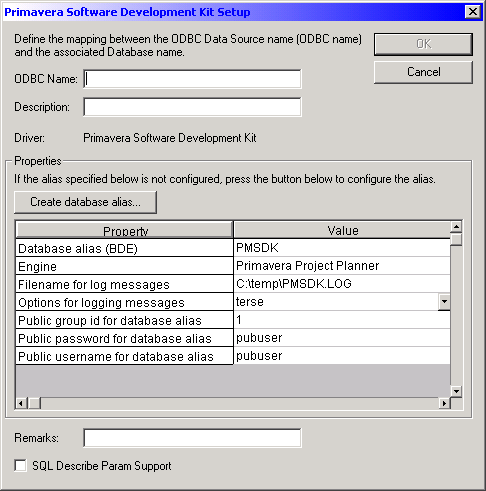
and when i open the DSN tab. It already had all the Primavera SDK database info. with the correct alias PMSDK (and all the info was correct). So that why i didnt re-create the PMSDK alias.
This is what i dont undertand=
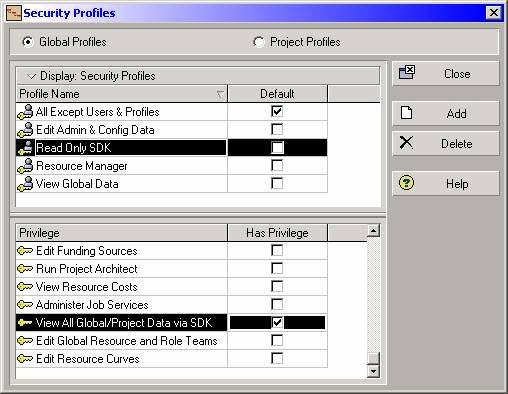
This screen locks like the old P5 Ver. i am not sured but i added the following iN P6.2.1
Security Profile >>> View All Global/Project Data Via SDK
I added all the Security Privileges to that Security Profile but no luck.
How Do Set Up the PMSDK access to level 7 and stuff like that.
UPDATE PROJECT SET scope_level = 7 WHERE proj_id IN (151, 209, 3005)
Are this set via VB?
Hi Jose,
Try to reconfigure the database alias for the SDK.
1. In the control panel, choose Data Sources (ODBC).
2. On the system DSN tab, highlight PrimaveraSDK and click configure.
3. Click the "Create Database Alias" button.
4. Choose yes to create the database alias PMSDK.
5. Choose the appropriate driver type for your database:
5.1 Microsoft SQL Server/SQL Express
5.2 Host Name: Machine Name\primavera
5.3 Database Name: pmdb$primavera
Then next and next..
6. Click finish to complete the configuration.
Please refer also to Solution ID:
1. prim64752
2. prim7227 (Error: "Resource not available - Connect error" when using the SDK).
3. prim80721
I hope this helps.
Regards,
Arnold