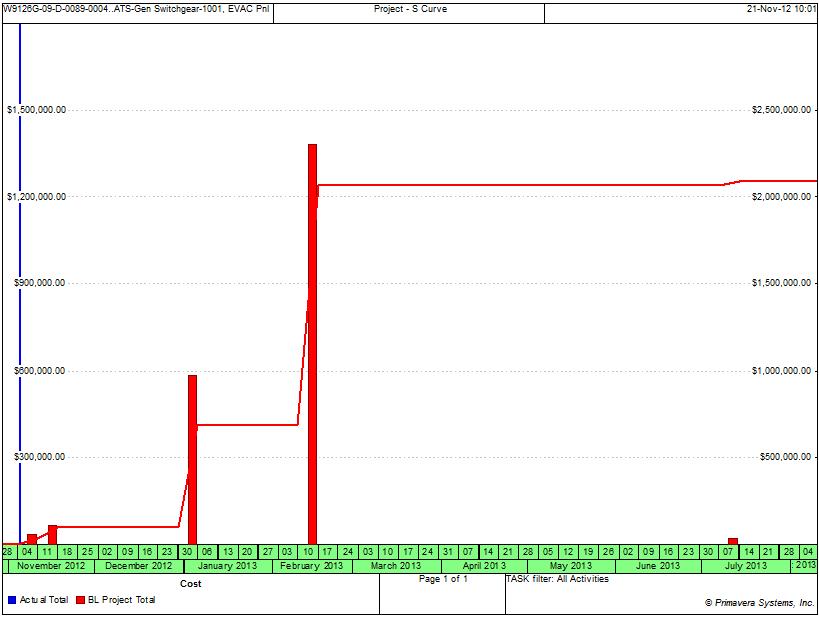
I am using P6 v8.2. I have one resource for all activites and I have not statused the schedule. I have changed any resource curves but even if I do, it does not seem to do anything. Why does my S-curve look like a set of steps? More pointedly, why does my summary schedule not evenly distribute budgeted cost over the course of months as opposed to just front loading it at the begining of the month? Help is appreciated.



I think that you have loaded the cost by using expenses, if that is so than you can distribute it by going to expenses tab and changing the accural type of the expense to "uniform over activity" as according to my knowledge it is the only option which loads cost either at the start of the activity or end of the activity or uniformly load it over the activity.
Hope it helps.
I think that you have loaded the cost by using expenses, if that is so than you can distribute it by going to expenses tab and changing the accural type of the expense to "uniform over activity" as according to my knowledge it is the only option which loads cost either at the start of the activity or end of the activity or uniformly load it over the activity.
Hope it helps.
Ben,
I rather request you to send me xer of your schedule and will try creating the graph for you.
Thank you, Raymund. I tried that. It does not effect the cure.
Thanks, Rafaela. Assigning a baseline has no effect.
Ben,
One solution is to remove the resource and re-assign.....
Benjamin,
I am not a P6 user but noticed the red color on the vertical columns are red and the legend says red is for Baseline Schedule so it was the reason for my first suggestion.
I also understand that not assigning a Baseline can create issues and some P6 displays will make you believe itn was already assigned. I also understand planned dates can also create confusion.
The following is a statement by Ron Winter that you shall investigate.
www.ronwinterconsulting.com/Understanding_P6_Dates.pdf
Planned dates are also used in the Activity Usage Profile to show the budgeted values and as the baseline values when no baseline has been set. Once a baseline has been assigned then baseline dates are used.
As I am not an expert on P6 and follow the postings to have some understanding on a software other do use and at times submit to me their schedules in this format, therefore this is as far as I can go.
Best of lucks,
Rafael
Thanks, Rafaella. I can see that. Changing my histograms settings does not change the fact that all the money is budget for day in February as opposed to being spread over the course of a couple of months.
For whatever reasons, I cannot see Raymund de Laza images. The links are dead:[[wysiwyg_imageupload:1429:]]
OK, but clicking enable\disable Rich-Text has no effect on me seeing the image. The link you providing has htm code, it is just a flat text.
If you paste the HTML code while on the rich text mode it will never display the image, just text no matter if you switch modes.
You got to paste the HTML text code while in disabled mode.
When you paste the HTML code on the disabled rich text mode and then change to rich text mode the display instead of a flat text becomes a display of the image. Then you can switch back and forth and the display will switch from text to image and from image to text.
This I have been doing for years and the images of years ago are still being displayed.
OK, but clicking enable\disable Rich-Text has no effect on me seeing the image. The link you providing has htm code, it is just a flat text.
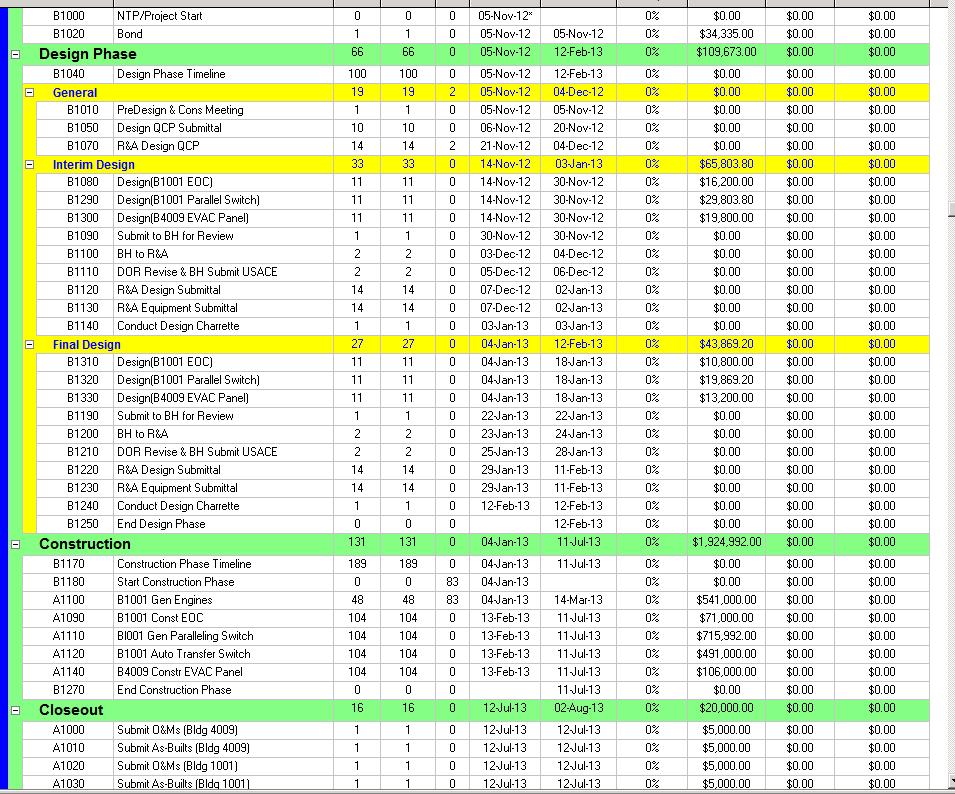
Anyway. I noticed that my resource assignments all last one day. See image. How do I change it to spread? Changing the Curve assignment has no effect. [[wysiwyg_imageupload:1428:]]
Does not really explain why an activity, let's say A1110 B1001 Gen Paralleling Switch, is all budgeted for one day, Februrary 13, 2013, and notspread over the course of February, March, April, May, June, etc. as it relates to the S Curve.
Hi Benjamin
Hereunder find a link detailing the "s curvers look like stairsteps.
Trust this clarifies.
Johannes
http://plannenvoornietplanners.net/component/content/article/136-tutori…
Some of us do not paste the pictures directly to the forum. Instead we save the pictures on a file hosting service such as Photobucket and paste the HTML code with rich-text disabled, then we return to rich-text mode and can see the picture as others will see it.
You disable/enable rich-text mode by clicking back and forth on the blue text "Disable rich-text"/"Enable rich-text" displayed on the lower left corner of the window you use to post your comments.
Long ago I found pictures posted directly will eventually vanish but not if saved on an external file host.
It looks like initial post keeps the picture reference as it does not moves but on replies it might be that as soon as a new reply is added then the reference is lost.
Sorry, this is what it looks like to me. Thank you for all your support.[[wysiwyg_imageupload:1425:]]
Ben,
It's there shown.
I cannot see these images either.
I cannot the images for some reason. :(
Ben,
Here are 2 graph from the same schedule....
[[wysiwyg_imageupload:1416:height=168,width=609]]
[[wysiwyg_imageupload:1417:height=174,width=639]]
Hi Benjamin
I have made two screens shots from the same schedule and herein you can clearly see that the stairsteps you have created are "Nomal" and therefore i agraad with Andrea.
Johannes
[[wysiwyg_imageupload:1404:]][[wysiwyg_imageupload:1405:]]
i think because the resourse is not spreaded, but i have a question how is possible to view graphic in P6? i can only hystogram and reports,
thanks for the help
Andrea
i think because the resourse is not spreaded, but i have a question how is possible to view graphic in P6? i can only hystogram and reports,
thanks for the help
Andrea
Try clicking/selecting Remaining Early and Remaining Late and let us know.
Here is where you should change.
[[wysiwyg_imageupload:1401:]]
Once Change then go to Activity Usage Profile Options and click Apply.
This is resource distribution issue. Check how you distributed the resource because it seems like your resources were not spread.
Assigning a baseline has no effect.
This has no effect.
Here they are. Thanks, in advance. [[wysiwyg_imageupload:1383:]]
Changing this to day, week, month, etc has no effect. Thanks for your help.
It seems that Resource distribution Interval was set in Months while your timescale is set in weeks.
Try chnaging the Interval in the Preferences.. Resource Analysis.
Can you display your histogram settings?
What I am seeing from your figure goes further than just steps, seems like you are not showing current schedule histogram/cumulative_curve.
Histograms are step functions and therefore cumulative curves display as linear segments, can be sloped or horizontal. Because the point of inflection do not change at end or finish of a month but at week end/finish seems like your interval is weekly.
Try to change the resource curves in resource assignments window. Insert column 'Curve' and select the required curve.
Hope this will work.
I am not a P6 user but it looks like you are displaying baseline schedule S curve, shall be red as per leyend. If you have not assigned a baseline then this can cause some other issues.
Because you have not statused the schedule there is no Actual S curve, shall be in blue as per leyend.
Suggest checking your settings for S curves.