Hi,
I have a problem in Assigning Resources in P6. As you know I am new to P6, so.....
In P3, I Define the Resources as UNIT (one resource only) and assign to the activities by putting the value in Unit/Day (in Resource Dialog-box) and it automatically calculated the Budgeted Quantity.
But in P6, I don't understand where to put my value, Either in BUDGETED UNITS or BUDGETED QTY Column.
Also when I change the Budgeted Unit Value, the Remaining Unit/Time (%age) changes to more than 100%.
Please guide me in this problem.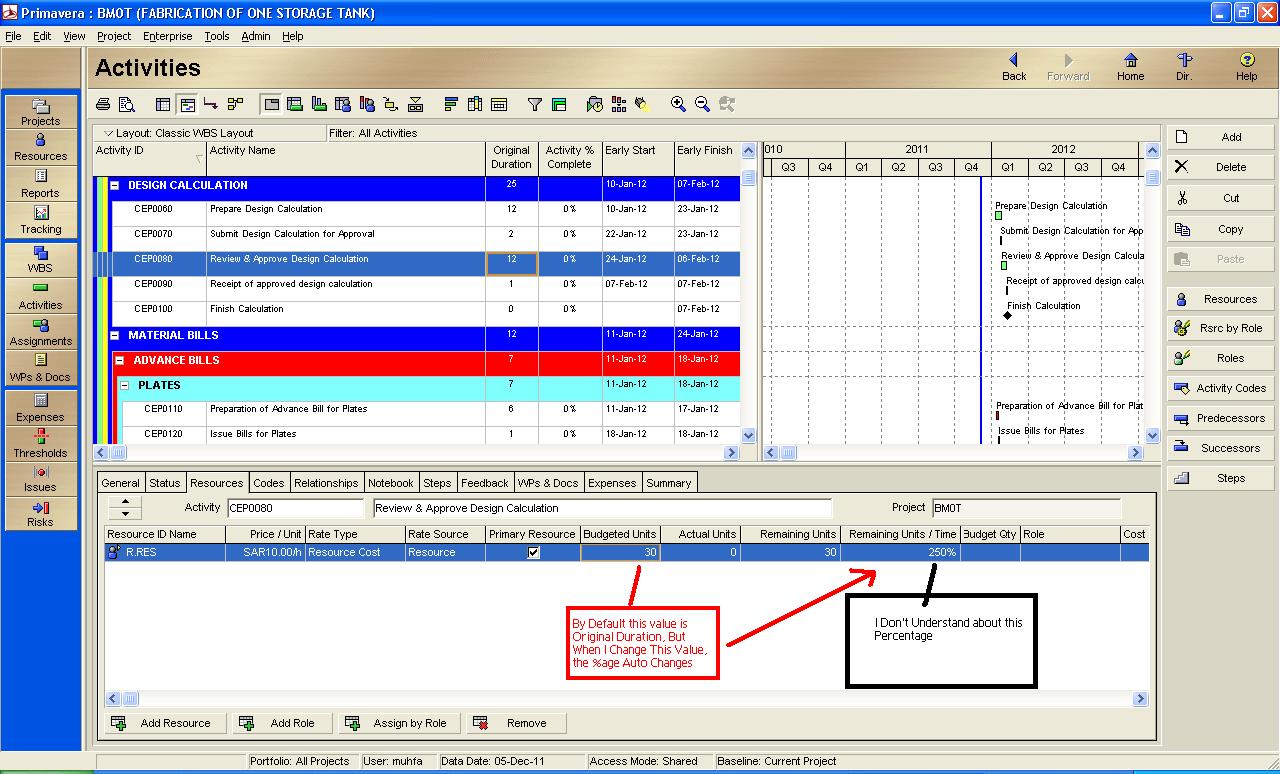
Print Screen Image is also attached herewith for proper understanding of my problem.
Thanks,
Muhammad Farooq



Dear Arend,
when you need to accelerate the work (crash your schedule) and select different options one of them is to afford overtime. Playing what if scenarios you will want to understand what you will get and how much it will cost. People do not work overtime without a permission and if it happens then it was planned.
I think that Pro's will be happy to model all possible options and select the best solution taking into account not only time but also money. It is not the best practice to calculate actual expenses that were not planned.
Best Regards,
Vladimir
Dear Edwin,
In P6 you can calculate overallocation on resources units.
The overallocation can be made vissible in a graph or in figures in the activity usage profile or resource usage profile.
Budgeted Costs are not available against overtime rates, only at normal rates.
Dear Vladimir
Planning would mean that you avoid overtime and overallocation.
Costs for overtime become visible after you update your schedule and apply actuals. (which is unforunately uncommon practice for most) P6 is for pro's only.
Regards,
Arend
Edwin,
there was a special discussion http://www.planningplanet.com/forums/primavera-version-pm5-pm6/519905/overtime-input-primavera-p6 and I did not find the satisfactory answer there.
I don't know the answer myself and can only explain how overtime rates are modelled and calculated in Spider Project.
I suggest to start new discussion on this topic with the theme that sounds like "P6 is not the right tool for project budgeting. It cannot plan even so simple items as overtime costs!"
With this statement you will attract an attention of many P6 distributors that attend this forum and I hope that some of them will propose some reasonable solution.
Best luck,
Vladimir
1 want to know how to calculate overtime wages.. please explain me step by step.. i'm new to primavera...
Hope you will help me..
thanks
Edwin
It is not uncommon to require in the same activity for some resource assignments to be fixed units/time while others to be fixed duration & units. In this case fixing the assignment rules all at the activity level instead of at both, the activity level and the team level, will prevent correct modeling.
Take a look at the following assignment.
For activity 1
Of course the assignment can be allowed to be of variable workload per day to be determined on availability which will complicate the assignment further making it very difficult to to allocate by hand.
It is important to be able to distinguish the individual assignments for transparency, for understanding and in order to make sure it works as intended otherwise the software can be making unintended allocations and you not figuring it out so easily.
hi joshua,
I couldnt see ur file. there is some problem.
regards
Hi,
I use both MS Projects and Primavera for planning but for resource planning i tend to use only the MS projects. my Main Is to estimate the Manpower for the project. My project is a Very Large scale project having manpower around 5000 Nos.
I have a problem is assigning resource for this large scale on primavera, for eg: i need to assign a resource for a Footing work - i require 10 Masons and 5 Barbenders and 3 Carpenters for that job. But in primavera i am not able to assign in terms of numbers. For multiple activities in MS project if i am going to assign the resources it would provide a total no of labours required. But this case is Not possible in Primavera. I have attached a Sheet showing the resources in MS Projects. Kindly Let me know if it is possible in Primavera
[[wysiwyg_imageupload:1080:]]
Hi Muhammad,
This is a common problem if you have not selected the correct duration type, what i say you will be using "fixed units / time" instead of "fixed duration & units". so kindly change with this one. Now to set the digits. Bring digits to 0 and then set the "fixed duration & units" as your duration type. and then allocate the budgeted hours. You will see that it would be normalised now.
If the problem still exists then i will tell you another way to sort it out.
just dont hesitate to contact me.
Regards,
Muhammad
Thanks for your replies,,,
But my problem is still there :(
When I enter the value (e.g 4.00) in Budgeted Units under Resource Tab, the Remaining Unit/Time (%age) changes to 400%. Duration of the this activity is ONE Day. Also when Value is 5, the Remaining Unit/Time changes to 500%.
Defaul Unit/Time & Max Unit/Time are already set to 100% since the time of Resource Addition Wizard.
I don't know what to do? :(
No, these engineers have 8 hours work day but only 50% of their work time will be dedicated to this work and other 50% of work time (4 hours) they are available for doing another work.
In particular they can do two or more jobs in parallel if each of these jobs requires part time assignment.
In this case you get to assign two kinds of engineers like civil and mechanical ,, civil work 4hrs /day nd mechanical 8hrs / day... Please, let me know if u need any more info..
Thank you,
HANSON
Hanson,
do you know how to assign 4 engineers for 4 hours per day and distinguish this assignment from assigning 2 engineers for 8 hours per day? In both cases work day is 8 hours but in first case remaining 4 hours can be used for doing other tasks (part time assignment).
Sir,
Default Units/Time = number of Hours every single resources will work during specific time like 8Hr/Day..
and Max Units/Time= number of units X default units/time = (5 engineers working per day and every one working 8 hrs)= 5x8 =40...
So, you have only two to change the default units/time and the Max units/time..
Please, let me know if you need any more info..
Thank you,
HANSON