When I import the schedule.xer from primavera P6, I recieved a message error:CRRIP-3179-7 - TCCurve.ReadRow: invalid percentage values.
Anybody can help me.
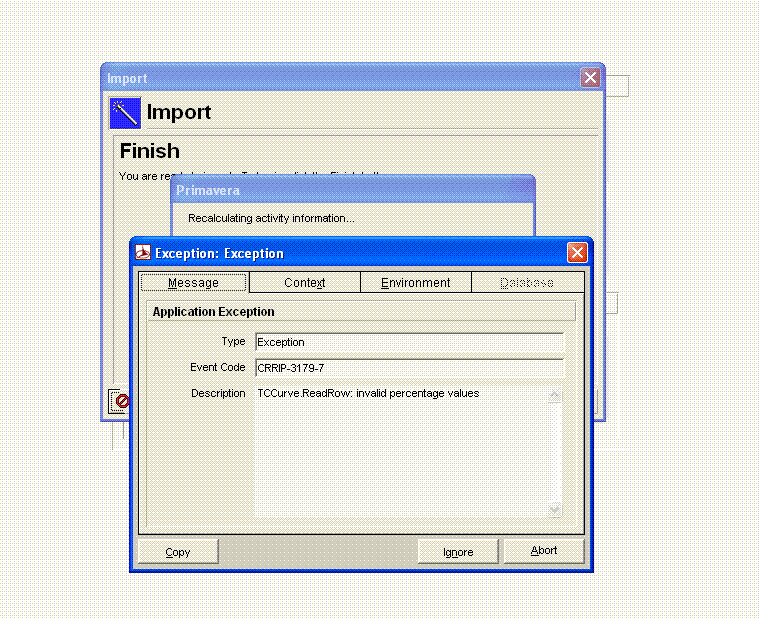
When I import the schedule.xer from primavera P6, I recieved a message error:CRRIP-3179-7 - TCCurve.ReadRow: invalid percentage values.
Anybody can help me.



hi russel ,
Thanks for your reply actually I did like you have told me and I have found the %T RSCCURVDATA but I couldn't knew if the resource curve definition is correct or not, so I delete that resource as I don't need it for now and the XER file is working fine now, but in case I had this problem again in the future find below the information I found for the resource curve, what is incorrect about this info. Thanks again for your reply.
Best Regards,
Assem
%F curv_id curv_name default_flag pct_usage_0 pct_usage_1 pct_usage_2 pct_usage_3 pct_usage_4
%R 14 Offset Triangular Y 0 1 1 0 0 0 0 5 5 0
pct_usage_5 pct_usage_6 pct_usage_7 pct_usage_8 pct_usage_9 pct_usage_10
0 0 0 0 0 7 7 5 5 0 0
hi russel ,
Thanks for your reply actually I did like you have told me and I have found the %T RSCCURVDATA but I couldn't knew if the resource curve definition is correct or not, so I delete that resource as I don't need it for now and the XER file is working fine now, but in case I had this problem again in the future find below the information I found for the resource curve, what is incorrect about this info. Thanks again for your reply.
Best Regards,
Assem
%F curv_id curv_name default_flag pct_usage_0 pct_usage_1 pct_usage_2 pct_usage_3 pct_usage_4
%R 14 Offset Triangular Y 0 1 1 0 0 0 0 5 5 0
pct_usage_5 pct_usage_6 pct_usage_7 pct_usage_8 pct_usage_9 pct_usage_10
0 0 0 0 0 7 7 5 5 0 0
Hi assem,
Remove any incorrect Curve definitions from the XER file using WordPAD or NotePAD.
1. Open the XER file in NotePAD or WordPAD.
2. Verify if each resource curve definition is correct. If it is not correct, delete that line.
Note: The resource curve section starts with %T RSRCCURVDATA. Each curve definition starts with %R. See example in above symptom.
Note: You can enter the curve value percent periods directly into the XER file, but only whole numbers may be used. Once the XER file has been imported, you can refine the curve by modifying it in Project Management (Enterprise, Resource curves).
3. Save your edits and reimport the XER file.
Note: In the n ew database, you will need to manually recreate any resource curve definitions that were deleted from the XER file.
Best regards,
Russel