Hi everyone, I know that it is not best practice to have a mandatory finish constraint and negative float on your programme, but contractually we have to have those two in our programmes. Now the question is P6 shows all the negative activities as critical and also makes them RED on the Gantt chart. Is there any automatic way that it shows the highest negative number as the critical ones only?
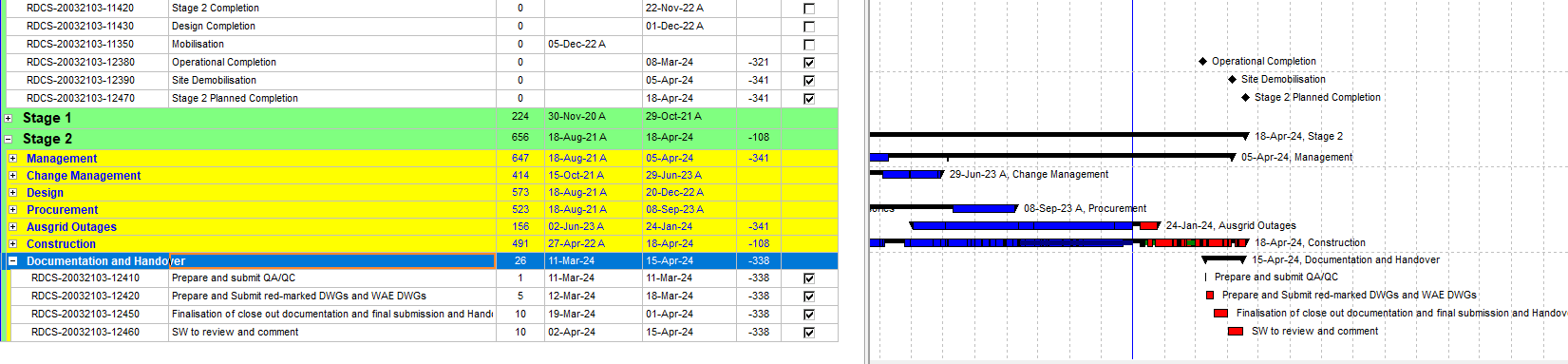
I made a screen shot of one of the projects for better clarification. As you can see, planned completion has -341 days float and makes it Critical, but also activities under documentation and handover are also critical, although the float is -338.



Highest negative number may not solve your problem as real critical activities may have FT with less negative number.
For effective project management you need to be able to identify REAL critical path.
I have offered a solution in this post:
https://saluteenterprises.com.au/total-floats-with-or-without-project-d…
Regards,
Alex Lyaschenko
Highest negative number may not solve your problem as real critical activities may have FT with less negative number.
For effective project management you need to be able to identify REAL critical path.
I have offered a solution in this post:
https://saluteenterprises.com.au/total-floats-with-or-without-project-d…
Regards,
Alex Lyaschenko
Highest negative number may not solve your problem as real critical activities may have FT with less negative number.
For effective project management you need to be able to identify REAL critical path.
I have offered a solution in this post:
https://saluteenterprises.com.au/total-floats-with-or-without-project-d…
Regards,
Alex Lyaschenko