Hello,
I am trying to run a Check Schedule Report in P6 Professional r22.12.
The Tools | Check Schedule Report feature does not count the correct number of schedule Project Baseline Finish Dates before the 29-Feb-2024 data date.
In the below Check Schedule Report the Baseline Activities count (6) is the same as the number of Project Activities (6), as per the status date.
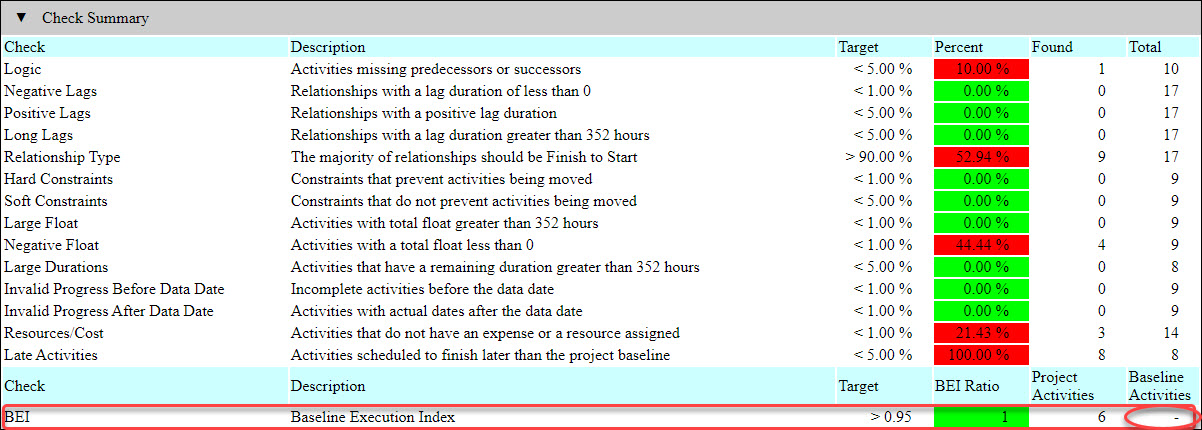
However, the correct number of Baseline Activities is eleven, as per the below screen shot of the P6 schedule.
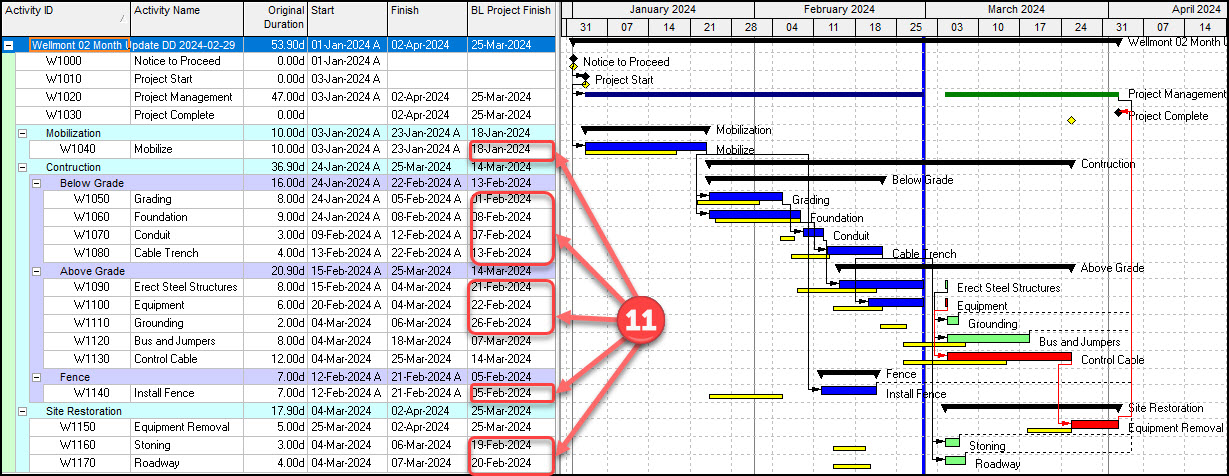
The BEI should compute to 6/11 or 0.55. The schedule fails the DCMA 14-Point BEI ratio assessment. The Check Schedule Report shows it passing (green) the BEI test.
Is this a bug in the Check Schedule Report feature?
Any thoughts?
--Steve



It seems it's only calculates the completed activities and does not include not started, in-progress, Milestone, WBS Summary and LOE are also not included. See below:
BEI - Baseline Execution Index: Mark to analyze the number of completed activities in the project against the number of baseline activities calculated to finish before the open project's data date. Not started activities, in progress activities, Milestones, WBS Summary activities, and Level of Effort activities in the open project are not included in this analysis. In the project baseline, milestones, WBS Summary activities, Level of Effort activities, and activities with a finish date later than the open project's data date are not included in this analysis. Specify the target for the acceptable ratio of completed activities in the open project compared with baseline activities scheduled to finish before the open project's current data date, as expressed as a percentage.