Recently my project schedule started displaying the wrong total slack number. In the screenshot below it should display -47 not -33. I am using the same calendar throughout the project. Please advise!
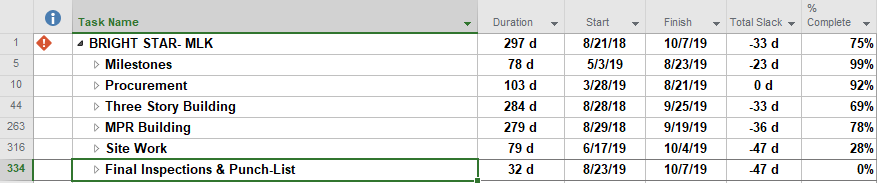
Recently my project schedule started displaying the wrong total slack number. In the screenshot below it should display -47 not -33. I am using the same calendar throughout the project. Please advise!















Brian,
Your graphic had my attention drawn to task 334 for some reason.... Yes, for a well-constructed schedule network with no task or resource calendars and no constraints/deadlines, I would usually expect the Total Slack of your top level summary task to equal the lowest value in the project. To troubleshoot, I'd suggest activating the default Schedule table (which includes early/late dates), adding columns for Start Slack and Finish Slack. (Total Slack for a task will be the lesser of the two.) Then use the autofilter to see where your top-level summary task is getting it's dates.
Unfortunately, all bets are off if you have recorded out-of-sequence (OOS) progress, especially in a more recent version of MSP. The backward-pass-equivalent calculations in MSP get wrecked. Since your issues started in the middle of project execution (and presumably progress updating), that's what I would suspect. Correcting the logic to remove OOS progress may be necessary.
Good luck, tom
This is right on the money. Interestingly, the critical path drag of a summary activity, as computed by any of Spider Project, Asta Powerproject or the Boyle Project Filter add-on to MS Project, CAN be of value. If, for example, all the activities in the summary are (1) on the CP and (2) the responsibility of a single subcontractor, It can be valuable to point out to the contractor that he is adding X days to the project duration, and to negotiate an incentive for the amount by which he is able to reduce the drag by reworking/rescheduling the detail activities.
Fraternally in project management,
Steve the Bajan
Tom,
Thanks for the response. I understand and agree it is useless for summary task, but the top task is the project and it should have a -47 under total slack. Is the work around to create a seperate milestone for project completion and put a deadline on that? Every other project I work on does not have this issue and this just started several weeks ago.
Brian,
It seems likely that Total Slack of summary tasks in MSP is computed differently than you think. In most cases it's meaningless.
From an article I wrote a few years ago:
"Total Slack as presented in Microsoft Project is not a valid metric for logical analysis of Summary Tasks. Users are advised to ignore it." - https://wp.me/p6CCB4-4A