Hello there!
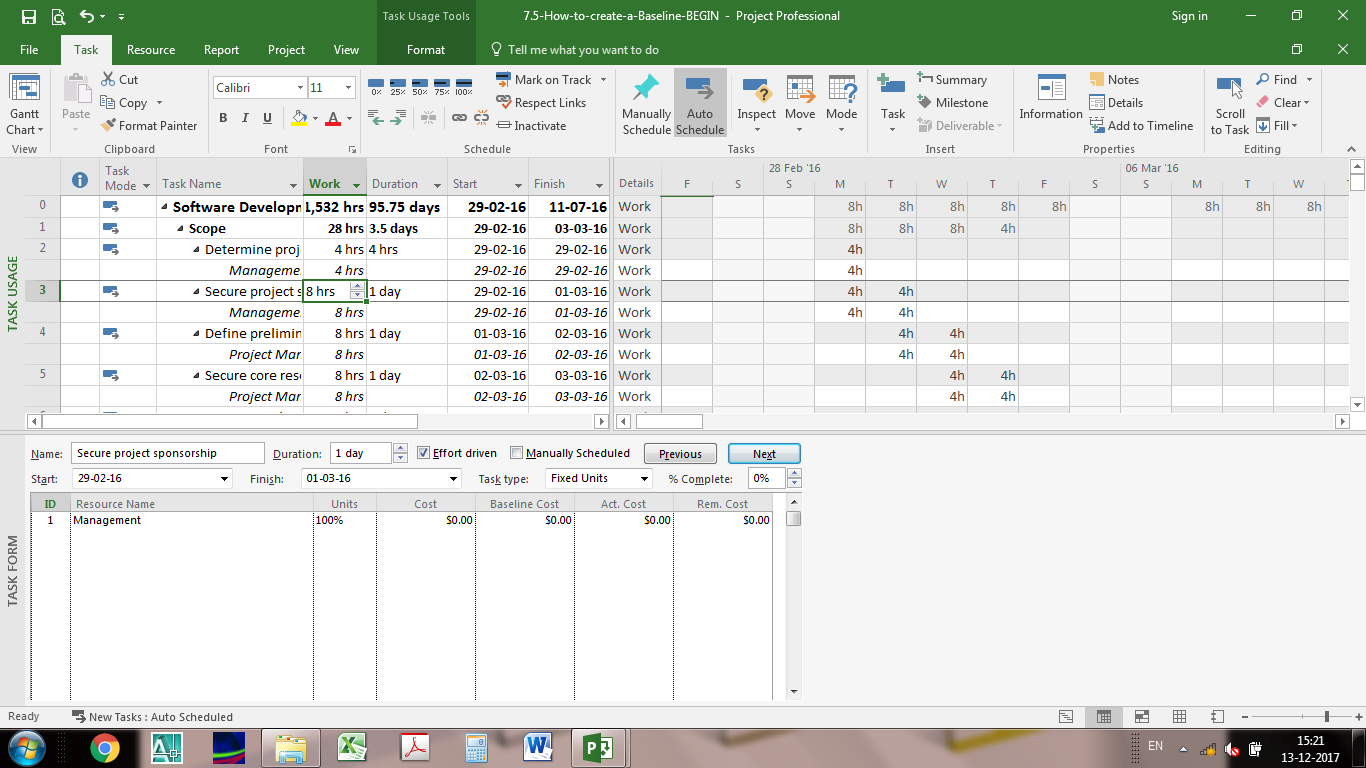
I am using MSP 2016 and I have a doubt. As shown in the attached image, for the task name - Define, the duration is One day and it is showing a start date of 01/03/16 & 02/03/16 as finish date. Ok fine. In the Task Usage sheet - the work has been divided into 2 days with 4h work in each day. Why ?? Why not 8h in a single day?
I went to Options - Schedule and found out that the default start time is 8:00 AM with end time as 17:00. Hours per day is 8 (Standard Calendar).
The cost is fine on the Cost Sheet which is obvious as the total work hours is still 8hrs















Thanks a lot!
Shishir,
With the improved image, it is easy to see your problem. Task ID 2 "Determine proj" is a half-day task ending mid-day on 29Feb'16. It's string of successors then start and finish at mid-day.
This is normal behavior whenever you introduce partial-day durations.
Thank you for your time. I have updated the enlarged Image. As you mentioned, I added the Time in the
Options - General - Date Format but it is not helping. It is showing Time along with the Date.
Shishir,
The image you posted is illegible. In the General Options, choose a Date format that includes the time of day. That will demonstrate your task starting at mid-day on 01Mar'16 and finishing at mid-day on 02Mar'16. You must review the logic to see why this is the case.