2010 : Breaking Of Grouped Bands , Any Work Around Yet ??
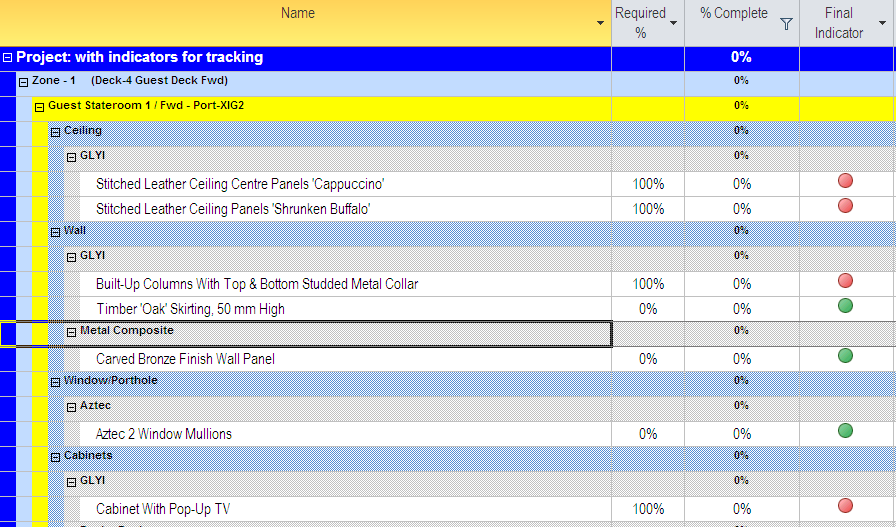
The Above plan when printed , gives the following result ...since MSP 2007
any workaround ??
[[wysiwyg_imageupload::]]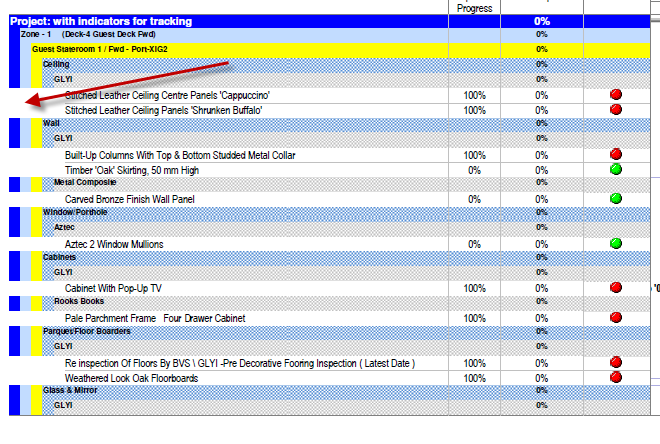
2010 : Breaking Of Grouped Bands , Any Work Around Yet ??
The Above plan when printed , gives the following result ...since MSP 2007
any workaround ??
[[wysiwyg_imageupload::]]















Hi Mike ,
My Question was not how to group
All following versions after MSP 2003 , there is a problem with grouped bands as above
I dont know any workarounds in 2007 & 2010 still.
Sorry KUMIZ...la MUFIZ
Hi Hemanth
Kumiz gave you a reasonable answer and form your abrupt response it seems that you already know the answer to your query.
A little bit of courtesy to your fellow PP members would not go amiss.
Best regards
Mike Testro
Read and understand questions carefully
Choose Project --> Group By --> More Groups.
The More Groups dialog box appears.
Select either Task or Resource to specify in which list of groups you want .
To revert back to no grouping, just select No Group from the Group By drop down. To re-group, just choose your new group from the list.