Hi
In my model I extract tasks data according to line below from model file:
<Column name="DurationDays" datatype="Duration" group="Date" formula="Duration / '1d'"/>
The problem is that some tasks have duration in working days and some of them in elapsed days, please look at attached screenshot for more details.
Working days are not a problem at all. Problem is with elapsed duration
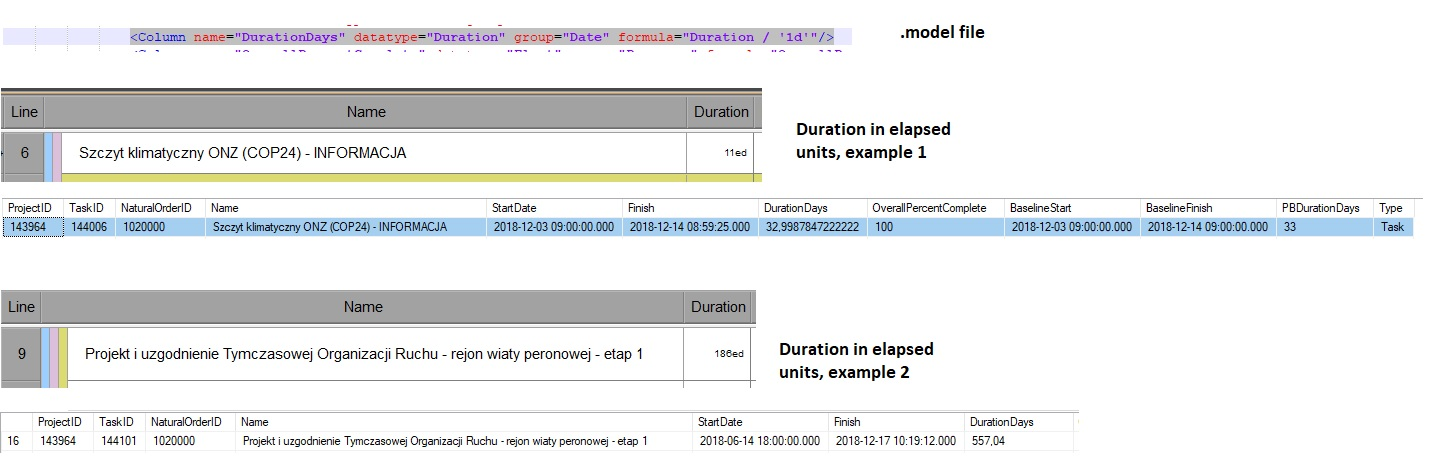
What should I do to get durations in format I have in Powerproject into the same table?
Thank you in advance for any hint!



Hi Ben
Thanks for that. This is exactly what I did:
<Column name="DurationDays" datatype="Duration" group="Date" formula="If(IsElapsedTime(duration) = TRUE, Duration / '1ed', Duration / '1d')"/>
Hi Dariusz,
There are several potential solutions to this. The simplest is to add a column that tells you if a task is a Working or Elapsed:
<Column name="ElapsedStatus" datatype="Boolean" group="Date" formula="IsElapsedTime(duration)" />
Cheers,
Ben @ Powerproject
Hi Mike
Thanks for reply and warm welcome ;)
It's not about Asta Powerproject itself but BI Controller.
These elapsed durations you could see in screenshot are OK, my entire plan contains days and elapsed days.
The problem is coming when I want to export Powerproject data to external datasource.
For example I've got 2 tasks:
Task 1 , 2d duration
Task 2, 2ed duration
Model files has formula for duration and it "force" to write durations in days:
formula="Duration / '1d'"
But for Task 2 it will return incorrect value becasue of elapsed units...
With formula:
formula="Duration / '1ed'"
it will return correct values for durations expressed in elapsed days (Task 2), but not for working days (Task 1).
Still with me? :)
I can't find any way to export correct durations via BI Controller regardless of duration units used for tasks.
Hi Dariusz - welcome to planning planet.
Right click the duration table - select Format Cells - Left click Duration - select your format "Day".
Best regards
Mike T.