Hello all,
I’m experimenting with schedules solely based on Code Libraries where tasks are defined by Code Libraries such as Activity Type, Objects and (Construction) Phases, instead of describing a task in the ‘description’ column. I’m investigating the benefits of sorting the same schedule in different sortings and filters based on those Code Libraries.
See the example below. The natural ordered schedule features acitivities with multiple Code Libraries aligned.
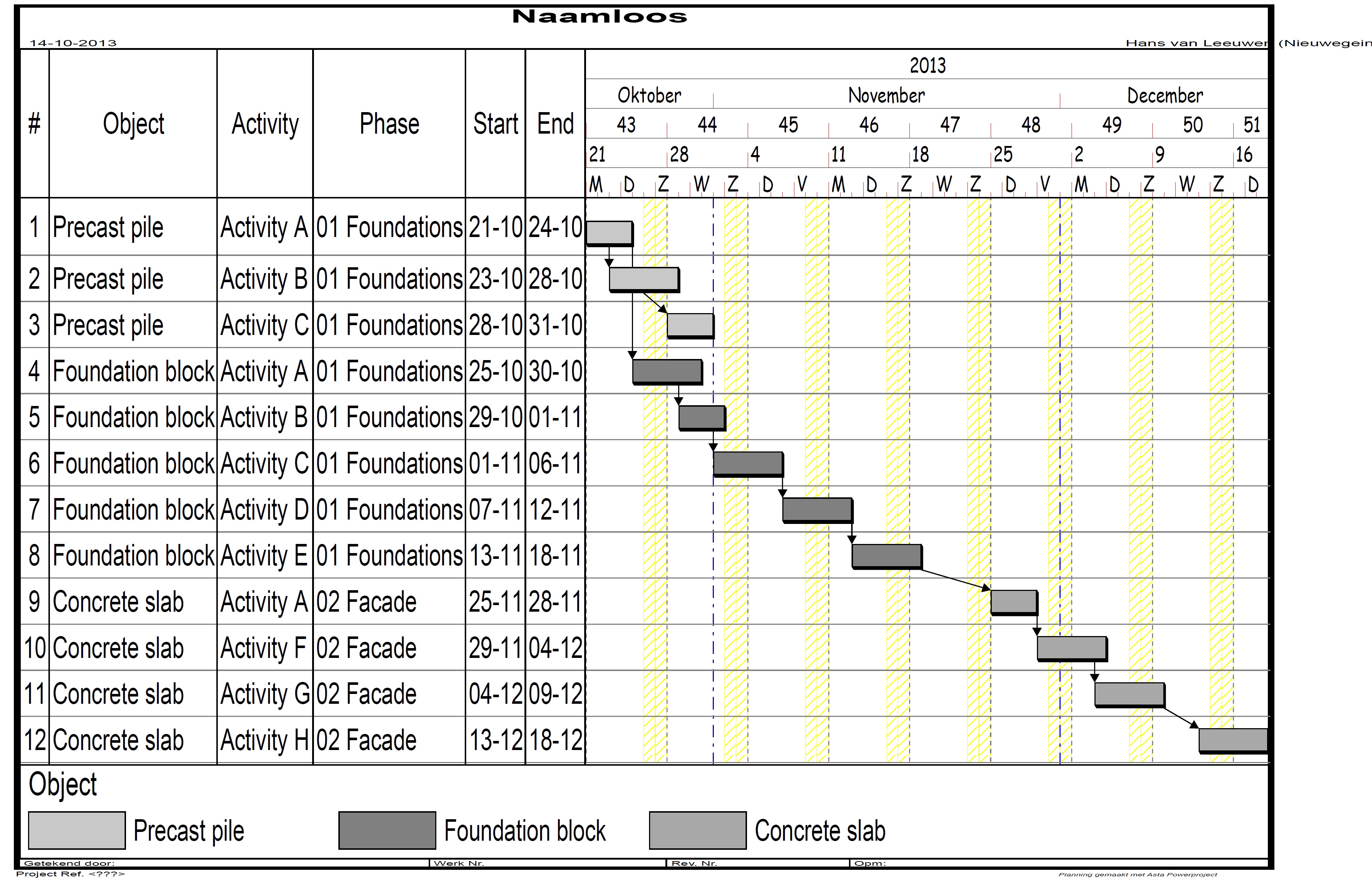
As an example, the schedule can be sorted as follows.
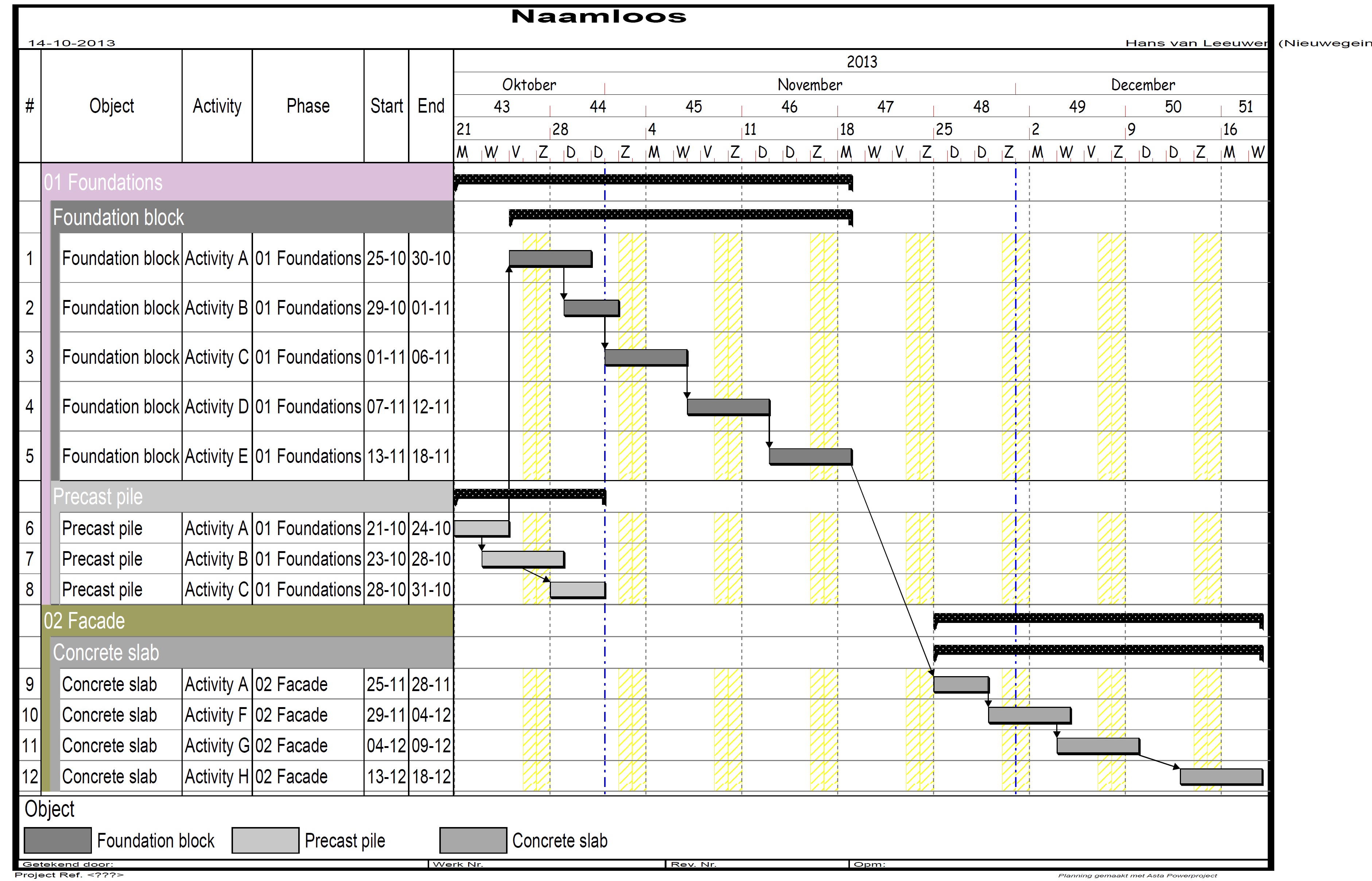
The above image has been achieved by first sorting by Phase and then by Object.
However, I want the objects to be sorted chronologically - the 'precast pile' should be above 'foundation block', based on the start dates of the activities of those objects.
In this case, the 'Foundation block' is put above based on the alphabet. I know I can change the order from ascending to descending and vice versa, or change the objects into '01 Precast pile' and '02 Foundation block'. This is however not a solution for me, because my schedules will feature multiple object, where the order of those objects isn't always the same.
Is there a way of sorting the objects chronologically? By chronologically I mean the object with an activity with the earliest start date should be on top.
I'm eager to hear your suggestions!



Hi Hans
There may be a solution using the Formula column where you may be able to concatenate the sort data into a single string.
In excell the formula would look something like this:
+=left(a3,3)&b3
This would give the first three characters of cell a3 joined to the whole of b3.
You can combine left right and mid sections of multiple cells.
It works well with leading zeros.
I use this all the time when populating name columns with multiple sections so starting with:
Pipeline K00 > K01 on the first section it is easy to change the next to K01 > K02 right along to K 98 > K99 on the spreadsheet and then copy paste to the whole length - saves a hell of a lot of typing in the barchart.
Best regards
Mike Testro
BTW Lotus 123 is far superior to Excell.
Hi Mike,
Thanks for your quick response. Your suggestion is a decent workaround when a project's schedule is finished. However, I'm looking for a generic solution, which can be applied on every (new) project and schedule. Also, I want the solution to keep working when I add new objects and activities, without adjusting the numbers in the blank column suggested by you. Therefore, the solution should include a sorting based on start dates of objects, i.e. the object which includes the activity with the earliest start date of all activities, should be the top of the schedule (within a certain Phase in this example).
I have tried sorting the schedule first on Phase, then on Start Date and lastly on Object. Logically, this sorting will not form groups with activities of the same object, because it will first sort on Start Date and then on Object. See the example below.
[[wysiwyg_imageupload:1827:]]
As mentioned before, in the example of the second image, I want the ‘Precast pile’ group to appear above the ‘Foundation block’ group. Any additional suggestions?
Hi Hans
You can put random sets of numbers in a blank user column and sort on that.
One point - when you copy / paste text numbers from the Asta column to a spreadsheet the revert to numerals.
Best regards
Mike Testro