Dear all,
I am looking at resources in Spider and have a question how to simulate resources absence.
As I can see, every resource needs to have a calendar, which, in turn, depends on a Week object and exceptions.
I am now considering the situation of named resources.
Question 1
As in practice each resource has his own absence schedule (due to individually booked vacations ), does it mean, that I will have to create:
- separate exception for every vacation of every resource?
- Separate calendar of every resource?
So, in case I have 10 resources, each of them will have approx 5 vacations spread over the year (in addition to public holidays), that means, that for the project of 1 year I will have to create 50 exceptions and 10 calendars just to cover resources vacations.
Is it correct?
Question 2
How to handle situation, when resource is only made available for a some time (shorter, then expected duration of a project)
In MS Project one can set resource availability periods, (which is by default set to From N/A To N/A), but in Spider I found only how to set exceptions, not availability.
Regards.
Evgeny



Evgeny,
This looks great, but remember your first hunch, there might be a more efficient schedule. In this particular example activities are not linked, I assumed brick installation on different unrelated areas. This means you can assign all resources to each activity with a proportional reduction in time if activity duration depends on volume of work. In this way no single resource will be idle.
I tried a model using Skills in combination with variable quantities but for some reason I could not make it work, therefore I tried using Productivity Type activities resource loaded using variable Quantities but not Skills. As "Quantity" when using variable quantities means Maximal I changed the label of the title to Quantity [Maximal] as a reminder. I added some additional activity as for making the resource leveling algorithm to look for a solution that tries to minimize project duration and override priorities if these delay project duration.
The total duration of bricklaying activities was reduced to their minimum and no idle resources resulted from this model. The resource allocation worked as expected. But note the activities start ASAP even when no resources are still working on them and cannot finish until all resources execute the required volume of work. To me the Start of Activity 2 (and most others) is a bit weird as I would expect activity to start at the start of first production resource as well as to finish at the latest finish of any production resource, this means it should be modeled as having Start Flex instead of Start Float [in Spider named as Float to distinguish it from Finish Float]. The start of each production resource also does not makes sense to me.
http://www.mediafire.com/download/nv0lxeo0brbybqo/RD015.004.sprj
In more complex jobs it shall also do the work. Suggest trying different resource productivity on different activities due to difficulties particular of each activity or particular of any resource plus the addition of some additional successors.
Resource leveling is not just about making viable schedules as if you put all activities in tandem there will be no resource conflict and usually at a substantial cost in time, resource leveling is also about using the tool for better schedules, of shorter duration and with minimum idle resources. The excellent resource leveling algorithm in Spider Project is just one too but there are other tools unique in Spider you shall explore.
Take a look at the following file. Here I reduced maximal amounts as to allow more than a single activity be worked in parallel, note some times not all resources work in parallel on a single activity, for a better view as how many a report is of great value.
http://www.mediafire.com/download/x9bzze31pzl77pc/RD015.005.sprj
Best Regards,
Rafael
Rafael,
You are correct. To be able to use variable resource assignment correctly these tasks should have been Productivity tasks.
Any way I changed it back and compared schedules with 2 methods and the result is almost the same (the difference is only 1 day, which I can’t troubleshoot at the moment).
You can see the results below.
RE
<<
Maybe in addition to my wish for Calendar Exception Activities another type Frozen Activities shall be included in my list. Activity that is frozen in time and entered via two of the following Start/Finish/Duration.
>>
You have it I think (almost). I use it to simulate vacation. This is a fixed duration task with Start NET constraint and with unachievable Finish NLT constraint.
https://docs.google.com/file/d/0B1FBt_G3gCVqSG1reVZRZXZ6bVE/edit
https://docs.google.com/file/d/0B1FBt_G3gCVqWGFoTnpKbXNPNEk/edit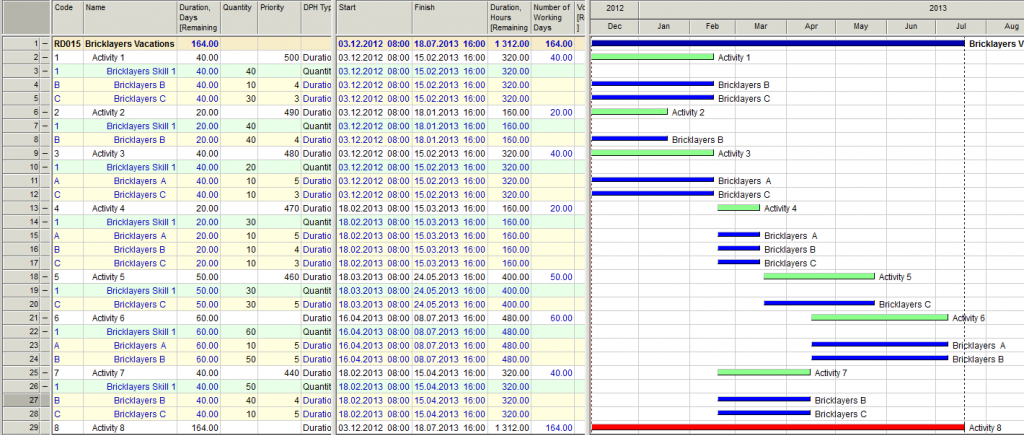
Evgeny,
You said - I used variable resource assignment, but my method would work also without it. I used it just to make it even more efficient.
Quantity & Workload displayed on partial assignments: When using partial assignment quantities/workload the displayed amount is misleading, better showing actual range of assignments or nothing unless a single value, if a single value shall be the assigned and the Maximal shall be displayed under a differently named field. Another option might be to display an asterisk along with the quantity amount when partial assignments are being used.
You said your method should also work and I agree just that we are no there yet. Then we can compare results with the Skills method.
Maybe in addition to my wish for Calendar Exception Activities another type Frozen Activities shall be included in my list. Activity that is frozen in time and entered via two of the following Start/Finish/Duration.
A useful two edged knife that shall be used with care but not banned.
Roports is something, which I did not look at yet. How do you generate these *.sdoc files?
Variable resource assignments as well as reports shall be discussed on a separate thread several days after you start exploring it.
During this year my wish list have been drastically reduced, actually it is a small list whose majority of items I keep because of my stubbornness even when a some have been rejected as of not enough value to be implemented.
Best Regards,
Rafael
Rafael,
you are correct, I use variable resource assignmnet, but my method would work also without it. I used it just to make it even more efficient.
Regards.
P.S. Roports is something, which I did not look at yet. How do you generate these *.sdoc files?
Specific comments to your example:
Generic comments to your method:
Alternative suggestion:
Best Regards,
Rafael
Rafael,
Thanks for your example. I played around with it.
Specific comments to your example:
Generic comments to your method:
Alternative suggestion:
I modeled the same project using high priority task to model resource vacations.See below
What do you think of it?
You can download it here:
https://docs.google.com/file/d/0B1FBt_G3gCVqT253a2t4NFhHUGc/edit
...
The following Spider Report provides you with a detailed weekly assignment of resources by activity.
http://www.mediafire.com/?b6g3ba2t3aj7rqe
You can download a sample file from following link.
http://www.mediafire.com/download/hpsl5ed9p07b97u/RD015.001.sprj
The following screens are from the sample file. Please explore and make changes yourself to quantities, activity priorities and resource priorities. I selected the option for the Gantt to display unassigned resources, convenient for changing priorities directly from the table. Also included an activity that spans over a year for you to see that after some time all resources are available and idle.
Let me know if you need some assistance.
Best Regards,
Rafael
How would you model with calendar exceptions the following
Cannot be done using a single resource as by definition a resource can have only one calendar otherwise it would be ambiguous.
If you mean
you will need 3 Bricklayer Definitions, 3 calendars and 3 calendar exceptions.
If other combinations are within your needs then it might be you need more calendar and resource definitions as to distribute the vacations.
Then assign activity resources using resource skills for all Bricklayers. Activities will be assigned available Bricklayers from the Pool of Bricklayers Skill.
It can yield a better prediction even when always you will have to manage your schedule and make adjustments on the run.
Best Regards,
Rafael
Rafail,
RE
<<
The best way to model vacations is how all CPM software do it, by using calendar exceptions. It applies to all resources no matter if named or unnamed.
>>
Call me stupid but I don't understand, how would you model with calendar exceptions the following
In my view you can only do it with time resource production or with high priority task.
Am I missing something?
Regards.
Evgeny
Evgeny,
The best way to model vacations is how all CPM software do it, by using calendar exceptions. It applies to all resources no matter if named or unnamed. The problem is when you do not know when the named or unnamed resource will take vacations.
A way to handle unknown vacations on long duration activities with many such unnamed resources would be to assign some extra resources and reduce workload to less than 100% to account for the impact of resource vacations. If you are modeling resource cost then the added resources at a reduced workload shall balance the cost as well as the total resource hours. This is rarely done by us as we consider it excessive granularity.
Our hands down approach have been to use the CPM as a guide, we do not go into excessive granularity and allow individual supervisors to adjust crew size to make it within the estimated time without using overtime which locally is 2x while in the Mainland US it is 1.5. At times it comes out that because of improved methods, because of the use of more productive equipment, because of higher manpower productivity on site, the field supervisor do it on time at a reduced cost with less manpower. We do not pretend perfection in our schedules, we manage them, we know initial preparation is 10% and the remaining 90% is managing. Of course the impact of vacations in our schedule is low because we know in advance most vacations will be on x-mass recess. Still we are impacted in a lesser way because of sick-leave and other reasons.
Best Regards,
Rafael
Rafael,
Having considered all of this I somehow think, that one of the the best ways to model vacation of unnamed resources is to create a high priority task and to assign to it an amount of resources, which take vacation in this period. Once you run resource leveling, it will reallocate resources from the real tasks, thus taking into account resources vacations.
And so far the best way I found in Spider to assign a high priority to a task is to set an unachievable Finish NLT constraint, as I described here:
http://www.planningplanet.com/forums/spider-project/531725/resource-leveling-and-activity-priorities
Regards.
Evgeny
Evgeny,
You said - It does not have any resources, so it is difficult to see on which way it models resources vacation.
Think out of the box, resources are not available during vacations, do not force the vacation activity to use unavailable resources, it is not the way CPM is designed to work. It might be better to model vacation activities without using resources but the known vacation start and finish dates.
You said - your example seem to suggest, that you need 3 activities (2 milestones and 1 hammock) and 4 manually set constraints (2 for each milestone) to model 1 single vacation. Isn’t it too bulky?
Yes it is bulky indeed, even if you can hide the milestones using a Non-Main WBS Structure.
Each milestones need only one constraint, a single SNET constraint is needed. You have the option to manually set the constraint or transfer them to the corresponding cells either using cell formulas which is too confusing to me when looking for external tables, or use Reference Books.
If I have to model vacation activities instead of merely looking at the exceptions table I would prefer the cells formula option but as said before the syntax I do not understand. With this option any changes in vacation dates executed via calendar exceptions can be updated by executing all formulas using a script and a single click of the mouse.
Not all exceptions are vacations, not all correspond to the same vacation, so anything else than looking at the exceptions table and come comment field to identify and filter vacations will require some CPM modeling.
Another method that occurs to me might be to create a single duration type activity for every vacation exception, to set the SNET constraint in a similar way and set the duration by a formula. Perhaps might be convenient to use a 24/7 calendar as to be able to use simple formulae that do not depend on activity calendar. I will explore this and will let you know. This is the first time I am trying to model vacation activities and believe we might still find a better way within how CPM models are designed, we shall not give up easily.
http://www.mediafire.com/download/ihzva3p5a1i7dim/RD012.002.sprj
As in the previous model, updating vacations on this model will require either:
I am assuming you are looking for a way to synchronize vacations exceptions and the vacation activities through a software procedure rather than all manual. That you have a common pool of resources for a portfolio of multiple jobs. That you want to be able to see exceptions that represent vacations as activities all on a single separate job as well as to see some of the vacation activities on other jobs. Therefore it cannot be by direct use of resource assignments on many vacation activities. That you are looking for a procedure to transfer any changes in exception dates other than using double data entry.
I have a few other special activity types in mind such as the SureTrak Topic Activity and something equivalent to P6 WBS activity that have not passed Vladimir test. I believe some of those might add extra compatibility with other software when you import/export files.
About The BrickLayer_no_x-mass. Bricklayers with no vacations? If vacations when?
Best Regards,
Rafael
Rafael,
reference books, is something, which I still have o learn in Spider, so will have to deepen myself in your example.
At the moment I must say I don’t quite understand it.
1) It does not have any resources, so it is difficult to see on which way it models resources vacation.
2) Separately to this, your example seem to suggest, that you need 3 activities (2 milestones and 1 hammock) and 4 manually set constraints (2 for each milestone) to model 1 single vacation. Isn’t it too bulky?
RE
“Because every unnamed resource will share a common calendar you might need to create several unnamed resource for each calendar and use skills to assign them to activities. For unnamed resources we use a single calendar as here it is the rule that over 90% employees take vacations during x-mass recess as per agreement with the unions, it is party time. In other industries it is common for it to be per named resource.”
Just checking my understanding: for your example you will create 2 resources to cover brick layers
BrickLayer_no_x-mass (with x-mass period in as an exception in the calendar)
BrickLayer_x-mass (without x-mass in the exeption calendar)
Each of the resources will have a BrickLayer skill.
The BrickLayer_no_x-mass represents 10% of brick layers and BrickLayer_x-mass 90% of brick layers
Is it how you suggest to model this?
Rafael, this is great stuff.
You can then relate the reason(s) for each delay to any drag and drag cost caused thereby. And then this can be collected and modeled in Pareto charts, showing the causes of delay over the past three months in descending order of drag cost: the cost of delays due to unavailability of hobbits was $525,000, while the cost of delays due to unavailability of goblins was $200,000, so let's hire two more hobbits.
This is a huge aspect of the Total Project Control methodology (specifically when related to resources, it's called the Cost of Levelling with Unresolved Bottlenecks (the CLUB), which in turn is triggered by drag cost). And, of course, Spider is currently the only package to be able to provide this sort of functionality, as it is the only one that computes drag (and, I assume, (if the data is properly entered) drag cost.
Fraternally in project management,
Steve the Bajan
You said - If you have 100 brick layers and each of them is going on vacation 5 times a year, you would have to have 1000 entries is the time resource production to show this. This will probably difficult to manage, especially as you can’t assign some sensible name to time resource production entries.

With regard to setting individual vacations time you need to enter start and finish of vacations for every vacation exception and assign the exception to each resource, at some point you got to tell the computer.
You can model each Vacations as a hammock activity driven by two milestones without need to resource load the vacations activity and therefore without need to use resource production that shall match calendar exceptions, without need to use resource loading to drive the vacation activities with all the complications it can create.
The following figure shows how you can do it. You can do it by fixing the milestones using a SNET constraint. You can change manually the constraint dates or you can change them using reference books to transfer the exception data.
If you want to explore the option for updating using reference books you can download the file and instructions from the following links.
http://www.mediafire.com/?805gvmtoavm4w40,bz24iiuqoutlt4g
http://www.mediafire.com/download/bz24iiuqoutlt4g/RD012.001.sprj
http://www.mediafire.com/download/805gvmtoavm4w40/Instructions_for_Vaca…
http://www.mediafire.com/?t1nrxd33v823brb,exys4rqox41s112
http://www.mediafire.com/download/exys4rqox41s112/ACT01.001.sdoc
http://www.mediafire.com/download/t1nrxd33v823brb/CE01.001.sdoc
Keep in mind using reference books you can transfer to other jobs from the Vacations Schedule the calendar exceptions as well as the vacation activities as needed. You will need to create an exception for every vacation period without using Recurrence Periods as this method will only transfer a single start and a single finish date for each exception.
As you will notice I have no problem with creating cell formulas within a single table my problem is when creating cell formulas with other tables. If there would be a graphical way to select cell references from within the current table as well as from within other tables I would be using direct formulas instead of using reference books to consolidate two tables.
Remember that to execute multiple formulas a script can be very handy.
You also said - So I am just wondering, how in reality the absence (vacation) of unnamed resources is managed? (for named resources this can be done via calendar exceptions).
Because every unnamed resource will share a common calendar you might need to create several unnamed resource for each calendar and use skills to assign them to activities. For unnamed resources we use a single calendar as here it is the rule that over 90% employees take vacations during x-mass recess as per agreement with the unions, it is party time. In other industries it is common for it to be per named resource.
Best Regards,
Rafael
Rafael,
Re “I downloaded your file Vacations.001 and could not find any unexpected result.”
May be the result is not unexpected, but it is not what I was looking for. As the idea is that vacation has fixed dates and shall not be delayed, it shall only be taken into account.
So, the way out is to use time resource production, however I find, that it is not so easy to track.
If you have 100 brick layers and each of them is going on vacation 5 times a year, you would have to have 1000 entries is the time resource production to show this. This will probably difficult to manage, especially as you can’t assign some sensible name to time resource production entries
So I am just wondering, how in reality the absence (vacation) of unnamed resources is managed? (for named resources this can be done via calendar exceptions)
Regards.
Vladimir,
What a surprise, Resource Production can delay activity execution even when not resource loaded, and it makes sense just that it is not so obvious.
There is a reason why every activity is not scheduled to start at the beginning of times, million years before 10,000 BC. Perhaps if the Scope of Delay Reason is modified then it would be able to display a delay reason for every activity such as:
By reducing the detail level for all or some reasons it might be easier to program, it might be of faster execution. It will give enough clue as for the user to find out the details, especially those hidden delay reasons for which now the functionality gives no clue.
It might be that at the beginning some delay reasons might be overlooked and labeled as "Other" but very soon it would be all inclusive.
Guess that if you schedule all my requests as separate activities maybe we can find a limit to Spider
Best Regards,
Rafael
Evgeny,
I delayed this decision because if you need an exact dates time production works properly, but additional option - to change resource quantity after they will finish jobs where they were assigned may be useful too.
And indeed there were other priorities. Since January many new functions appeared in Spider Project.
Regards,
Vladimir
Evgeny,
I downloaded your file Vacations.001 and could not find any unexpected result.
I suspect Vladimir is referring to other issue that might still be or might not be pending. For this issue another sample might be needed. If you have such file please make it available if different to Vacations.001
Please verify on my statements about Vacations.001 and let me know if you are in disagreement.
Best Regards,
Rafael
Vladimir,
I was playing around the latest Spider version (11.01.37) and found out, that the problem, identifyed by you in your post from Mon, 2013-01-14 21:28 is still present.
Just wondering, is there spesific reason not to fix it, you simply there were other priorities?
Re:
<<
Rafael,
an activiy will be delayed if requires exactly 10 bricklayers and there are only 9.
But I found that vacation start may be delayed if resources are not available at their start date.
It shall be corrected.
Regards,
Vladimir
>>
Regards.
Very frequently you have more resources available than needed, this makes some resources to be idle. This comes at a cost you want to track and keep under control, especially when in your budget such idle time was not considered.
Modeling resource availability fixed with time when in reality is to be driven in a dynamic way by the schedule is wrong, although might be handy on a Delay claim. There is some logic into the planning for resource availability, it is good practice to make your model to follow true logic. Don't just draw your availability as if fixed bars.
At home we have no seasons, we are on the Caribbean, it is always Summer and rainy, therefore we do not plan resource availability based in fixed time, we plan our resource availability based on stages that move as the project moves. Those using software that cannot follow true resource planning and constraining that moves with the phases are forced to use fixed time resource availability. They must manually adjust the availability as the schedule plan moves.
If using Monte Carlo this plan will not change and will generate many unrealistic plans. I do not trust Monte Carlo simulation under software that cannot automatically model ever changing resource availability as it happens at home. In such case the software will model hundreds or thousands of schedule runs with a resource alignment that is not real, hundreds or thousands of wrong schedules, a big mess.
At least with some trouble they can fix their deterministic plans.
Time production is usual when you hire or remove project resources at certain time.
Activity production is used when you plan mobilization as subproject (a ship shall be moved from the port to construction site, heavy machines moved from one site to another, some equipment shall be assembled before use, etc.).
When produced resources may be used at any activity where they are are required.
RE: - you were talking about increasing the number of resources available for a specific period of time, rather than for a single activity
This is correct it is about timing, not about a specific activity. Resource production available for all activities can be controlled fixed with time, or can be triggered by an activity. When triggered by an activity it will be available for all activities, it is the timing of a movable activity that determines when it resource production will happen.
Say you are scheduling the construction of a school like ours, all reinforced concrete. During the Concrete Phase you will hire more concrete work labor and will keep a minimum such force for miscellaneous concrete to be executed latter on. A contractor plan his manpower, it is not merely assigning the maximum across the board for all job duration. This plan will have an effect on your schedule. The combination of resource production fixed with time and resource production triggered by activities [ I usually use milestones] will help you create better plans.
Ok, now I think I undestand what you meant. Let me see if I got it right, you were talking about increasing the number of resources available for a specific period of time, rather than for a single activity, les't say summer, so you would produce resources at the beggining of summer (for exeample) and have negative resource production in winter. Hope this is what you meant.
After reading the posts it has occured to me that resource production can be very helpful in portfolio management, when you move resources from one site to another in oder to finish some jobs more quickly. Please correct me if I'm wrong.
Best Regards,
Bogdan
When you double click a resource line on the resource table you will get displayed a resource properties window, there you have a tab for Resource Production.
Among the options are to issue a resource production fixed with time or a resource production that is generated with the activity.
You deduct resources via a negative value.
It is common for contractors to increase resource availability based on how the job activities progress and not on fixed dates therefore there is a need to model resource production that moves with activities as they move.
At times the contractor increase or decrease resource availability based on time such as when seasons have an impact, say on Winter you reduce resource availability while making others available.
In this way you will see correct resource availability as planned by PMs at the jobsite.
Greetings,
I was reading the conversation since I've been meaning to see how resource production works. I noticed in a couple of posts the terms "time production" and I was wondering what do they mean, in relation to resource production and activity resource production, is is a functionality of spider that I don't know of, or you were refering to something else.
Regards,
Bogdan
To me delay of activity 3 in my sample schedule using resource production works as expected, activity 3 was delayed until resources are available for the whole activity duration.
Cannot start on Jan 22/23/24/25 because it must start when ressources are available within the duration of the activity as we are using continuous PDM model.
I got to be missing something.
I was expecting for the Skills model to produce an earlier finish time in accordance to the software rules, and it did even when activities 3 and 4 were finish delayed by reason of calendar exceptions that are active at the time of activity as scheduled. A very slippery finish delay reason.
Vladimir,
thanks.
With time production it works
Regards.
Evgeny
Evgeny,
use time production instead of activity production.
I discovered this problem and wrote about this earlier in this discussion. Production activities may be delayed if resources are busy but time production will not.
But I still consider this as a problem and we will work with this.
Regards,
Vladimir
Vladimir,
I did what you suggested and it works fine, except now I found one problem:
When task has resource production, associated with it, Spider resource leveling delays this task. Even setting Finish NLT constraint does not help (up until now, if was a remedy, which always worked).
So, effectively I now have 2 problems:
Note: I tried it both with single task as well as will 2 milestones, separated by a link with lag.
See below screenshots:
The sample schedule one can download here (Vacations.001.sprj )
https://docs.google.com/folder/d/0B1FBt_G3gCVqS1pmZTJqcWI0Qjg/editWithout leveling
Without leveling:
With leveling:
Regards.
Evgeny
P.S.
Contrarily to what I have written previously, that “in Spider it seems not to be possible to have resource production of the same resource both at the beginning and at the end of the same task” I found out, that it is possible. It is also used in this schedule
Rafael,
you are right that in this case time production shall be used instead of activity production. But Evgeny wanted to see vacations in the diagram. Defining vacations as time production is similar to setting calendar exceptions.
Using skills is fine but it requires creating named resources and if the number of workers is large it may become complicated. I think that modelling vacations as resource production is preferable in this case.
For bricklayers I would use variable resource assignments. When the number of workers become lower or increases the work is done but with different speed.
It looks like in your example activity interruptions do not work as expected.
Best Regards,
Vladimir
Vladimir,
If you compare the models it looks to me like it is not the same modeling available resources via resource quantity than via calendar exception. In one model I assigned different calendar and exceptions to all resources while in the second I assigned the same calendar and exceptions to all resources.
I believe what you are saying is related to a model I have not performed in my comparison, a model using activities resource production instead of the fixed time resource production I am modeling.
I use activity resource production as well as time resource production but my comparison is between resource production using a time fixed single resource production [single calendar, single set of exceptions = none] versus using skills [different resources, different calendars, different set of exceptions].
Resource production might be easier but does not equals skills under the sample jobs I am using. Skills give me a shorter schedule duration even at the expense of increasing some activities time span. In the first model activities time span is increased, in the second model activities time span was not increased but delayed enough to delay overall project duration.
Team calendar is calculated as an overlap of activity calendar and team resources calendars while a single resource team will have a calendar equal to the single resource calendar. In my first model there are several resources with different calendars due to exceptions while in the second model there is a single calendar and this makes the difference.
Please feel free to take a look and if you find an error let me know.
http://www.mediafire.com/?1o08ns4nnx2kvzz,azw6chr6f085kaj
Best regards,
Rafael
Rafael,
an activiy will be delayed if requires exactly 10 bricklayers and there are only 9.
But I found that vacation start may be delayed if resources are not available at their start date.
It shall be corrected.
Regards,
Vladimir
Vladimir,
But it will delay activities as all resources will share a single calendar. Maybe I am missing something but I modeled the schedule using resource production using time instead of activity resource production, shall be similar to your proposal, I guess. But the project was delayed as illustrated on the figure.
It looks like they are not the same model, it depends on your needs.
Best Regards,
Rafael
Evgeny,
on January 28 one resource unit will be "spent" and produced again in a week, on February 11 one resource unit will be spent and produced again when will return from the vacation.
Modeling is easy - create two zero duration activities linked FS with vacation duration lag. Apply SNET constraint on vacation start.
On first activity -1 unit is produced, on the second +1 unit is produced.
Creating named resources with individual vacations is more complicated though it is also possible.
It is easy or I missed something in your question.
Best Regards,
Vladimir
I would use Skills for resource loading when resources have different calendars, for vacations I would use resource calendars and exceptions.
If the crews can work with less than 10 bricklayers then I would assign the skills to different teams, but this is another topic.
Also can use production type activity if duration depend on resource productivity, another topic as this is implemented through volume of work, a functionality not available in MSP and perhaps not available in any other package.
The beauty of all is how it works with resource leveling.
I suggest displaying a column for calendars to make sure calendar assignments are correct, also double check on assignment of calendar exceptions. Definitively your request for a view on calendar exceptions applied for every resource could help a lot.
Rafael,
May be I missed something regarding resource production. But how would you simulate the following:
You have a resource “brick layers” with quantity 10. Since brick layers are all the same pretty much, they are not named in your schedule (there is only one resource with quantity 10 to cover all of them).
But on week of 28 January one of them goes for 1 week vacation and on the week of 11 February another one goes on 2 weeks vacation.
How do you simulate reduced resource availability of these resources for the weeks, when some of them are on vacation?
Regards.
Evgeny,
I suggested resource production for how to handle the situation when resource is only made available for a some time (shorter, then expected duration of a project), for any resource type, named or non-named.
I suggest exceptions to model vacations, for any resource type, named or non-named. At home in my industry, Construction Industry, we schedule vacations for x-mass recess so we apply the exception across the board for most resources, for any resource type, named or non-named.
Most available CPM software remember and takes into account when resources are on vacation, they differ on their approach to store the exceptions. I believe with Spider it can be less difficult (yes still difficult, impossible for me) to generate a report for vacation periods because in Spider exceptions are stored as a range while in other software you mark individual hours for non-work time and do not let you see for what reason each non-working time little segment was assigned as non-working. For the moment you can do it very easily using separate reports, one for your resources where you show their calendar ID, one for your calendars where you show the calendar exception IDs and one for your exceptions where you display the specific date ranges. You cannot combine the 3 reports into one with ease [if can be done within Spider] and under your needs I see a lot of value for such report as you clearly defined it. For the moment the option would be to export the reports to a Database and generate the report, but still some fields are multi-valued fields and this complicates it further.
Resource Gantt Diagram tells you in a graphical and tabular way who is doing what to the activity level. It does not display unavailable time as an activity. I do not like the idea of using activities for displaying non-available time or available time for all resources, but it does not means it cannot be displayed as a bar. I would prefer to have functionality to display on Resource Gantt, in addition to activity distribution each resource global availability on a separate row and each exception at another individual rows. Row elements at the same outline level than activities, convenient for filtering purposes.
But my list is endless, I would also like a Cost Gantt similar to Resource Gantt. From these diagram views it would be easier to generate the reports and edit/enter data as well. In this case I prefer challenging Vladimir and his team for more powerful functionality than reports, for me Spider reports works perfectly, Diagrams are more powerful, adding diagrams will add report options.
To me finding the logic to resource allocation is the most difficult task, anything that adds understanding to it is of much value. I find your request of much value. Then why not asking for the table as well as for the bar display for exceptions that do not require additional activities. The Cost Gantt I can live without, is more a matter of convenience.
Best Regards,
Rafael
Rafael, Vladimir,
I think whilst for named resources the usage of vacation tasks is questionable, for none-named resources this seems to be the only way to do it in Spider (this is not a criticism as in MSP it is not possible at all)
This is how I understand it:
For named resources:
one either has to create exception for every vacation or to create a “vacation task” with fixed dates. As I understand, “vacation task” is not the way it was meant to be done, but it also has several advantages in my view:
For non-named resources:
For these resources the quantity by definition is above 1 (e.g. 10 brick layers), but these resource may also go on vacations. I thought it was Rafael’s suggestion to use resource production feature to simulate people’s vacation in this situation. And since in Spider it seems not to be possible to have resource production of the same resource both at the beginning and at the end of the same task, I think the solution is to use not one, but even 2 tasks to simulate one vacation of one person. In the start of vacation the resource is removed and at the end added (via resource production).
Or, am I missing something?
Regards.
Evgeny
Evgeny,
applying FNL constraint is the same as applying higher priority.
I agree with Rafael: creating 50 dummy activities is not easier than creating 50 calendar exceptions. But you will not need to use advanced functionality like variable resource assignments and hide vacation ativities creating reports. I do not see why creating vacation activities may be preferable to creating calendar xceptions.
Best Regards,
Vladimir
Not movable indeed, if you change the exception they will not move and will show wrong bar if you miss re-drawing your bar manually to fit the changes. A MSP user common solution, to draw instead to use CPM functionality.
A virus that has mutated into what others call Bucket Planning.
To draw vacations bars that do not move with the changes on the exceptions better use separate software, either Excel or a Paint software, they are going to be completely independent anyway.
-"So, in case I have 10 resources, each of them will have approx 5 vacations spread over the year (in addition to public holidays), that means, that for the project of 1 year I will have to create 50 exceptions and 10 calendars just to cover resources vacations."
This means drawing 50 activities just to cover vacations of 10 resources.
It is not uncommon for our construction jobs to have over 100 employees at any given time, this would mean 500 vacation exceptions if each of them will have approx 5 vacations spread over the year, 500 dumb activities that will not move.
I believe your original idea on using tabular reposts is the way to go. I do not know of any serious scheduling software that only produce Gantt reports. Tables and reports are a much needed, so do bars, but none is a full substitute of the other.
Vladimir,
Coming back to this subject.
In one of the topics you have written, that
“By the way you can also show vacations as tasks. In this case your resource assignments shall be variable and vacations tasks shall have high priority”.
Just for your information, I found out, that in my view it is better to use not priorities, but to set 2 constraints on every vacation task (Start [NET] and Finish [NLT]). In this case this vacation is then really not movable even if one uses Optimization Plus resource leveling.
Regards.
http://office.microsoft.com/en-001/access-help/guide-to-multivalued-fields-HA001233722.aspx
http://office.microsoft.com/en-001/access-help/using-multivalued-fields-in-queries-HA010149297.aspx?CTT=5&origin=HA001233722#BM4
In certain industries it is not only about the day but also about the shift as sometimes some companies rotate shifts. Spider has unique capabilities for easy modeling of shifts on a single activity.
I wonder how best to model rotating shift in Spider. Perhaps by assigning a 24/7 calendar and then with the use of exceptions you can rotate the available hours in addition to vacations and holidays.
Shift can also model longer work-hours during the Summer and shorter during the Winter plus other availability scenarios, your activity might be delayed from Summer to Winter time and if production + duration is affected it should be in the model.
This would make your request still more useful to check on availability if you need to see the details on the available hours.
Vladimir,
as exceptions are the reverse of availability, there is not much difference.
It is just that practically it is easier to print to somebody his 5 lines vacation report to check it, rather than to ask him to check his 365 days availability report.
In a matrix organization people often book vacations without following all the necessarily procedures or there are no proper procedures to make sure, that vacation information ends up with the scheduler. That is why it requires periodic verification. And if you constantly will give people to check 365 days report, they will simply get fed up very quickly.
So, nothing more than that.
Regards.
Evgeny,
our users limked Spider with other programs (1C, Navision, etc.) using CSV export/import.
Yes, Spider exports everything and if some values in CSV files will be changed Spider will open project with new values. Export to databases does not add much to this functionality.
For us it is easy to create standard report that you requested but usually people are interested in resource availability like in my example. I am not sure that your report adds value to availability report. Please try to convince me.
Best Regards,
Vladimir
Rafael,
I have MS Access, but Spider demo does not have feature to export to Access. However having looked at how it exports to text files, I tend to agree with you, that on a calendar table the exceptions field most probably will be a multi-valued field. I am also not sure, that it will be a multi-valued field in MS Access 2007 terms, or it will be just a text field, separated by a “|” symbol. In the latter case, this will not make it that straight forward to build a query in this case. Having said this, I am sure there is some way to achieve it, may be using some MS Access VBA code.
The important, and quite impressive I must say, is the fact that Spider can export ENTIRE schedule to text or database. So, it is important that information is made available. So if somebody needs something special, they can always extract it.
By the way, MS Project has discontinued starting from version 2007 feature to export project to MS Access.
Regards.
Evgeny
Evjeny,
You said "If doesn’t cost too much time...". So I would like to see how it comes out in Access. Not the file as I do not have Access, and my alternative would be to buy and learn a Database software.
I am very interested in your request as in order to see a resource calendar my actual options require to print separate tables in order to see all details.
I would like the report to display for every resource the Resource Calendar, Calendar Week and Calendar Exceptions combined on a single Report as follows.
Resource Name
Resource Calendar
Calendar Data Titles
Calendar Record
Calendar Week
Calendar Week Data Titles
Week Record
Calendar Exceptions
Exception Data Titles
Exception Records
Best Regards,
Rafael
Evgeny,
all Spider Fields created in any CSV table and database are described in the CSV and DB import/export section of Help menu.
Reports that you want nobody required and I agree that it is hard to get them.
But resource availability reports for any period is easy to get in a table form or as a diagram
In this example resources have planned two weeks vacations at different times.
Upper diagram shows overall availability of some resource skill (resource center).