
Dear Planning Planet Members,
Welcome to the newsletter; did you know that this newsletter goes to the largest community of project controllers on planet Earth?
As many of you know we’ve transitioned to a new, faster, and more modern web portal that’s already benefiting our users. We chose to make the switch quickly rather than spend weeks testing, so we truly appreciate your ongoing feedback in identifying the bugs or issues we need to fix.
ALICE PLAN - new functionality to help view activity sequencing
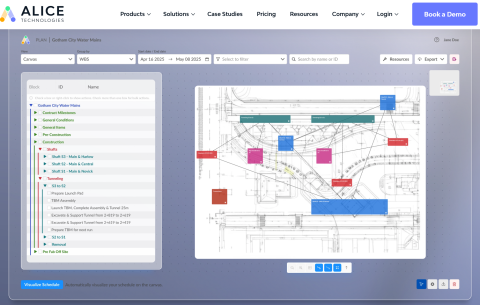
Transform your schedule into a 2D interactive layout and start planning visually—without the need for a 3D model.
A REAL PLANNERS STORY - THIS IS HOW I WOULD DO IT
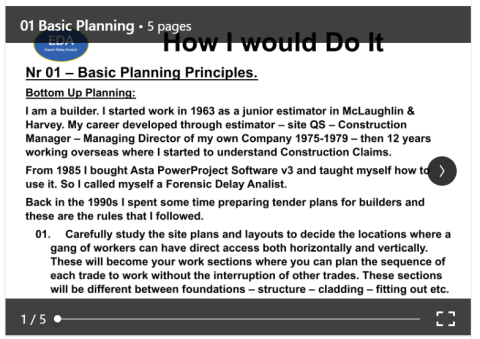
This is How I Would Do It - 01 Basic Planning Principles.
This is the first of a series of Articles on Planning & EOT matters
More will Follow...
Source: Mike Testro
REAL TIME PROJECT MONITORING?
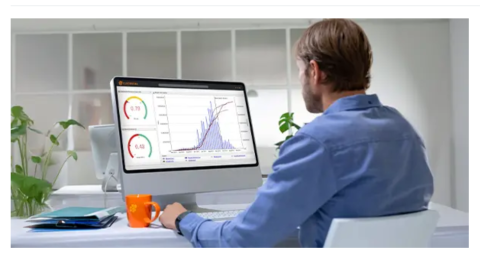
In the dynamic world of capital projects, real-time project monitoring has become a game-changer. It allows teams to track performance as it happens and ensures that every activity remains aligned with overall project objectives, improving both control and predictability.
What is Project Monitoring?
Project monitoring is the process of systematically tracking a project’s progress to ensure that it aligns with its planned cost, schedule, and quality objectives. It involves collecting, analyzing, and reporting data to identify variances, assess risks, and support timely corrective actions.
In traditional setups, project monitoring relies on periodic updates, often weekly or monthly reports, implying that many issues are only detected after they have already caused significant impact. In contrast, real-time project monitoring uses digital tools and integrated data systems to provide continuous visibility into key project metrics. This allows project managers and stakeholders to make faster and more informed decisions.
Why Real-Time Project Monitoring is Crucial
Real-time project monitoring takes the principles of project tracking to the next level. Instead of waiting for end-of-month reports or manual updates, teams can monitor progress continuously, seeing live data streams that reflect the current state of their project. These streams display real-time information, including progress percentages, resource utilization, and cost performance.
This shift from reactive to proactive management offers several advantages that can directly influence project success.
Increased efficiency and productivity
When teams have access to live project data, they can identify issues as soon as they emerge and take timely corrective action. For instance, if equipment delivery delays begin to impact the schedule, the team can quickly adjust resource allocations or sequence activities differently to keep the project on track.
Real-time project monitoring also reduces administrative burdens. Instead of manually compiling spreadsheets, tracking changes, or reconciling data across multiple systems, automated tools aggregate and update information continuously. This frees project professionals to focus on decision-making rather than data collection.
From experience, projects that adopt real-time monitoring often see measurable productivity gains. Teams spend less time chasing data and more time analyzing it, turning insight into action.
Improved decision-making
Informed decisions require accurate, up-to-date information. Real-time monitoring provides that visibility by consolidating cost, schedule, and progress data into one unified view. When stakeholders can see how performance indicators are trending (e.g., CPI, SPI, or forecast-to-complete), they can assess project health instantly and take timely action. Moreover, early warnings become much more effective. Instead of discovering variances weeks after they occur, project control teams can respond within hours. This agility can prevent small deviations from becoming major problems.
According to the Project Management Institute (PMI), projects with real-time performance insights are significantly more likely to meet their original goals and business intent. In short, real-time project monitoring transforms management from reactive reporting to proactive steering.
When implemented correctly, it becomes the foundation of a truly data-driven project culture.
Best Practices for Implementing Real-Time Project Monitoring
Successfully implementing real-time project monitoring requires more than just technology. It involves establishing clear processes, integrating systems, and defining consistent metrics that guide decision-making. Below are key best practices to ensure success when monitoring capital projects.
- Integrate data sources across disciplines
Real-time monitoring only works when data flows seamlessly between project control functions: cost, schedule, risk, and procurement. Integration between systems ensures that project managers can see the full picture without having to reconcile multiple reports. - Automate performance reporting
Automation eliminates manual reporting delays and errors. By using software that automatically updates progress and cost data, project teams can rely on accurate information without waiting for periodic reviews. - Standardize KPIs and metrics
To make data meaningful, all stakeholders must speak the same language. Define consistent KPIs such as Earned Value (EV), Cost Performance Index (CPI), and Schedule Performance Index (SPI). This standardization enables teams to compare performance across projects and business units. - Use intuitive dashboards for transparency
Interactive dashboards are essential for real-time project monitoring. They present complex data in an intuitive format, highlighting trends, variances, and risks at a glance. This shared visibility ensures that both management and field teams stay aligned. - Establish governance and accountability
Finally, define who owns which part of the project monitoring process. Without clear accountability, even the best systems can fail to drive action. Thus, ensure that each deviation identified in the dashboards triggers a review or response from the responsible party.
When these best practices are embedded in daily operations, real-time project monitoring becomes a cornerstone of proactive project control.
Top Tools for Real-Time Project Monitoring...
CONTRUENT: PROJECT COST MANAGEMENT PRACTICES AND PROCESSES
What is Cost Management in Project Management?
Cost management is the process of managing capital construction project costs through planning, estimating and controlling a project’s budget. While project cost management begins before a project starts, it continues on throughout the entire project lifecycle to completion. Upon completion, the data provides a view of the project’s planned predicted costs versus its actual costs, which can be used for benchmarking future projects and portfolios.
Project cost control is a critical part of project management and project controls, as major construction projects are on average delivered one year behind schedule and 30% over budget, according to McKinsey & Company.
Effective cost management throughout a project significantly helps project organizations and enterprises avoid cost overruns. According to PMBoK, the project cost management process includes:
- Forming a cost management plan, including resource planning
- Estimating project costs
- Determining the project budget
- Controlling project costs
The first three processes of project cost management occur prior to the project during planning, while the last process occurs throughout the project’s execution.
Read more...
IAMTECH iPLAN
iPlan4.0: Wish your team all planned consistently?
For decades, major turnarounds have been managed across siloed tools and teams.
iPlan4.0 gives asset owners a single source of truth—bringing clarity, accuracy, and consistency to every work order from day one.
First look at iPlan4.0 AI-Enhanced Planning: WATCH VIDEO— how would this transform planning in your world?
Contact James Holt at [email protected] today to discuss your specific requirements or to arrange a full demonstration.
IAMTECH KNOWLEDGE
IAMTech Knowledge: The final 5–10% of STO events cause the most disruption.
In our latest article, James Holt of IAMTech explores why completions fail and how structured digital QA/QC helps restore control and confidence.
To read the full article, click here.
PLANNERS - PEOPLE - ARE YOU REALLY CUT OUT TO BE A PLANNER!

Fed up with adverts from software companies and consultancies that are going to change the world of Planning and solve all your project problems?
This series of occasional articles promises nothing but thought provoking questions on how well we understand the basics of our profession from the perspective of a retired planner with 50 years’ experience in the industry whose worked in a variety of UK EPC roles for Clients and Contractors with no axe to grind.
We are going to look at PEOPLE, PROCESSES, and PROCEDURES (the old 3P’s – not 4P’s, 5P’s, 6P’s or 7 P’s) that we all have been educated and trained to use in our everyday work (5W’s + 1H) and POKE THEM IN THE EYE / LOOK UNDER THE STONE (the Inverse Universe) and get into trouble with the planning profession because for loads of reasons were not doing so well. If you want to contribute to this soul searching drop me a line with either POSITIVE or NEGATIVE comments (yes, we are PLANNERS that can hold both views at the same time!)
No 2 - Continuing with PEOPLE – ARE YOU REALLY CUT OUT TO BE A PLANNER!
In blog 1 we looked at why the team was working hard but recording no schedule progress and how the planner reacted. Now we look at that strange beast - the planner him/herself.
We planners are an eclectic bunch. There is no foundation degree in planning or universally accepted career entry path, so we have migrated from technical / logistic / military / management / graduate trainee / tools backgrounds to take a keen interest in Kipling’s Wise Men (5W’s + 1H). But what makes a good planner?
This thought started when I was on a team building away day, kicking off a new job, run by the Client and included Contractors, Vendors, Operators, 3rd Parties. As the ice breaker we did Myers-Briggs personality colours.
Surprisingly it left a deep impression, with me, that the team is made up of individuals, all with different personalities, that have to be approached and treated in different ways, if as planners, we wanted to ask the right questions, in the right way to get the right answers.
So which category do you fit in? Do you describe yourself as:-
- Cat 1 - Assertive, decisive, goal-orientated, results driven, dynamic, thrives on a challenge, task orientated extrovert, prefer direct communication.
- Cat 2 - Optimistic, cheerful, creative, highly social, enthusiastic communicator, life of the party, decisions on gut feelings, idea focused,
- Cat 3 - Meticulous, analytic, introverted, focused on detail and facts, takes time to weigh up options.
- Cat 4 - Stable, reliable, supportive, relationship focused, value harmony and co-operation, good listener, resistant to change.
Now the Myers-Briggs (or Hippocrates) colours bit...
- Cat 1 - RED – DOMINANT PERSONALITY – DYNAMIC – ASSERTIVE - CHOLERIC - Definitely the project managers group!
- Cat 2 - YELLOW – INSPIRING PERSONALITY – ENTHUSIASTIC – INNOVATIVE - SANGUINE - Definitely the site workers group!
- Cat 3 - BLUE – ANALYTICAL PERSONALITY – ANALYTICAL – DETAILED - MELANCHOLIC - Definitely the project control and planners’ group!
- Cat 4 - GREEN - STABLE PERSONALITY – CALM – SUPPORTIVE - PHLEGMATIC - Definitely the technical group!
Take the colour test, there are loads on the internet!
Now the Changing your approach to managing their behaviour bit.
- Cat 1 - RED – Move fast, speed up, cut out the fluff, skip the small talk, focus on the core message, keep their eyes on the detail, explain the benefits for other team members, be firm, don’t be bullied.
- Cat 2 - YELLOW – keep it light and fun, skip the boring bits, focus on the big picture, tell a story, show interest in them, repeat yourself, get them to commit to timelines, remind them that they are part of a team, be very clear what you are trying to say.
- Cat 3 - BLUE – prepare well, don’t know an answer - say so, stick to the subject, use a checklist, keep to known facts, use your spreadsheets, explain how they need to work with other team members, be methodical but highlight being timely with submissions is important, use their intuition if needed, tell them they probably will never have all the facts but decisions have to be made.
- Cat 4 - GREEN – listen to their problems, make them feel safe and secure, allow time for them to calm down, tell them exactly what is going to happen next, give them the plan, don’t criticise them openly, talk to them one – to one in private, take time to go through things again and again.
Question to you all –
- Do you see yourself in the categories shown?
- Do you tailor your approach differently depending on which group you are dealing with?
- If you want to explore these themes and more, read ‘Surrounded by Idiots’ by Thomas Erikson.
Next time, for PEOPLE No 3 , we are going to look at what technical and personal support you should expect from your Company Planning Department.
Source: Peter Holroyd
SUPERIOR ALTERNATIVE TO THE "MOST POPULAR" SOFTWARE FOR US AS PLANNERS?

A superior alternative to the "most popular" software for us as planners?
Spider Project
Spider Project Team is a group of project management consulting and training companies. With headquarters in Moscow, Russia, we have branches, partners and representatives in other Russian cities, Australia, Brazil, Colombia, Kazakhstan, Romania, USA.
We develop professional PM software Spider Project that is the most powerful and functional tool for project, program, and portfolio management.

We develop advanced approaches and methods of project management that are widely used by our customers in 37 countries. We provide training on project management and Spider Project software for our customers around the world.
We manage projects for our customers and implement corporate project management systems in companies of different industries. We believe that good project management can improve our world and are happy to provide the best services and tools to our customers.
We are proud of our achievements.
The current version is used in 37 countries. Spider Project offers numerous unique functional features and is the only PM software that optimizes resource, cost, and material constrained schedules and budgets for projects and portfolios.
Spider Project offers numerous unique functional features and is the only PM software that optimizes resource, cost, and material constrained schedules and budgets for projects and portfolios.
Check it out here... Ask questions here...
WOULD YOU LIKE TO ADVERTISE ON PLANNING PLANET?
We want to give more of our members the opportunity to advertise on our site. Click here to get started!
THANK YOU FOR READING OUR MESSAGES
If you’d like to lend a hand to the small but enthusiastic team behind this newsletter, feel free to reach out to us at [email protected]. We know there’s still a lot of work ahead to make this an informative and eagerly anticipated bi-weekly read, so get in touch and be part of the journey.
Regards...
The Planning Planet Team