10.0 - MANAGING CHANGE
10.1 - Module 10-1 - Introduction to Managing Change
10.2 - Module 10-2 - Develop The Managing Change Policies & Procedures Manual
10.3 - Module 10-3 - Managing Change - The Owner's Perspective
10.4 - MODULE 10-4 - MANAGING CHANGE - THE CONTRACTOR'S PERSPECTIVE
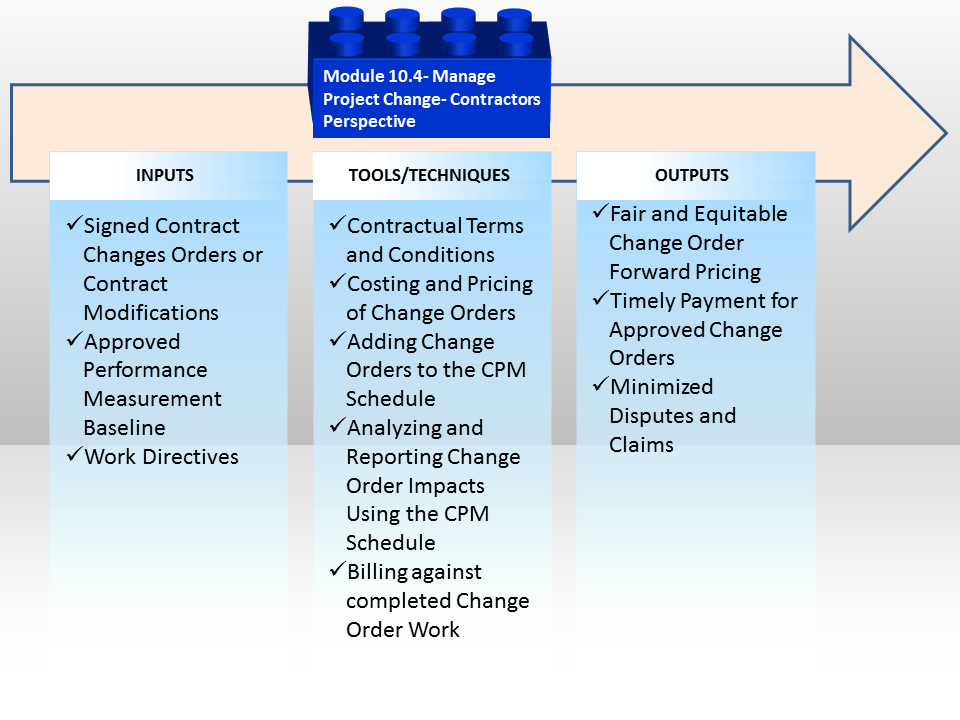
Figure 1 - Managing Change - The Contractor's Perspective
Source: Guild of Project Controls
10.4.1 INTRODUCTION
Managing change from the contractor’s perspective tends to be much more straightforward than trying to manage changes internally within the owner’s organization. The reason for this is all of the standardized contract document sets (i.e. FIDIC, AIA, EJCDC, AGC etc) all contain robust change control processes, designed to withstand legal challenges.
The major problem facing contractors is for them to KNOW the procedure and FOLLOW it, lest by not following the process, they are precluded from claiming a change order they are legitimately entitled to.
Figure 2 below comes to us compliments of the Construction Specifications Institute (CSI USA and CSI Canada) “Manual of Practice- Module 7 Construction”. It illustrates just how complex the change order management system can be and why it is critical that as “subject matter experts” the professional project controller needs to be aware of this process. Ideally by following this process we can avoid at least some of the disputes, especially if they are caused by failing to follow the procedure outlined in the contract documents.
Also important for project control professionals to know and understand is that while this process applies to AIA and EJCDC documents, it may NOT apply to FIDIC, AGC or other contract documents which means the project control professional needs to review the contract documents for each and every project they work on, knowing that the process is highly likely to change.
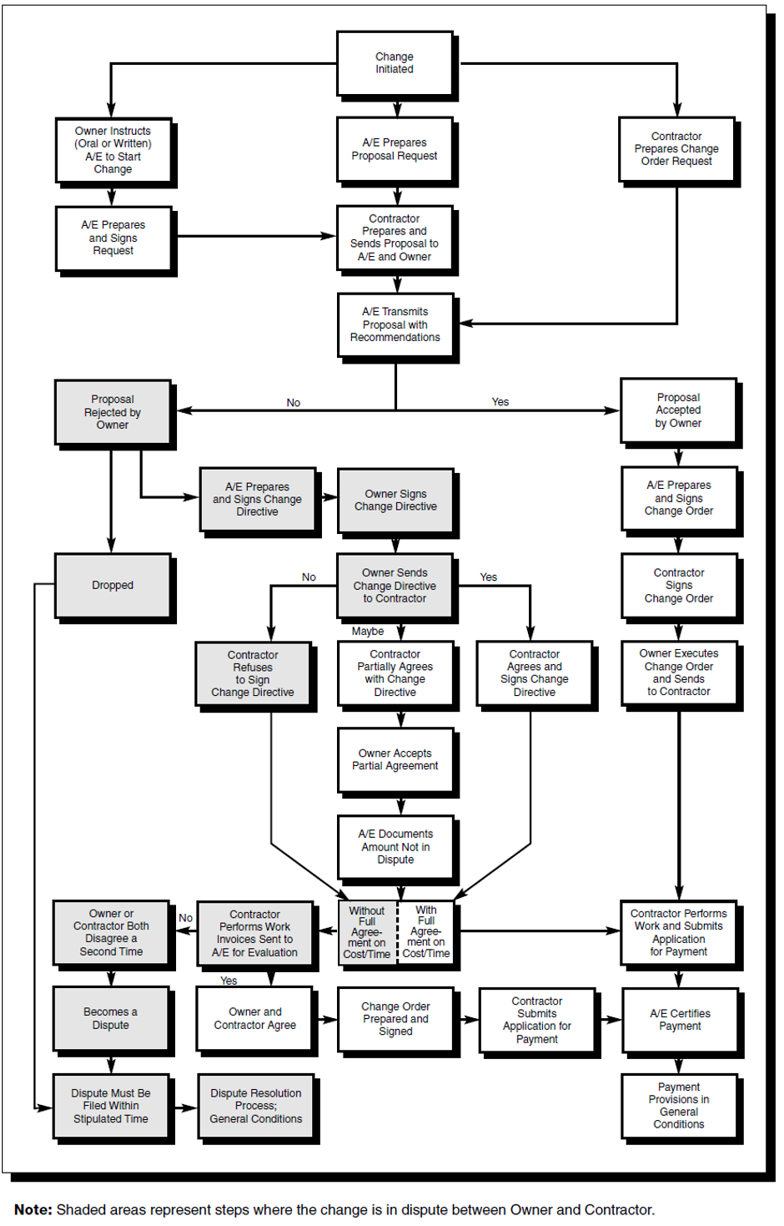
Figure 2 - CSI “Manual of Practice - Module 7 Construction”
Source: Construction Specifications Institute’s Manual Of Practice 5th Edition
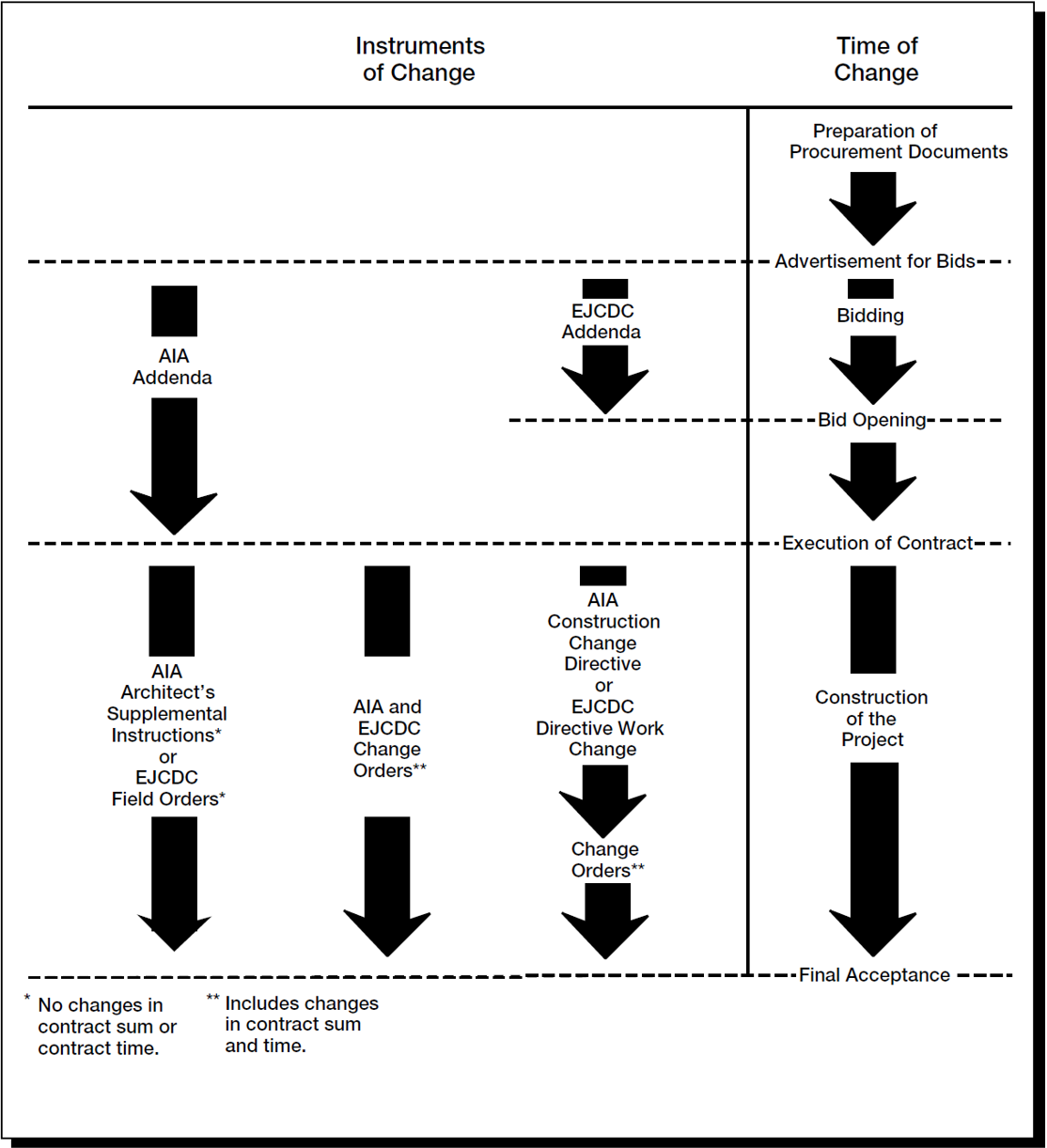
Figure 3 - CSI “Manual of Practice - ”Module 5 Construction Documents”
Source: Construction Specifications Institute’s Manual Of Practice 5th Edition
Referencing the Construction Specifications Institute (CSI USA and CSI Canada) “Manual of Practice- Module 5, Construction Documents” we can see that PRIOR to the start of construction, changes are made through the use of ADDENDA while once the Notice to Proceed has been issued, changes are implemented through the use of “Construction Change Directives”, “Architects Supplemental Instructions” or “Change Orders” (AIA) while using EJCDC documents, the documents used to initiate or authorize change are “Field Orders” “Change Orders” or “Directive Work Change”. This gives you some idea how important it is that the project manager, supported by the control practitioner knows how to read and understand what is in the contract documents.
10.4.2 INPUTS
- Signed Contract
- Approved Performance Measurement Baseline (PMB)
- Approved Change Orders
- Change Directives
10.4.3 TOOLS & TECHNIQUES
10.4.3.1 Contractual Terms and Conditions
Important for contractors to know and understand is that a Change Order is a legal document that serves to amend or modify the contract and while it is encouraged that change orders always be in writing, using the forms provided in the FIDIC, AIA, EJCDC or AGC documents, that the contract can be MODIFIED verbally or even by the actions of the parties. So the project manager and project control team need to be cautioning the field foremen and trade superintendents about following verbal directives or even changing the procedure they are using to install the work.
The next document is a Change Order REQUEST. This normally would be generated by the General or Prime Contractor for and on behalf of himself or any of his subcontractors and vendors, usually in response to ambiguity, conflict or missing deliverable discovered in the contract documents. Understand that this document is, as the name implies a REQUEST for a proposal from the General Contractor to the Owner, containing the price and/or any time impacts, and which may or may not be approved by the owner’s Change Control Board.
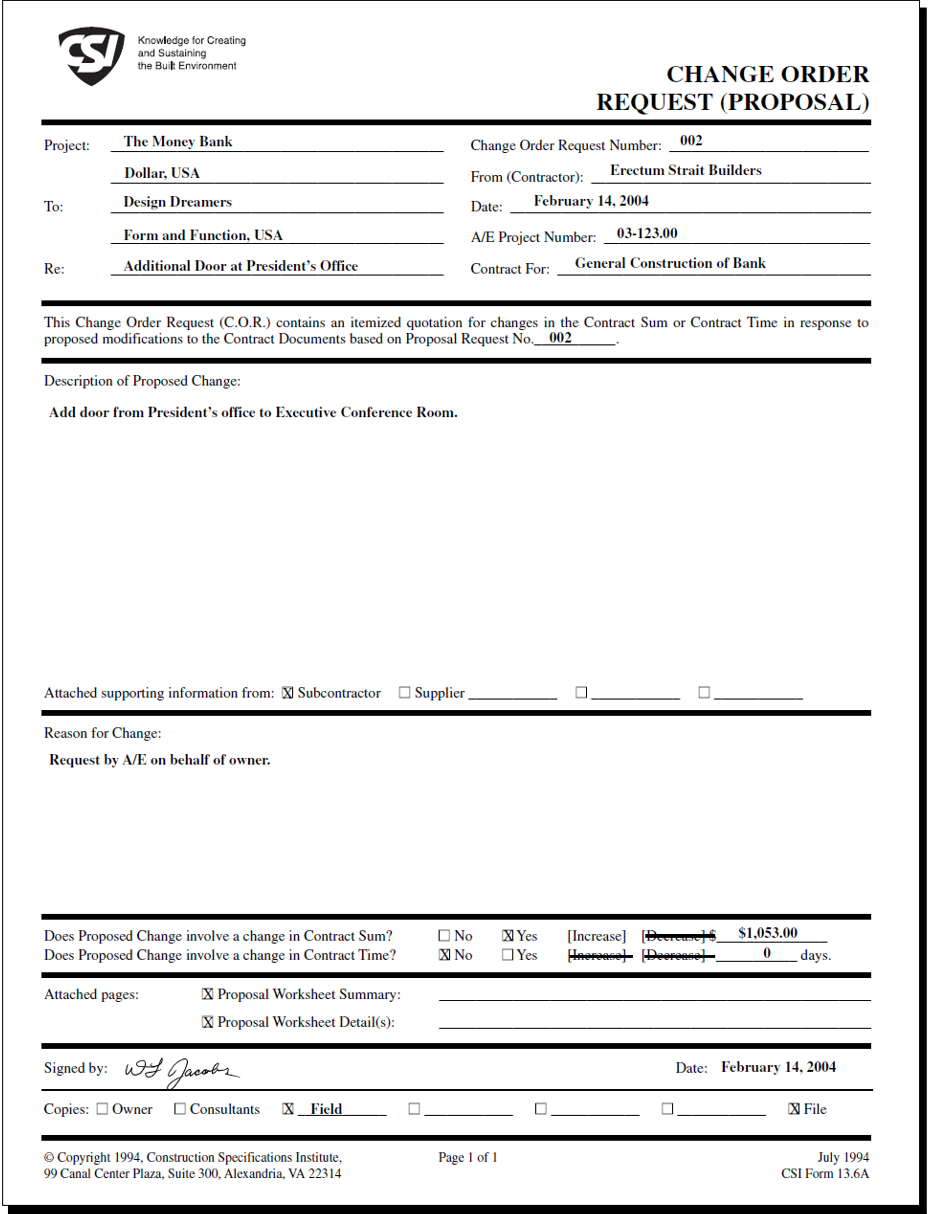
Figure 4 - CSI “Manual of Practice - "Module 7 Construction”
Source: Construction Specifications Institute’s Manual Of Practice 5th Edition
In the event this proposed change order has been approved by the Owner’s Change Control Board, the owner and only the owner can accept it.
Assuming the owner’s Change Control Board has APPROVED this change order request, then the Architect (AIA) or Engineer (EJCDC or FIDIC) issues a Change Order, which has the effect of changing or modifying what was in the contract documents.
Once again it is critical that the project control professional be aware of any and all approved change orders, as he/she needs to update the current schedule to reflect the impact of those changes. Normally, this is best done by leaving the ORIGINAL activity exactly like it was and adding a NEW activity which covers ONLY the scope of work contained in the change order. Explained another way, it is NOT a best tested and proven practice to take an existing activity and modify it to include the changes.
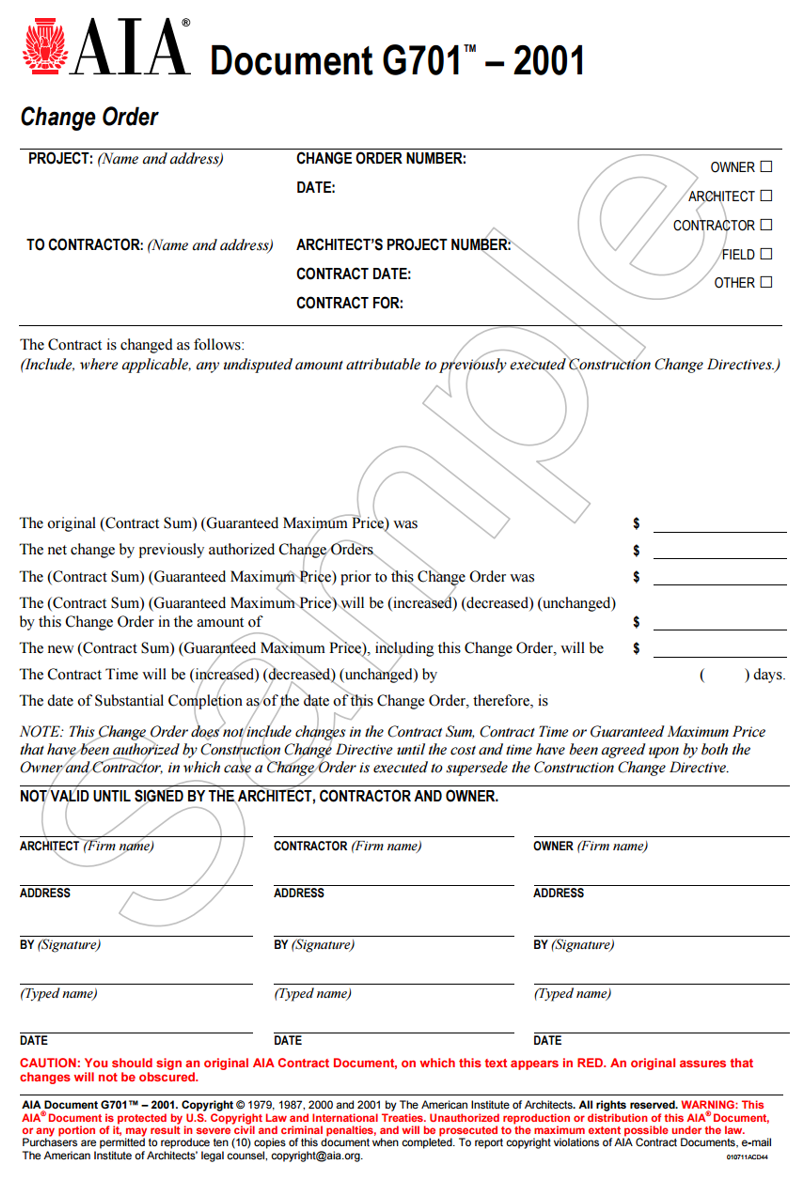
Figure 5 - AIA G-701
Source: AIA Change Order (n.d.)
10.4.3.2 Tracking Change Orders Using Change Order Log
As change orders are a specialized form of both risk and opportunity events which almost always have a direct and often significant impact on both costs and schedule, they need to be accurately recorded and tracked as this information is essential in filing the claim in the first place and especially so in the event the change order becomes a dispute.. Below is a very well done Change Order Log Template coming to us from Viewpoint Software which the Guild has adopted as a “best in class” example.
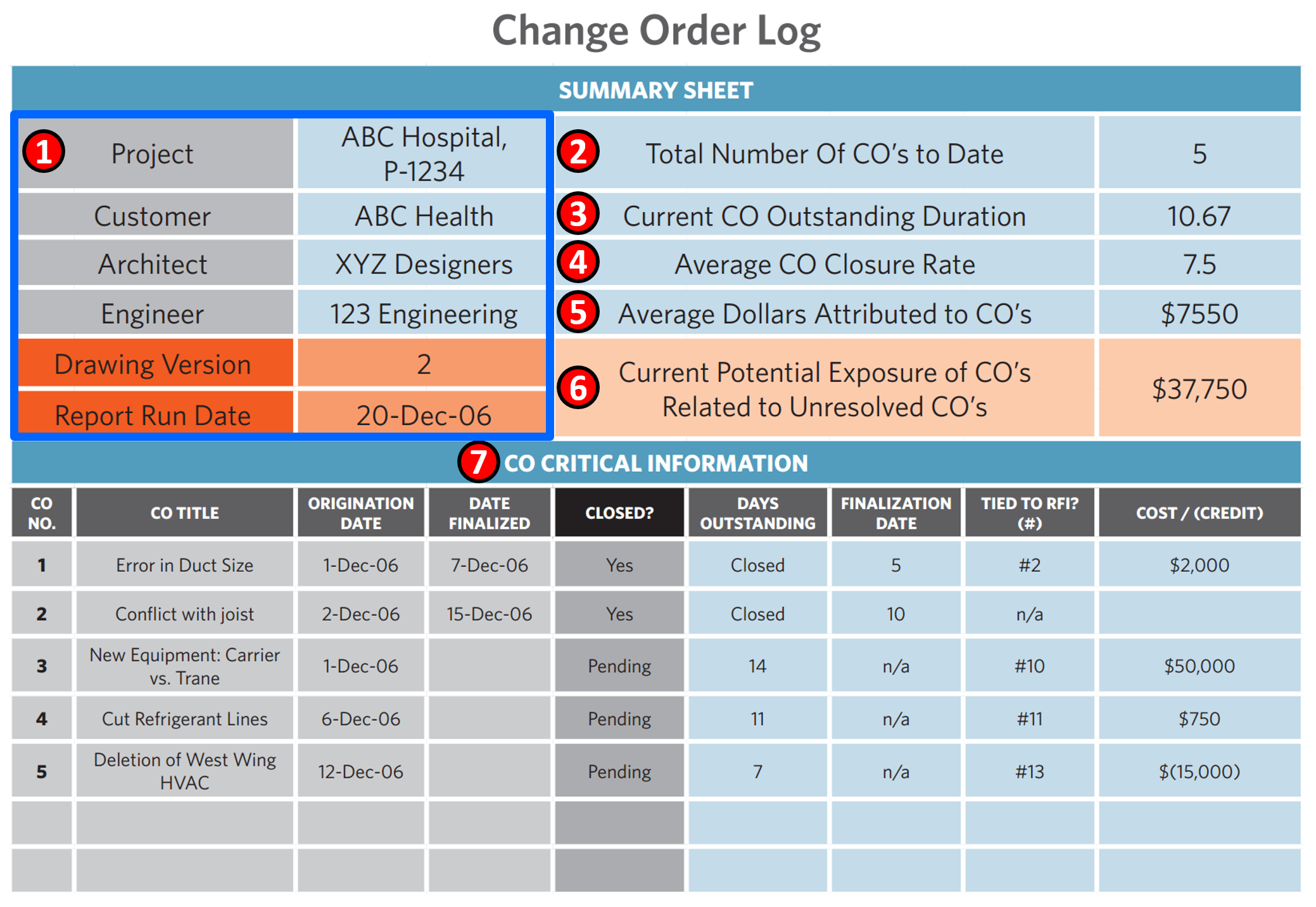
Figure 6 - Change Order Log Template
Source: Viewpoint Construction Software (2015) “Developing a Proactive Change Order Management Strategy to Manage Risk and Avoid the Paradox”
To be considered complete, a Change Order Log should contain the following Information:
(1) Project Information- including the key stakeholders and decision makers
(2) Total Number of Change Orders to Date- This information is important if the contractor expects to be able to claim damages for “cumulative impact” (For more on Cumulative Impact see Module 12- Managing Forensic Analysis)
(3) Current Change Order Duration- This is important as it serves to back up any claims or support that the open change orders caused or are causing a delay to the critical path or that the activity became critical because of a delay in approving the open change orders.
(4) Change Order Closure Rate- This is another important piece of information as it serves as a benchmark of how promptly change orders have been processed in the past vs how long it is taking to process the current open change orders. As with any benchmark, the objective in capturing and publishing this information is to see if there is continuous process improvement or is the process getting worse in terms of processing TIME.
(5) Average Monetary Value of Change Orders to Date- This gives both the owner and contractor a monetary benchmark against which to compare the current trends vs what happened in the past. As with any benchmark, the objective in capturing and publishing this information is to see if there is continuous process improvement or is the process getting worse in terms of trying to reduce the COST IMPACT of change orders.
(6) Current Exposure to Open Change Orders- This is the cumulative backlog of change orders which, for whatever reasons remain “in process” and not resolved.
(7) Individual Change Order Status Information- While the top part of this sheet provides us with a summary to date of all change orders, the lower half provides both the owner and contractor with specific information.
The GPC also recommends that in addition to the information shown in the template above, that both contractors and owners would be wise to include the following additional information:
- Work Package or Activity ID
- Impacts to Float or to the Critical Path
- References to specific documents or design drawings or design details
As change orders tend to be contentious and often lead to disputes, the contractor especially needs to be proactive in managing the change order process both to mitigate his/her own downside risk of losing money on the project as well as the opportunity to use the change orders to enhance his/her profit margin.
10.4.3.3 Costing and Pricing Change Orders
The costing and pricing of change orders is identical to the “bottom up” or “Activity Based Costing” (ABC) we learned about in Module 8- Managing Cost Estimating and Budgeting with one major and very important exception- Change order work will often cost 10 to 15 percent more than if it had been included in the original bid. This is for several reasons:
- Lack of a competitive environment.
- Inability to easily fit the change into the existing schedule.
- The inordinate amount of paperwork and distraction experienced by the contractor.(Interrupted work flow and/or out of sequence progress, not to mention the potential risk of rework)
Other than the mark-ups, the direct costs (labor, materials, equipment and subcontractors) are estimated exactly the same way as are the project indirect costs. Many “standard form” contract documents (i.e. FIDIC, AIA, EJCDC and ConsensusDocs et al) address and/or actually specify what mark ups the contractor is entitled to use for change order work.
Typical mark-ups:
- Labor 10% to 30%
- Materials 10% to 20%
- Equipment 10% to 20%
- Subcontractor work 5% to 20%
Engineer Joint (EJCDC) Contract Mark-ups:
- Labor 15%
- Materials & Equipment 15%
- Construction Equipment 15%
- Subcontractor work 05%
AIA and Consensus Documents do not specify specific percentages other than to state they need to be “fair” and “reasonable” both of which opens the door to claims and disputes.
Other contracts provide us with some guidance:
New York City NYC Contract Mark-ups:
- Labor 8% to 10%
- Materials & Equipment 8% to 10%
- Construction Equipment 8% to 10%
- Profit 10%
California Transportation Department (CalTrans):
- Labor 33%
- Materials 15%
- Equipment 15%
- Subcontractor work 5%
Florida Department of Transportation (FDOT):
- Labor 17.5%
- Materials & Equipment 17.5%
- Construction Equipment 17.5%
- Subcontractor work 10% for first $50,000, 5% for amounts > $50k + Bond Costs
Keeping in mind that these are GROSS margins, it seems that the following mark-up ranges would be considered to be “fair and reasonable” bit again, it depends on the project and the specifics involved:
- Labor 10% to 30%
- Materials 10% to 20%
- Equipment 10% to 20%
- Subcontractor work 5% to 20%
10.4.3.4 Adding Change Orders to the CPM Schedule
To add a change order to a project, the “best recommended practice” is to ISOLATE the change order from the related work.
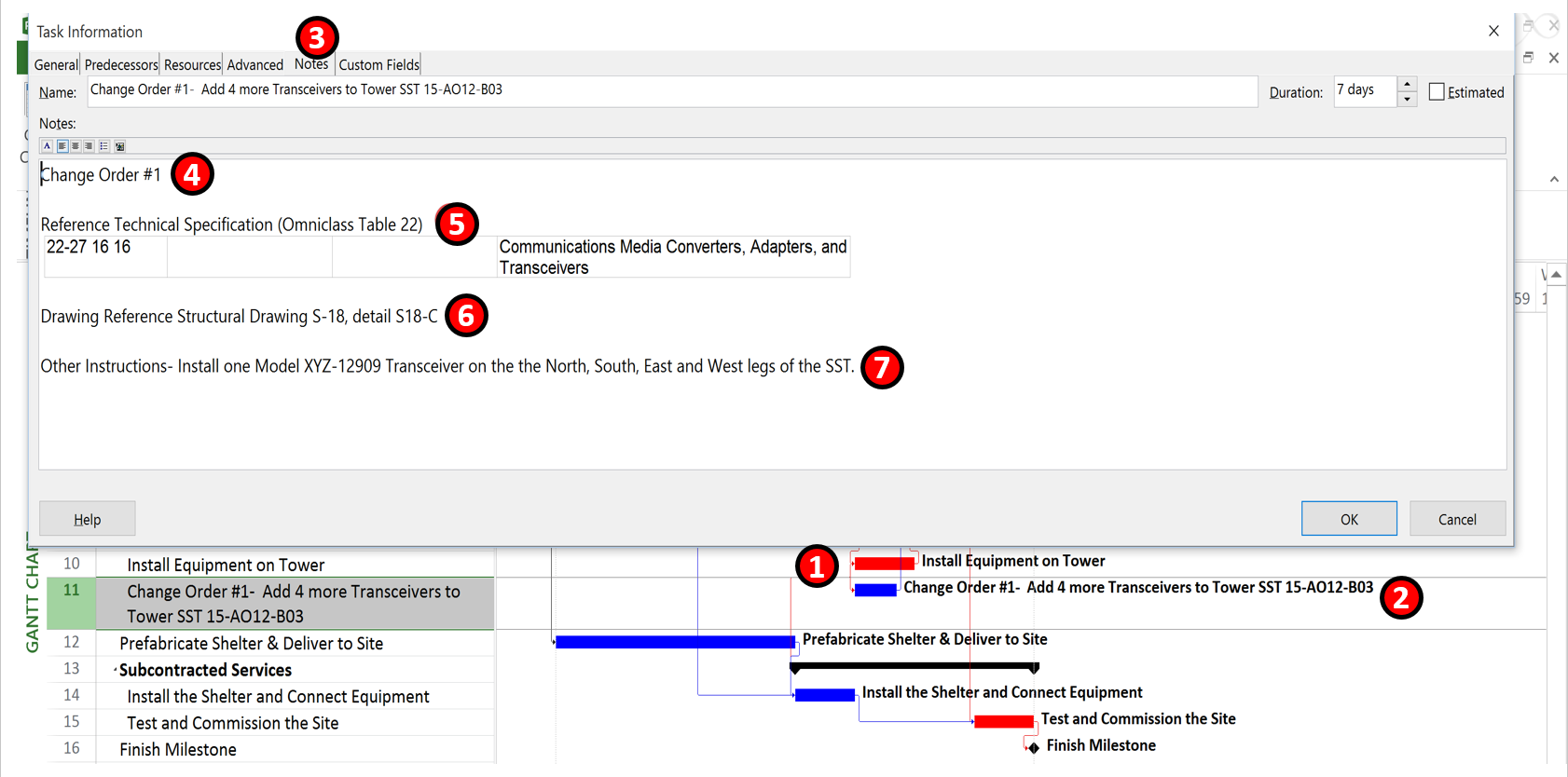
Figure 7 - How to add a Change Order to a CPM Schedule
Source: Giammalvo, Paul D (2015) Course Materials Contributed Under Creative Commons License BY v 4.0
For example we are constructing, installing the equipment, testing and commissioning a 70 meter tall 4 leg communications tower (SST) and the owner wants to add more equipment. Here is how it would be set up:
(1) Start with the original activity
(2) ADD the NEW ACTIVITY which represents the change. Make certain that this activity is cost and resource loaded. Also make certain that the LOGIC is entered correctly. In this example, we have added another crew to do this installation which means it can be “fast tracked”, thus not impacting the schedule. Had we used the same crew, then it would have had to be done using a FS relationship which, because the equipment installation is on the critical path would have impacted the completion date.
NOTE that by “cost loading” the activity (Activity Based Costing (ABC)) at the appropriate level of detail, the IMPACT of the change order as of the date it was approved, is transparent to all parties, and it enables the owner to analyze whether the schedule does or does not need to be Rebaselined or that a “Recovery Schedule” needs to be required in order to meet the original contractual completion dates.
(3) We then open the activity fields up to the NOTES feature where we can record at MINIMUM the following information:
(4) Change Order Log Number
(5) Reference to the Technical Specifications
(6) Reference to Drawing Numbers and Drawing Details or any other relevant CONTRACT DOCUMENTS
(7) Any additional or supplemental information that the field crew doing the work might need to know.
10.4.3.5 Analysing and Reporting Change Order Impacts Using the CPM Schedule
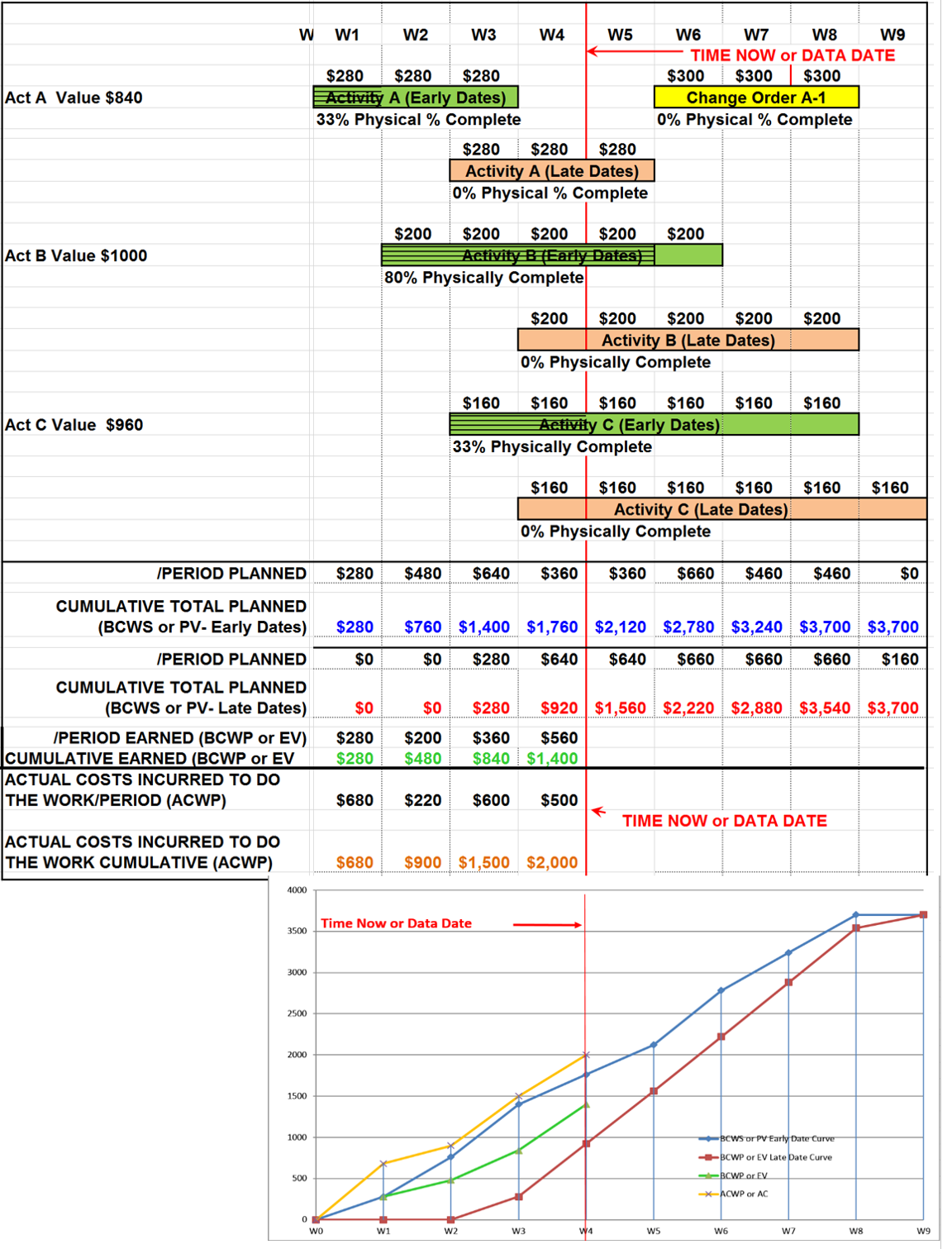
Figure 8 - Case Study Modified to Show Change Order #1 to Activity A in the amount of $900
Source: Giammalvo, Paul D (2015) Course Materials Contributed Under Creative Commons License BY v 4.0
Taking the above case study we can see that consistent with best tested and proven practices, we have an approved change order #1 for Activity A but instead of modifying the original Activity A, what we did was add the change order.
- This makes it very easy to see the impact of change orders on the project.
- A very powerful tool when we get to the module on Forensic Analysis, is to simply sort out the change order activities and it is sometimes shocking and very powerful graphic to show judges and juries just how frequently a project was experiencing change orders, especially if those change orders fall on the critical path.
10.4.3.6 Rebaselined CPM Schedule
Taking the same case study, we have now updated it to the end of W5 (instead of W4 as shown above).
During the period between the end of W5 and the start of W6 this is what has happened:
(1) We finished the last two weeks’ worth of work on activity A (Now 100% complete)
(2) We added a new Activity Change Order #1 which goes with Activity A per the approved change order;
(3) No change in Activity B, still 80% complete;
(4) Another 16% for Activity C (now 50% complete)
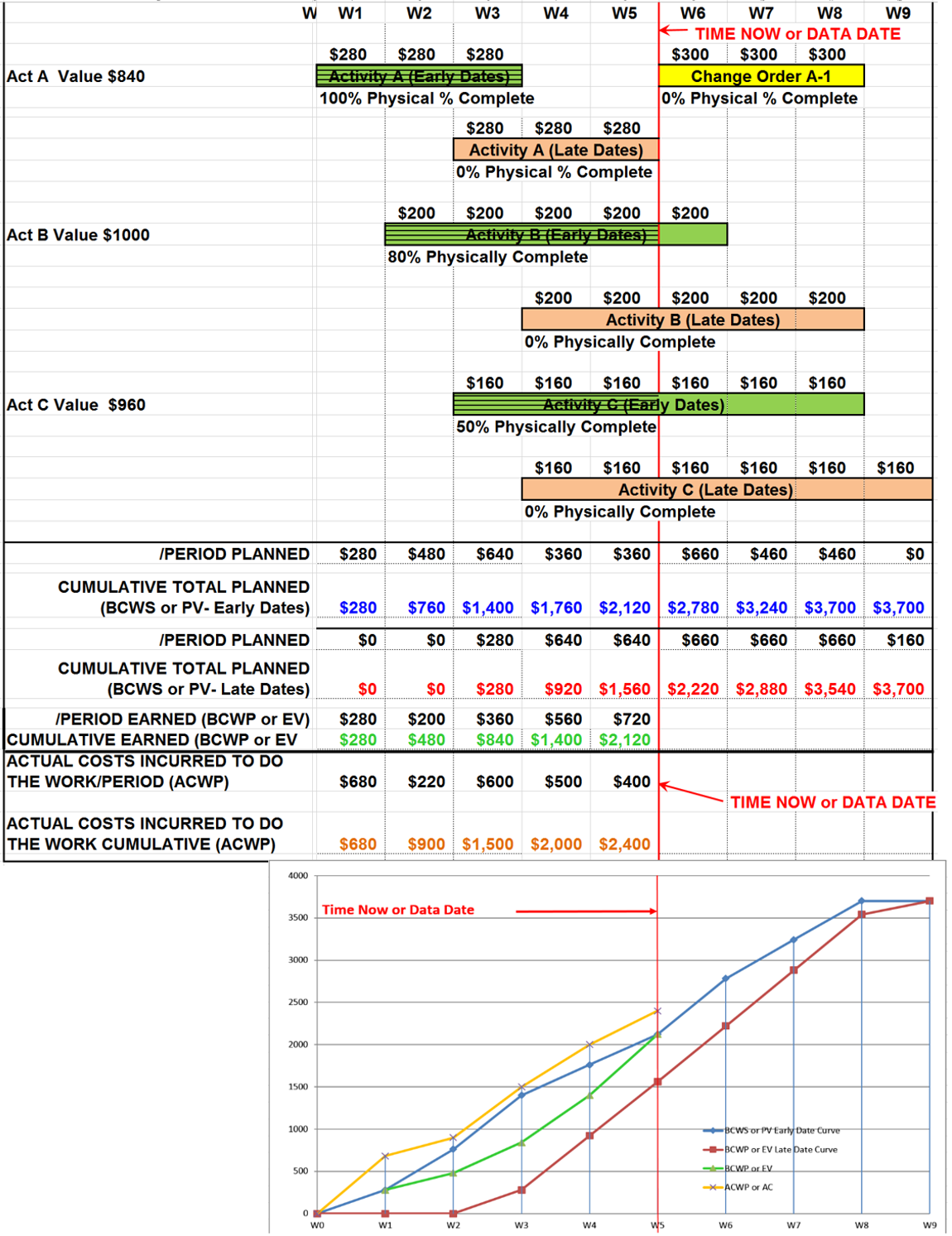
Figure 9 - Case Study Above Updated to Show What the Scurve Looks Like at End of W5
Source: Giammalvo, Paul D (2015) Course Materials Contributed Under Creative Commons License BY v 4.0
And this is what the updated S curve looks like at the end of W5.
At some point in nearly all schedules, what the schedule is showing has changed so much from the reality of what is happening in the field, that we have no choice but to REBASELINE the schedule and try as realistically as possible to show what the plan is to complete the REMAINING WORK.
What project controls practitioners need to know and remember is NEVER GO BACK AND CHANGE HISTORY, unless an honest error was made in either the ACWP or BCWP. The BCWS Early and BCWS Late dates should also never be adjusted, once they are baselined.
There are 3 methods we can use to REBASELINE a schedule:
(1) Using this method, (as we did in the example above) we update the schedule to the point where the change order is scheduled to start and leaving the ACWP, BCWP, BCWS Early and BCWS Late dates unchanged from W0 to W5, then we simply add the change order to the existing baseline.
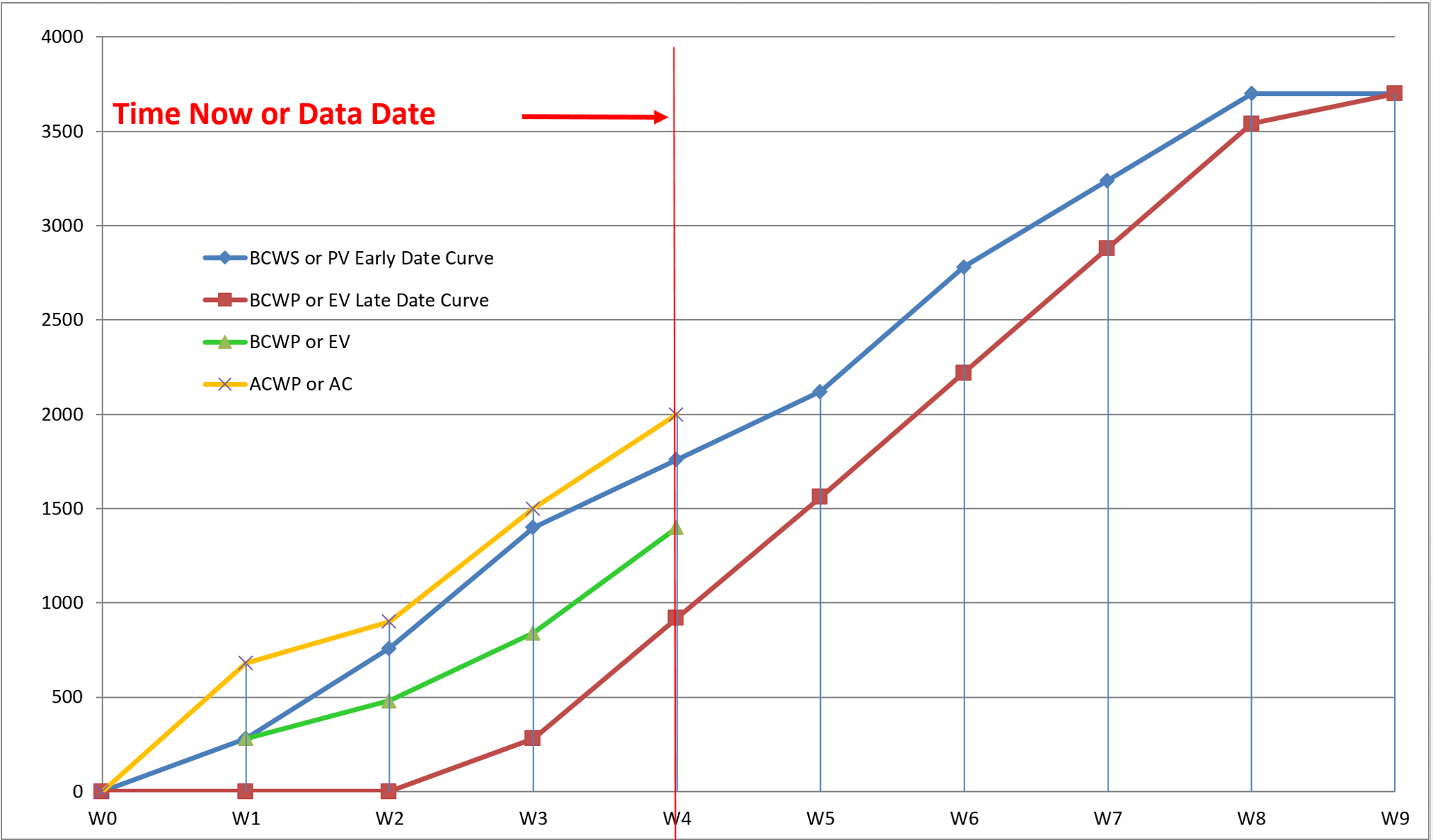
Figure 10 - Rebaseline Method 1- Do NOT change past history, but add in the approved change order from W5-W8
Source: Giammalvo, Paul D (2015) Course Materials Contributed Under Creative Commons License BY v 4.0
The weakness in using this method is we cannot really see to clearly what impact the change order has made in the schedule, even though we know it is in there.
(2) In the second method, we maintain the past history up until the end of W5 and then on the first day of W6, we add in the impact of the change order. Thus we added $300 to the BCWS Early and BCWS Late date curves, clearly showing the impact to the BCWS curves with the addition of the change order and the remaining BCWS Early and Late Date curves reflect the rest of the change order spread over an additional two weeks.
For contractors especially this is a powerful way to show the impact of change orders in the event you need to arbitrate or litigate to settle any claims.
If every month there are “jumps” or “stair steps” in your S Curve, it clearly tells the story of an owner who for whatever reason, didn’t do a good job on their scope definition.
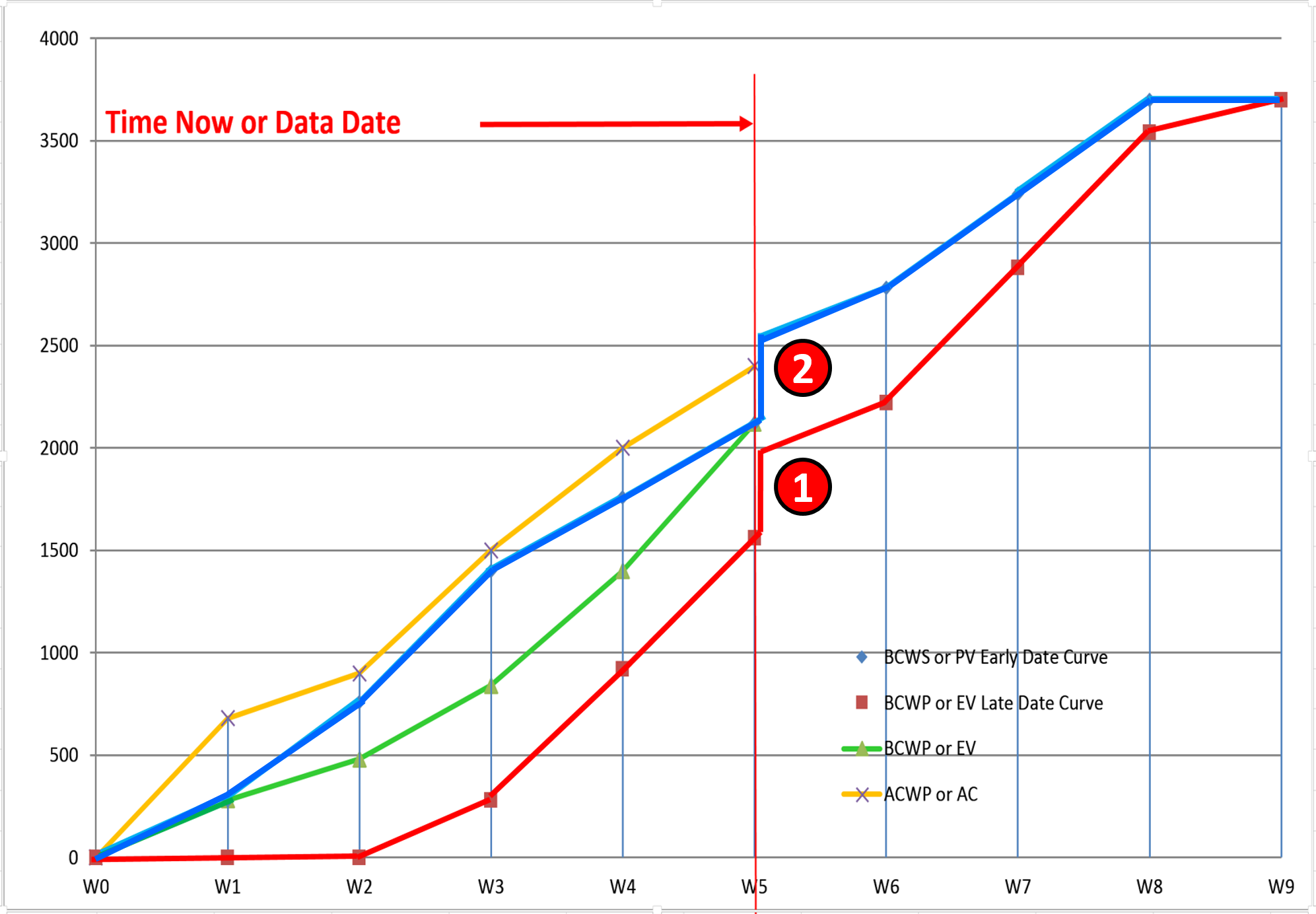
Figure 11 - Rebaseline Method 2- Do NOT change past history up until the end of W5, then add the Change Order starting the beginning of W6
Source: Giammalvo, Paul D (2015) Course Materials Contributed Under Creative Commons License BY v 4.0
As you can see this is a very powerful way to show the impact of a single large or many smaller change orders, especially if it happens every reporting period over an extended period of time.
This is especially powerful tool for contractors who are trying to prove the “cumulative impact” of change orders. If you produce curves showing that each and every report period the owner is making changes to the project, makes a compelling argument that not only are you entitled to claim the value of all the change orders but an additional amount due to the delay and disruption caused by so many change orders.
(3) In the third method, which is known as the “Zero Based Budgeting” method, as we did before, we do NOT change past history. But now, given the only piece of factual information we have is the ACWP, at the end of W5 we set the BCWS Early, the BCWS Late and the BCWP = to the Actual Cost of Work Performed (ACWP) Then we schedule the remaining work from W5 though to either W8 (early dates) or W9 (late dates). In effect, what we have are two separate projects- the “old” or original project from W0-W5 and the “new” project consisting of any work not done before W5 plus the remaining work from W6 to W8 or W9.
Often owners prefer this method for while it does not change past history, it tends to provide the most realistic schedule for the remaining work. This method is often used for what are called RECOVERY SCHEDULES, either to maintain the original completion date or to reflect the plan of action to complete on a revised completion date, either earlier or later than the original completion date.
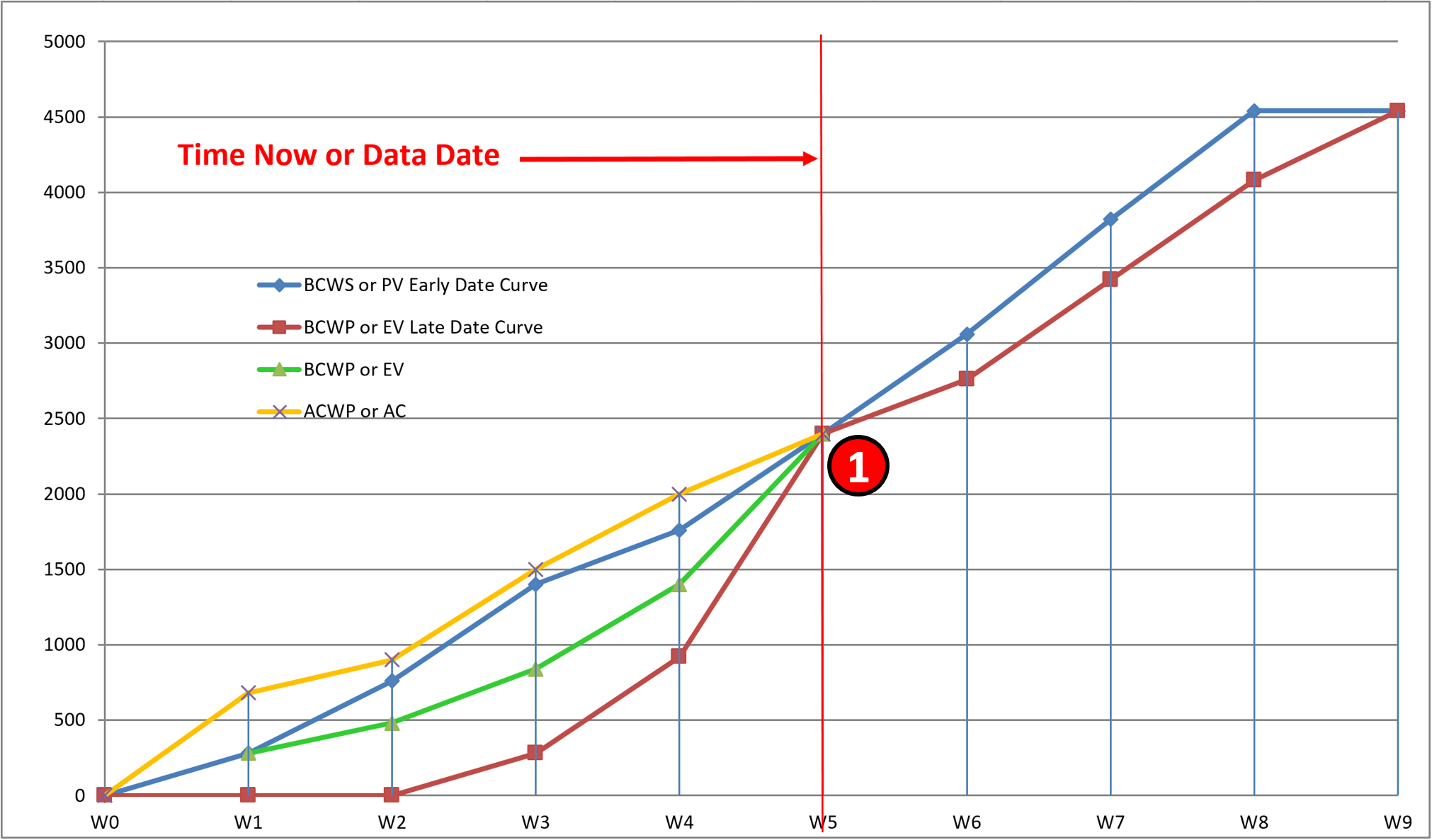
Figure 12 - Showing the Zero Baseline Budgeting Method of Recording the Impact of Approved Change Orders
Source: Giammalvo, Paul D (2015) Course Materials Contributed Under Creative Commons License BY v 4.0
In this example, we can see that all we did was set the BCWP early and late date curve = to the ACWP as of the Rebaseline date creating a NEW BCWS early and late date curve which INCLUDES not only the impact of the change order but also the value of any work which was not completed up to the data date.
Explained another way, using this method tends to bury or hide the impact that change orders have had on the project looking only at the value of the remaining work over the remaining time.
Effectively, we have two projects. The project up to the point where it was REBASELINED and a substantially NEW project moving forward from the date of rebaselining to the completion date. IF there have been a substantial number of changes and the project as being built is no longer close to what was originally planned, this is often the best or better approach, recognizing that it tends to hide or mask the impacts of each change order over time.
10.4.3.7 Billing against completed Change Order Work
As we know from Module 09.3 - Capturing Progress & Updating the Schedule we bill for Change Order Work just as we would bill for regular work, based on the activity. Which is another reason for naming the change orders as such.
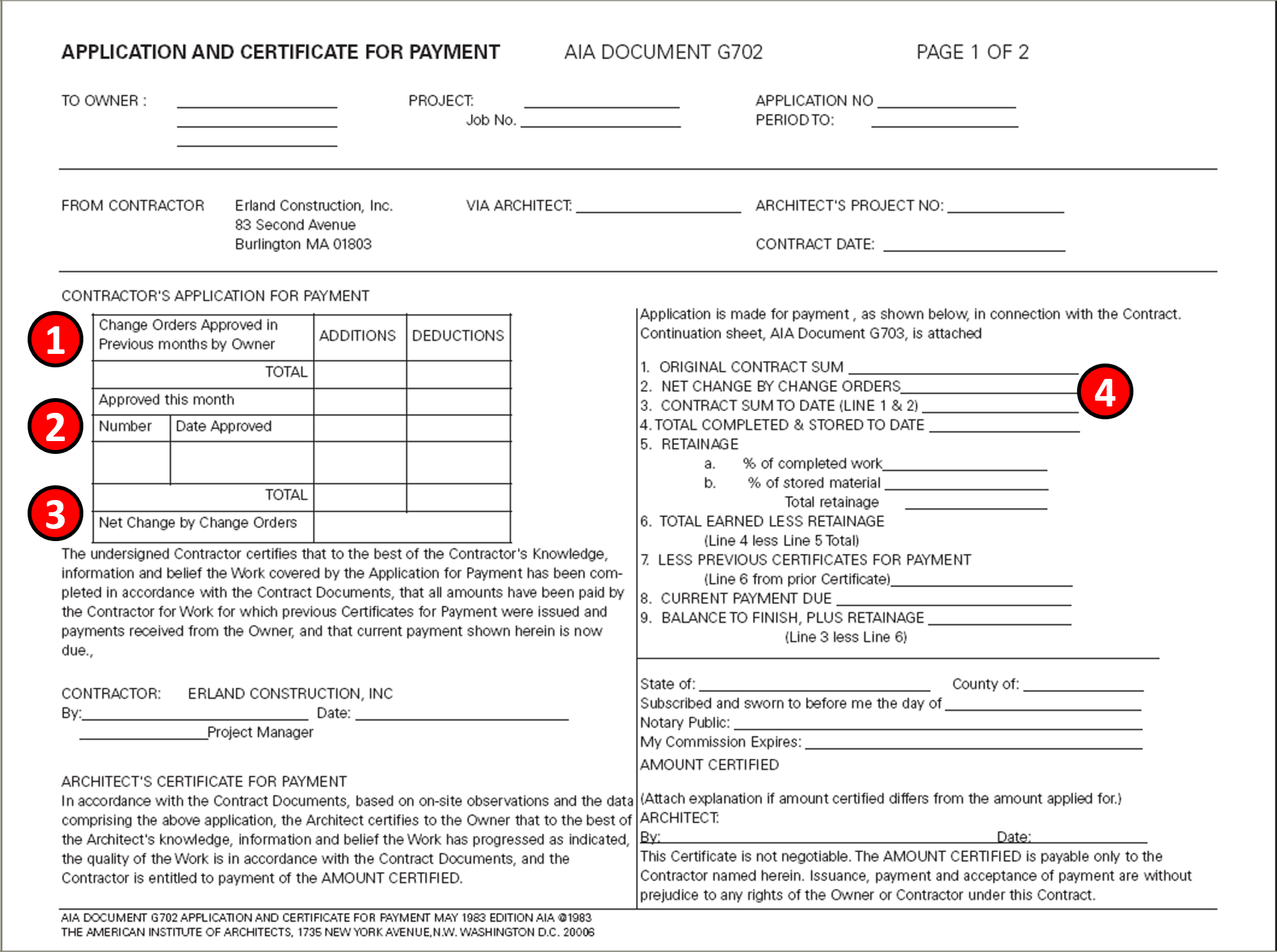
Figure 13 - AIA Document G702 Application and Certificate of Payment (Page 1 of 2)
Source: Adapted from AIA Form G702 Application for Payment
As we can see from AIA Document G702, Application for Payment, the documentation and approval project for Change Orders plays an important role in the periodic billings.
1) As part of the billing process, the contractor must show the approved change orders in previous periods. 2) The number and individual value of change orders approved this period 3) The number and total value of change orders to date.
All this information needs to come from the Change Order Log which should be kept by both the onwer and contractor which cross references not only the activities impacted but the approval documents.
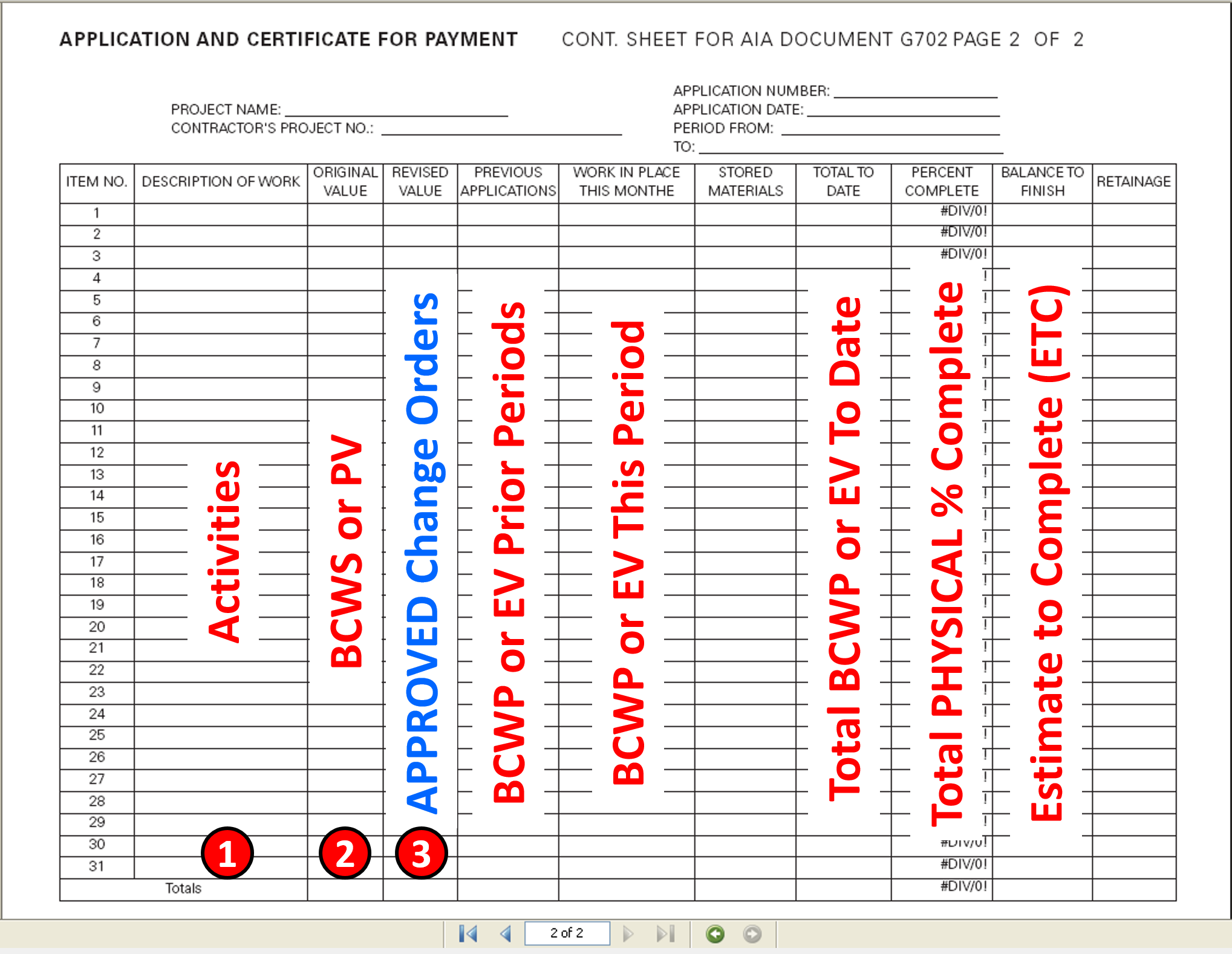
Figure 14 - AIA Document G702 Application and Certificate of Payment (Page 2 of 2)
Source: Adapted from AIA Form G702 Application for Payment
Because the Guild does NOT believe it is a “best tested and proven” practice to MODIFY existing activities by adding the impacts of change orders to existing activities, but to create separate activities for each change order, when filling in page 2 of AIA Document G702 (or your local equivalent) you need to:
(1) ADD a new Activity called Change Order # nn (linking it to the Change Order Log and/or Activity ID)
(2) then in the Original Value (BCWS or PV) it would be 0 (zero) indicating this was NOT in the original approved baseline) and
(3) then in the Revised Value, you would enter in the value of the approved change order, including contractors OH&P
While this level of detail could result in more than one page of activities being billed during a single billing cycle, by billing from the activities on the schedule forces the contractor to reference the approved baseline schedule when executing the work as well as serving to protect both owners and contractors alike, by documenting in detail which activities actually where completed during any given billing cycle and which were accepted by the owner as being complete, based on their approving payment for these activities. Thus if and when there is a dispute, this document serves as the best single source of evidence to use for any of the “Time Frame Analysis” or “Measured Mile” methods.
10.4.4 OUTPUTS
- Fair and Equitable Change Order
- Forward Pricing Timely Payment for Approved Change Orders
- Minimized Disputes and Claims
10.4.5 REFERENCES & TEMPLATES
- FIDIC documents- http://www.ebrd.com/downloads/procurement/project/mdbgcv3unprotected.pd…;
- AIA documents- http://www.aia.org/contractdocs/
- EJCDC documents- https://www.ejcdc.org/shop/
- AGC documents- http://www.nibca.net/documents/agc_at_a_glance.pdf
- CONSENSUS docs- http://www.wklawbusiness.com/store/products/consensusdocs-contract-docu…
10.5 - Module 10-5 - Configuration Management
GPCCAR M10-4, Revision 1.03