11.0 - MANAGING PROJECT DATABASES
11.1 - Module 11-1 - Introduction to Managing Project Databases
11.2 - Module 11-2 - Develop the Managing Project Databases Policies and Procedures Manual
11.3 - MODULE 11-3 - DESIGNING THE PROJECT DATABASE(S)
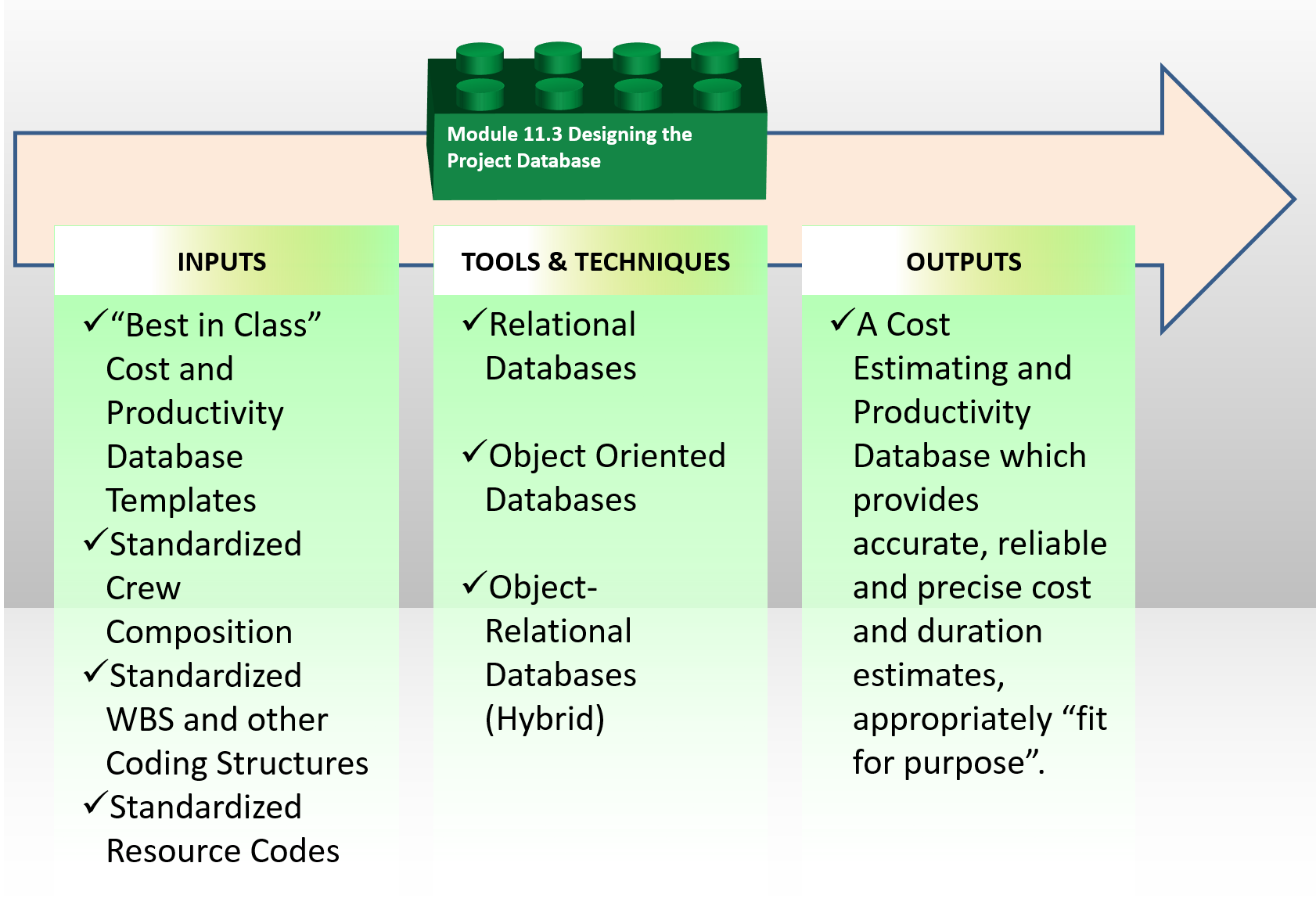
Figure 1 - The Designing the Project Databases Process Map
Source: Guild of Project Controls
11.3.1 - INTRODUCTION
Designing the Project Database is perhaps one of the most important steps in creating a useable (complex) project database. Given we are moving towards the use of Building Information Modelling and more sophisticated and demainding projects, the three most logical options would be to choose from the following database types:
- Relational Databases : Computer database in which all data is stored in Relations which (to the user) are tables with rows and columns. Each table is composed of records (called Tuples) and each record is identified by a field (attribute) containing a unique value. Every table shares at least one field with another table in 'one to one,' 'one to many,' or 'many to many' relationships. These relationships allow the database user to access the data in almost an unlimited number of ways, and to combine the tables as building blocks to create complex and very large databases.
- Object-Oriented Databases: A database specifically designed to work in an object oriented programming environment, where data of various types may be stored, including text, graphics, sound, and video, and it provides database management system capabilities to objects (3) created by object-oriented programming languages. Its abbreviation is OODB. Also called object database.
- Object-Relational Databases: A hybrid model, combining features of the relational and object-oriented models.
11.3.2 - INPUTS
- “Best In Class” Cost And Productivity Database Templates
- Standardized Crew Composition
- Standardized WBS And Other Coding Structures
11.3.3 - TOOLS & TECHNIQUES
11.3.3.1 Designing Database Codes
As we know from our exploration of database elements it is essential that every item has a unique identifier known as a Key Field.
Meaning one of the first challenges we face is to establish a coding structure, preferably one which has been standardized and ideally been done so across your industry and is not just unique to your organization. As we are using R.S.Means and the CSI/ISO Omniclass Tables as representing what the Guild believes to be good examples we will use those for our case studies. However there may be other coding structures, especially in other industries which may be used instead of these examples.
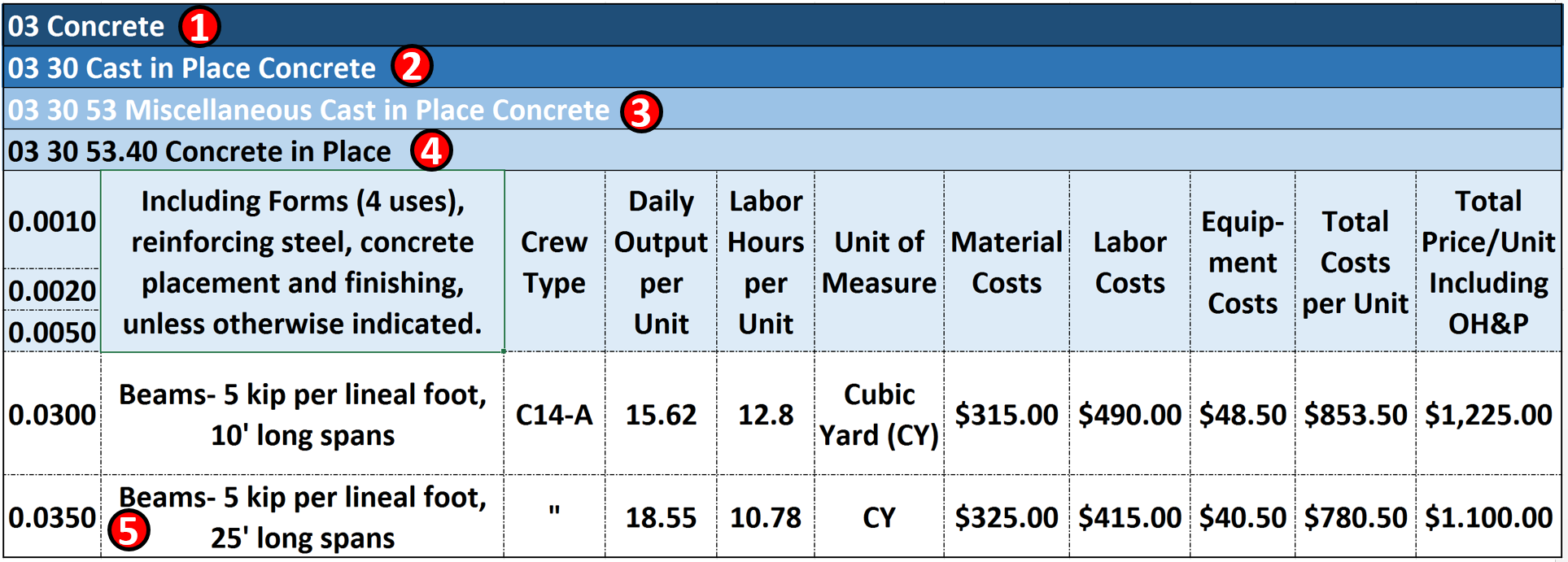
Figure 2 - R.S Means Database Coding Structure Explained
Source: Giammalvo, Paul D (2015) Course Materials Adapted from R.S. Means 2008 Facility Cost Estimating Database. Contributed Under Creative Commons License BY v 4.0
The example above illustrates the levels of detail that most CONTRACTORS would normally develop and maintain for their bids, estimates and projects and databases which is why these coding structures are critical if we want to be able to maintain Vertical Integration capabilities so that the owners can “roll up” the contractors detailed cost estimates for their own use down to Level 3 minimum or more ideally, Level 4.
- 03 is CSI’s Level 1 WBS. Using CSI’s Masterformat or Omniclass Table 22, Division 03 covers all concrete work.
- 03 30 is CSI/Omniclass Level 2. For this example 03 30 is only concrete which is cast in place.
- 03 30 53 is CSI/Omniclass Level 3. In this example 03 30 53 covers miscellaneous cast in place concrete. This is the MINIMUM level of detail that OWNERS should be providing to CONTRACTORS in the contract documents.
- 03 30 53.40 is the CSI/Omniclass heading that covers Miscellaneous Beam Concrete in Place. This is the IDEAL or RECOMMENDED Level of Detail that OWNERS should be providing to CONTRACTORS in the contract documents.
- 03 30 53.40.0350 This is the Activity level of detail that the contractor would be developing from the contract documents provided by the owner. Now if there were more than ONE of these same activities (in other words if there were several different places in the project which required the Forming (0.0010); Installing Rebar (0.0020) and Placing and Finishing Concrete (0.0050) 25’ Span Beams then the contractor would add another level of code. Let’s say there are 3 places on the project where this happens. Then 03 30 53.40.0350.1000 would be the coding structure that the contractor would likely use to identify the first locaton, 03 30 53.40.0350.2000, would be the coding structure that the contractor would likely use to identify the second locaton and 03 30 53.40.0350.3000 would be the coding structure that the contractor would likely use to identify the third and final locaton
11.3.3.2 Designing Database Structures
Having explained the coding structure, let’s explore what a well established time, cost and productivity database might look like.
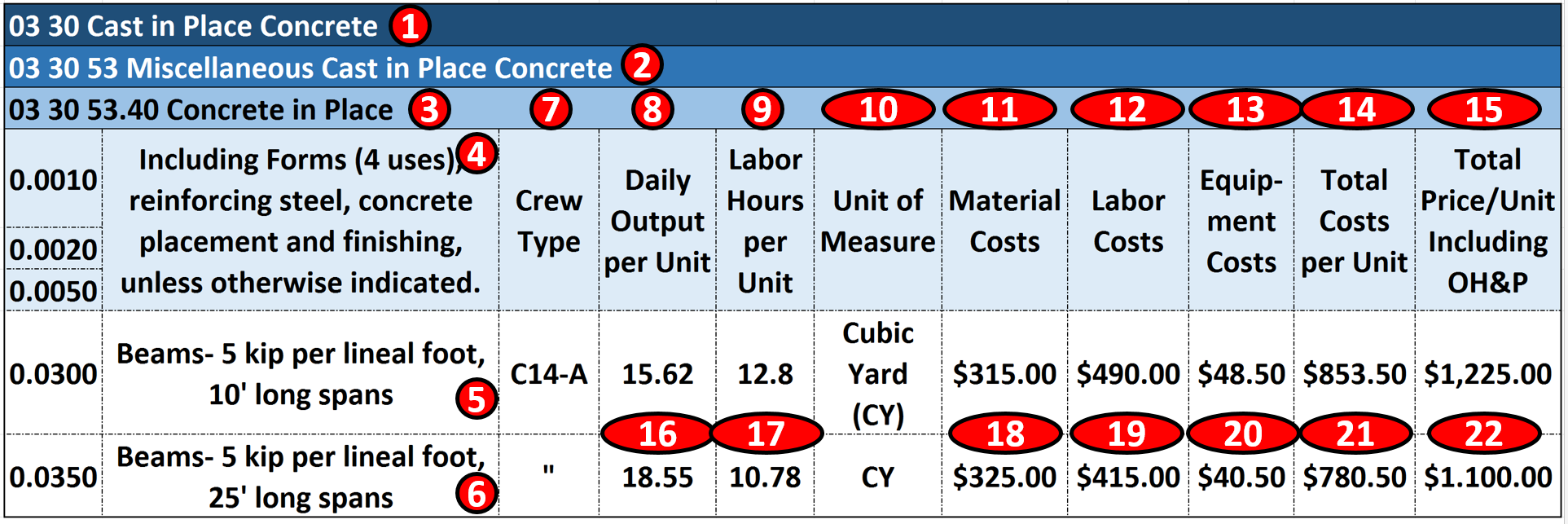
Figure 3 - Case Study Using Commercial Database Information
Source: Giammalvo, Paul D (2015) Course Materials Adapted from R.S. Means 2008 Facility Cost Estimating Database. Contributed Under Creative Commons License BY v 4.0
In the example above, which shows a classic example of Activity Based Costing (ABC) at Level 4, 5 or 6 commonly used by contractors but also shows how using, in this case, Masterformat or Omniclass Table 22, the activity costs can be “rolled up” to whichever level is deemed appropriate or necessary for use in “Rolling Wave Planning”. (For more on the importance of these coding structures, see also Modules 7.10, Managing Horizontal and Vertical Traceability (Time) and Module 8.8- Managing Horizontal and Vertical Traceability (Costs):
- 03 30 Cast In Place Concrete is CSI Masterformat/Omniclass Table 22 2nd Level WBS Structure. (Level 1 is 03 is Concrete and Level 2 is 03 30 is Cast in Place Concrete)
- 03 30 53 Misc Cast in Place Concrete is CSI Masterformat/Omniclass Table 22 3rd Level WBS (Level 1, 03 is Concrete, Level 2, 03 30 is Cast in Place Concrete)
- 03 30 53.40- Concrete in Place is CSI Masterformat/Omniclass Table 22 Level 4 WBS, which from this level down becomes not only a WBS but a Cost Breakdown Structure (CBS) and Productivity Breakdown Structure (PBS) as well. One coding structure serving three purposes. Worth noting is Level 3 of the WBS is the MINIMUM level of detail that an owner should be providing to a contractor, assuming the owner wants to minimize claims and disputes while at the same time, obtaining highly competitive bids.
- 03 30 53.40.0010, 03 30 53.40.0020 and 03 30 53.40.0050 is an ACTIVITY consisting of Forming (0.0010); Installing Rebar (0.0020) and Placing and Finishing Concrete (0.0050)
- There are two types of Activity “03 30 53.40.0300 is based on 10’ (foot) long spans” and Activity “03 30 53.40.0350 is based on 25’ (foot) long spans”. Depending on the number of scenarios, you could create other cost and productivity calculations for as many different combinations as you are likely to use.
- For the remaining example we will be using Activity 03 30 53.40.0350 to form, reinforce, place concrete and strip 25’ long, 5 kip (5,000 lbs) beams. Notice that the only piece of information MISSING from this is the Quantity Take Off or Bill of Materials? When we start to use Building Information Modelling (BIM) this information will be coming to us, using these coding structures. If we do not use BIM, then we have to do it the old fashioned way- doing quantity take offs using manual methods.
- This is where we know the composition of the crew that was used to calculate the productivity and costs. For this example, we will use Crew C-14A. See below for a more detailed look at what Crew C-14A is made of.
- Is simply the daily output that Crew C-14A can produce ON AVERAGE. (P50) value. It is not adjusted for any risks. This is one of the most important pieces of information that the Planner/Scheduler needs as this is how we calculate the DURATION and the Cost Estimator needs to know and understand to estimate the COSTS
- Is the number of Crew Labor Hours per Cubic Yard (CY) of beam concrete. This too is another useful piece of information for all project control professionals but especially planners/schedulers, as many projects are not tracked based on money but on man-hours expended or earned vs planned man hours. This will be covered in Module 9- Managing Progress.
- This is the Unit of Measure. In this case, it is Cubic Yards (CY) but it could have been Cubic Meters (M3) or any other fast and reliable way to measure physical progress.
- This is the Field where we enter Material Costs. As material costs tend to be location specific, the professional cost estimate needs to keep this updated and adjust these values for different locations.
- Labor Costs- As with Material costs, labor costs are highly variable and need to be checked and validated by the cost estimator/project controller for each location and for each trade.
- Equipment Costs- Tend to be less variable than material or labor costs, but also need to be updated at least semi-annually and preferably quarterly. Equipment productivity tends to be relatively stable and predictable.
- Total Costs is the sum of 11, 12 and 13
- Marked Up Costs (Contractors Selling Price) is shown in this column and as we can see, ranges from about 44% to 47% to cover Project Overhead, Home Office Overhead and all the other items shown above in Figure XX R.S. Means 2008 Facility Cost Estimating Database Back Cover Showing Labor Rate Markups
- Crew C-14A can produce on average, 18.55 Cubic Yards (CY) per day for this particular activity. Different activities will have different productivity rates.
- On average, it takes 10.782 labor hours per Cubic Yard (CY) in place for this particular activity. Different activities will have different productivity rates.
- The Material Costs for this activity is $315.00 per Cubic Yard of Concrete in place
- The Labor Costs for this activity is $415.00 per Cubic Yard of Concrete in place
- The Equipment Costs for this activity is $40.50 per Cubic Yard of Concrete in place
- The Total Costs per Cubic Yard of Concrete in Place is $780.50
- The Fair Market Value or Contractors Selling Price for each Cubic Yard of Concrete in Place is $1,100, including a markup for OH&P of ~47% (16% Home Office Overhead + 16% for Project Overhead + 15% for Contractors Gross Profit = 47%)
What this means is once we have the STANDARDIZED the Records and Fields, it becomes relatively easy to enter and update the actual costs and productivity to fit local conditions.
Knowing the base composition of each gang or crew, it is likewise easy to adjust the crew composition to fit local practices, labor laws or union agreements.
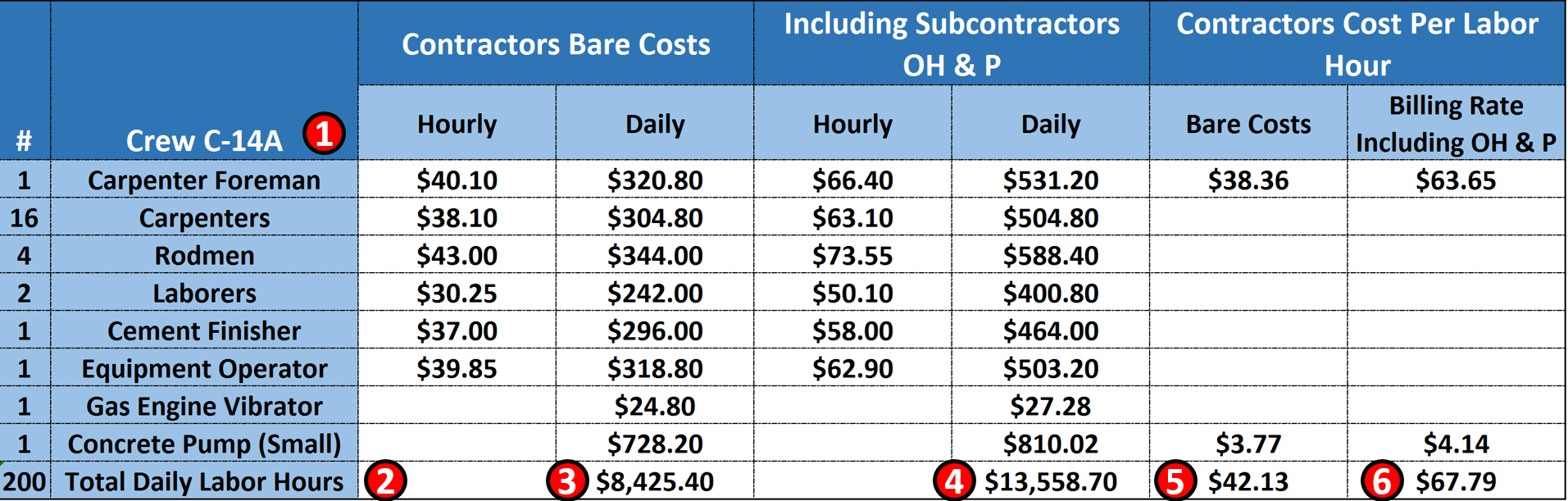
Figure 4 - Case Study Demonstrating Crew Composition Details
Source: Giammalvo, Paul D (2015) Course Materials Adapted from R.S. Means 2008 Facility Cost Estimating Database. Contributed Under Creative Commons License BY v 4.0
- Crew C-14A consists of the 8 Labor and Equipment items; 1 carpenter foreman plus 16 carpenters, 4, rodmen, 2 laborers and 1 equipment operator.
- This crew of 25 people equals 25 man days of labour and assuming they are working an 8 hour day = 200 man hours of labour per crew working day.
- The bare COST of this crew is $8,425.40 per day (bare costs are wages and fringe benefits for the labor and the depreciated costs of the equipment)
- This is what the PRIME CONTRACTOR has to CHARGE for this crew to work one day
- This is the additional amount the PRIME CONTRACTOR has to add to cover his/her Overhead and Profit on his Foreman and the Concrete pump the prime contractor provided. Thus the PRIME CONTRACTOR would have to take the $13,558.70 and ADD the OH&P of $67.79 for his Foreman and Pump for a total of $13,626.79 per 8 hour working day.
- Having established and kept current a PROJECT CONTROLS DATABASE when we have created a schedule then we have to draw from this database to create our RESOURCE POOL or RESOURCE ASSIGNMENTS or RESOURCE DICTIONARY in order to justify costs, budgets and durations etc.
11.3.4 - OUTPUTS
- A Cost Estimating And Productivity Database Which Provides Accurate, Reliable And Precise Cost And Duration Estimates, Appropriately “Fit For Purpose”.
11.3.5 - REFERENCES & TEMPLATES
- Kaosi, Takuru (N.D.) Understanding Databases Http://Www.Cengage.Com/School/Corpview/Regularfeatures/Databasetutorial/Index.Htm
- Althobaiti, Sultan, (2009) "An Integrated Database Management System And Building Information Modeling For Sustainable Design" Master's Theses. Paper 269. Http://Scholarworks.Wmich.Edu/Cgi/Viewcontent.Cgi?Article=1279&Context=Masters_Theses
- N. Long, K. Fleming, And L. Brackney (2011) “An Object-Oriented Database For Managing Building Modeling Components And Metadata” Http://Www.Nrel.Gov/Docs/Fy12osti/51835.Pdf
11.4 - Module 11-4 - Creating the Project Databases
11.5 - Module 11-5 - Updating and Using the Project Databases
GPCCAR M11-3, Revision 1.02