Hi all
I have generated a cashflow forecast in Powerproject which by the default periods are calendar months. I want to change this so that the calculation is based on specific dates - i.e valuation dates, which in this case are on the 18th of the month. So I would like the cashflow to show the periods between the 18th to 18th. Sometimes this date changes due to weekends to say the 16th.
Any ideas how to do that?
Thanks



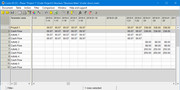
Create new graph definition for example I move Income 10 days forward:
IncomeOf(Defer 10ed)
It will move your income/cost according to Defer value:
[[wysiwyg_imageupload:7141:]]
Look at the following video, looks interesting, not sure if it can do the trick for what you need. Maybe Asta's pre-defined progress periods need not to be of same period/duration, maybe can be edited any time to account for changes such as when planned update date was delayed some days.
Spider is different, reporting does not necessarily depends on pre-defined progress periods to get it right. After/before some progress is posted, truncation can start at any time and finish at any time; might include several progress periods, might be portions of first + intermediate + portion of last.
Hi
Many thanks for the reply, but unfortunately we do not have Spider Project, is there anyway it can be done in Powerproject?
For this purpose we use Spider Project Software - Project truncation: Project truncation is one of the report forms executed for a certain period and presented in a separate project form. In project truncation, project data and representations are all displayed, also data under charges of cost components and materials, duration, volume, and also cost and materials calculation for the set time period are automatically executed. In the Activity Gantt activities which have been only planned or executed during this period will be presented.
If you do not have project truncation and everything else fails you can create report templates and transfer reports to Excel where you can summarize the data. Might require several templates for multiple parameters, some with actual and remaining data.
Good luck.