Resource Overloads Bar and Resource Overloads Reports:
- Resource Overloads Bar always misses to display material resources overloads.
- Resource Overloads Bar always misses to display financial resources overloads.
- Resource Overload Reports always get it right with regard to common renewable resources overloads.
- Overloads Reports always misses to display material/consumable resources overloads.
- Overloads Reports always misses to display financial resources overloads.
- All overloads are relevant, all shall be displayed in a transparent way. The report name "Resource Overloads Report" can misled you to believe all types of resource overloads are covered.
- Diagrams as well as tabular reports can display any type of resource overloads. The way the Resource Overloads Report is organized makes it easier to get into the details of renewable resources. Why not display materials/consumable resources as well as financial resources overloads in the same way? The devil is in the details!
The value of overloads reports shall not be underestimated. These reports are more reliable than overload bars/diagrams. A short duration overload of any resource makes the schedule not feasible, this you will not miss under overload reports but easy to be missed if looking at the overloads bar. When checking unleveled schedules or leveled schedules from external software this functionality can be invaluable.
Resource Dependencies:
- No consumable resources dependencies are displayed. Analogous to renewable resource dependencies they are temporal relationships.
- No financial resources dependencies are displayed. Analogous to renewable resource dependencies they are temporal relationships.
- If activity splitting by the resource leveling is allowed the links among the segments should be shown. Arguably each of the split segments has their own duration and float values and resource dependencies.
- All resource dependencies are relevant, all shall be displayed, otherwise why show some.
In summary: I would like the following:
For Resource Overloads:
- Overloads Bar is eliminated as it can be misleading or error prone while the more functional Overload Reports is enough.
- Overload Reports for Materials/Consumable Resources be made available.
- Overload Reports for Financial Resources be made available.
- This adds two items while eliminates one item from the Reports and Diagrams menu, for a net increase of a single menu item.
For Resource Dependencies:
- The links table should display and identify all resource type dependencies, not only renewable resource type dependencies but also materials/consumable resource dependencies as well as financial resource dependencies.
- In case of activity splitting by resource leveling engine double links should be able to make it clearer.
- No need to add a new field as Resource Dependency field can be used to this purpose, display "no" if a hard link while for resource links “resource", "materials", or "financial” labels can be used. Resource label to mean renewable resources, materials label to mean consumable resources and financial resources to mean cost expenditures.



In the following scenario "Reason of delay" misses to mention there are two driving links, this is misleading. Better say reason of delay is a predecessor link, then by looking at other reports the scheduler should be able to identify all activity links that caused the delay.
Date constraints should also be included as these can delay an activity.
we have not these problems here.
If the change of construction sequence is reasonable and does not endanger reaching contractual milestones successfully Owners do not object. But contractors are responsible for meeting major milestone dates and so they shall not agree with dates that are not achievable.
Hi Vladimir, Yes of course, resource-overloads happen even when using only FS0 for activities, as it is a fact that a typical construction schedule have multiple WBS which may be reasonably done at the same time (or WBS with activities that have Start-to-Start relationships), interior works for a high rise building for example. At first perhaps the preparation of a certain construction schedule maybe too ambitious considering all possible theories as regards activity-logic links and forgetting the fact that again, most (if not all) schedules are of course "resource constrained". For me, this is the first mistake that typically happens in construction scheduling. And in addition, contract requirements for durations for example have no real basis on how it was derived (or without resources-considerations). And of course the contractor have no choice but just to follow the contract requirements. And the problem is further aggravated by the requirement to use "Retained Logic Only". Isn't it?
Yes - There is resource link from activity 1 to activity 4.
But Reason of delay column for Activity 4 is empty. I expect it to show Resource A 7 days without specifiyng if because of Activity 1 or 2, both caused the overload prior to leveling. In other words same reason as that shown for Activity 3.
I don't understand why did you write that no reason for activity 4 delay is shown.
There is resource link from activity 1 to activity 4. I understand that it is not sufficient for starting both activities 3 and 4 in parallel.
Vladimir,
dates do not show why an activity is delayed
Of course not, same as delay duration does not tell why an activity is delayed. Duration is based on some calendar while a date of delay start can be as useful. I can live with only the delay duration. I am happy with how delay reason is supposed to work but there are some misses, to my surprise some delayed activities show no delay reason this should be esy to fix but I would like to see when delay reason was due to materials of financial constraints.
For the purpose of creating the snapshot schedule better keep the compromise, just keep reminding users that there is a pragmatic compromise.
Best Regards,
Rafael
Rafael,
dates do not show why an activity is delayed.
Creating multiple resource dependencies creates an impression that all preceeding activities shall be finished for current activity to start. Yes, this is the compromise but useful.
Resource dependencies are always ambiguous.
Before leveling: Please note there are no links among activities.
After leveling:
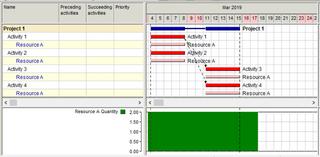
To created resource dependencies adds ambiguity and can be misleading. It was the use of resource by Activities 1 and 2 that delayed Activities 4 and 4.
To say the delay reason for Activity 3 and Activity 4 is availability of resource A by sept 9 is not ambiguous. Unfortunately some are missing, activity 4 was delayed and no delay reason is shown.
I understand the main purpose of creating resource dependencies is to be able to create a snapshot of the leveled schedule that does not depends on resource leveling, that uses not all but some of the dependencies as to keep it aligned. The same can be done in other ways such as if using date constraints. Such model can be transferred to other software that would yield different leveled schedule if these links are not transferred. It will not tell the whole story about delay reason but will still be very useful.
I use the date constraints method to freeze resource leveling done by other software, this can be used to verify if the resource leveling is feasible. Please be aware not all software yield reliable resource leveling output, not common but happens.
http://www.planningplanet.com/forums/asta-powerproject/576477/asta-pp-resource-usage-plan
I would like to see delay reason shows delay as it currently does and not miss any resource, including materials and financial and that all delayed activities due to resource leveling are included. This without any mention of resource dependencies as this would be ambiguous. The delay duration or perhaps a date should be enough for the scheduler to pinpoint and investigate complex delay reasons.
Bogdan,
the problem with multiple resource dependencies: they may create an impression that all preceeding activities shall be finished for the current activity start. But they are of OR type. Resource dependencies are just the indicators that show where to pay attention. They are also useful for exporting leveled schedules to other projects.
Anoon,
Resource overloads may happen in any schedule including those with only FS0 dependencies.
Activities have logical dependencies but may be delayed when required resource is busy on another activity.
Analyzing resource constrained schedules we show why an activity is delayed if it is delayed more than logical links require. So we create and show resource dependencies that show what activities used the required resource and caused activity delay.
Activity sequencing is determining activity logical dependencies that must be followed. Resource leveling considers both these dependencies and availability of assigned resources and creates feasible schedule. PM software vendors automate this process and try to create the best possible (shortest) schedule. Manual leveling is possible but is very time consuming and rarely provides good results.
It seems I haven't made myself clear.
From what Rafael wrote I derived the ideea to keep resource dependencies as links between activities in the links table but to have on option to display (draw) these resource dependencies on the Graphic part of the Activity Gantt from resource asignment to resource assigments, Spider identifies these "links" (delays) in a tabular form in the column "Reason for delay".
For me, the resource dependencies between activities and the column Reason of delay is enough to drill down the schedule; what I would like in the Schedule report, if it is possible, to mention the amount of delay and the other activities that use the resource, for example:
Activity "Activity 3" (Code: 3) is delayed due to the lack of Resource "Resource A" (Code: A) from Activity "Activity 2" (Code: 2), for 24 hours, 3 days using calendar 8hd5wd.
Activity "Activity 3" (Code: 3) is delayed due to the lack of Resource "Resource A" (Code: A) from Activity "Activity 1" (Code: 1), for 4 hours, 0.5 days using calendar 8hd5wd.
Where the calendar 8hd5wd is the calendar is the calendar of the activity which is delayed.
I think this information would be very useful.
Best regards,
Bogdan
It is not possible to export assignment dependencies because they do not exist in other packages.
So the users have a choice if to export all dependencies including resource dependencies, or logical dependencies only.
In the first case their package will keep Spider schedule, in the second case it could not be guaranteed.
Rafael,
I have to agree with Vladimir, in the sense that drawing links between financiar and material constraints could be difficult to realize and somewhat abigous to read; however if I may suggest, as it is now, Spider draws resource links between activities, maybe it could be made in such a way as to draw resource dependencies between resource assignments or maybe an option to have both: in the Gantt settings there is an option called Resource dependencies, perhaps a sub-option called Draw resource dependencies at assignment level would prove more reliable when showing them; even perhaps draw them in the Resource Gantt diagram.
The functionality will imply only drawing the resource links at the assignement level, while maintaining them between activities in the links table, this way the export resource dependencies as links will not be affected.
Best regards,
Bogdan
Resources overloads only occurs when there are several activities having assigned with the same resources are happening at the same time. Try using FS0 only and you will never get resource overloads. For "resource dependencies", for me, it means availability of resources. A resource cannot be dependent on itself, but an activity or task is always dependent to a resource. So why not just call it: Activity Dependencies? And besides, you were just assigning resources to activities. So I guess instead of worrying too much on automatic resource leveling, why not just focus on activities sequencing? And after all, when you update the schedule using "progress override" or "retained logic", I guess resource leveling do not matter at all.
Maybe there is still a way to show these multiple interruptions. Maybe an unorthodox idea such as creating temporary calendars and exceptions to represent the resource dependency can do the trick if there is a way to transfer such exceptions. Just a crazy idea in the hope something could come out of it. Never give up.
I have no problem whatsoever with how Spider works resource leveling. But when transferring resource leveled schedules to other software I have problems, I am looking for some workaround with the understanding these resource leveled schedules are a snapshot.
I believe Spider might have the required functionality to calculate the splits as calendar exceptions down to the seconds.
More challenging might be to transfer interruptions among different shifts on same activity.
For years I have been frustrated by how little functionality is on P6 that makes it impossible to mimic snapshots of more functional software such as Spider Project.
Even if some resource dependencies cannot be transferred to less functional software having access to them within Spider Project will be useful.
Rafael,
they do not model financing and supplies and delays are usually caused by delays of funding and supply.
And links may be complex because Spider Project schedule activities so that materials appear exactly at the moment when they were totally consumed. The link may lead to the middle of succeding activity.I am not sure that negative costs and materials can be exported to other tools.
But why not transfer delays caused by leveling of consumable as well as financial leveling?
I know most external software will not even recognize the existence of consumable and financial constraints but they are still relevant.
It is important for consistency and transparency that those receiving the Spider Project Schedule transfer get the delays caused by leveling of consumable as well as financial resources leveling. Maybe visibility will be available if consumable and financial resources are transferred as non-leveling regular resources along with their corresponding dependencies.
They might not be able to dream leveling consumable or financial resources but will be able to see what they are missing.
Rafael,
you remember that in Spider Project Resources are only rebewable resources.
Cost flow can be shown in the separate report where all cost "overloads" are shown like in this example
We do not special bar for materials "overloads" though material flow may be shown for any specific materials.
Resource dependencies are the result of resource constrained schedule analysis done after leveling. Resource dependency shows why an activity is delayed more than logical dependencies require. Besides they may be useful when Spider Project schedule is exported to another tool. One of the export options is exporting all dependencies including resource dependencies. In this case the schedule calcuated by external tool will be the same as the leveled schedule in Spider Project. We think that resource dependencies are useful for these two purposes: schedule analysis and schedule export. And once again by resources we always mean renewable resources.
You are right that it could be useful to show resource dependencies for portions of splitted activity.
Material dependencies are more complex. Next activity may start not only when another activity that consumed the same resource was finished but if its consumption rate became lower for some reason. In any case it is another task.
But what about materials/consumable and financial resource overloads?
As most construction schedules have materials/consumable and financial resource constraints I consider it a joke the claim these other software are good enough to efficiently handle resources.
The bar is against Spider itself.
In a prior post I said that the Resource Dependencies can be misleading and these are internal calculations that might be better if not shown. A 180 deg. turn from my request to display even more. Maybe the resource leveling algorithm does not make use of temporal links but temporal dates as I believe MSP does. If this is so why show something that is incomplete or not real?
Resource overload bar is the indicator of any resource overload.
Pressing right mouse button on the red area you will get the report on what resources were overloaded at that moment.
Resource peak workload calculation takes time and it is up to the user if to do it together with scheduling.
The warning of unsufficient resource quantity is shown when some activity requires more resource units that are available.
Resource peak workload shows the maximal number of resource required at any time, not only resource overloads.
did you press Resource Peak Workload button?
I might change my opinion about the bar as it will be a visual indicator of any overload, no matter what resource.
Thank you for the warning.
Best Regards,
Rafael
Rafael,
did you press Resource Peak Workload button?
Resource overload bar shows resource overloads after resource peak workloads are calculated.
You can set automatic calculation of peak resource workloads together with project scheduling in the scheduling/leveling options
I never trusted how resource dependencies are shown, perhaps enough for the software to level the schedule but not enough to show all dependencies.
Before leveling there are some overloads.
After leveling the so called Resource Dependencies can be shown.
The Resource Dependencies shown can be misleading. Activities 3 and 4 are delayed not only because of resources on Activity 1 but also because of resources on Activity 2.
The overloads report list all activities causing the overloads, this report is never misleading.
For the Resource Overloads Report to include materials/consumable resources as well as financial resources overloads is of much value, for me a big deal.
The following short videos showcase why I say Resource Overloads Bar can be misleading.
The ability to find out overloads using the overloads bar is sensitive to the time scale.
Even if the timescale is widened it still can be misleading as when multiple resources, each with their own overload events, each event with their own time span it is difficult if not impossible to figure it out where to click on the bar to hit each and every overload event.
The following scenario will showcase the difference between the diagams and the pre-defined overloads report.
The above diagram does not provide enough detail about the overload duration.
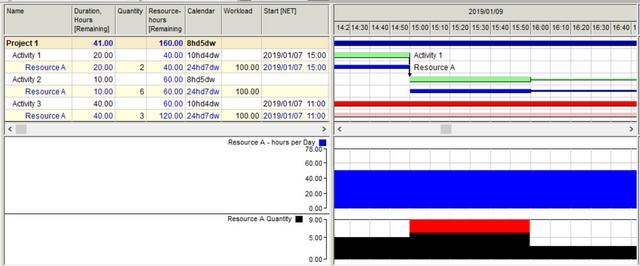
The above diagram is better but error prone and time consuming.
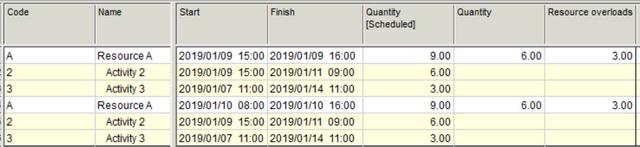
The above report give us the details up to the minutes, this is best report. There were two overload events, first lasted 1 hour and second 8 hours.
This report I want to be available for materials and financial resources.
BTW I am looking for the formula to calculate resource overload duration using resource calendar.